Mastering Employee Time Tracking: Everything You Need to Know
The ultimate guide to employee time tracking covering methods, software tools, key features, legal compliance, implementation strategies, and best practices for driving efficiency and profitability.
5 min read

Vik Chadha
Vik is a co-founder and investor in a number of high-tech companies.

On this page
Welcome, ambitious leader! You’re here because you understand that time, that elusive, non-renewable resource, is the lifeblood of any successful business. And when it comes to your team’s time, merely clocking in and out simply won’t cut it anymore. You’re looking for more than a basic attendance record; you’re seeking a strategic advantage, a way to unlock hidden efficiencies, and foster a more productive, transparent work environment.
This isn’t just about punching a clock; it’s about mastering the art and science of employee time tracking. Consider this your ultimate guide—a journey from traditional, often misunderstood practices to a modern, empowering approach that benefits everyone involved. Whether you manage on-site teams, remote work arrangements, or a hybrid of both, the principles here apply. So, let’s dive in and demystify this crucial aspect of business management.
What Exactly is Employee Time Tracking? It's More Than Just a Punch Clock.
At its core, employee time tracking is the process of recording when an employee starts and stops work, as well as the duration of their breaks. But in today’s dynamic work environment, it has evolved far beyond a simple timestamp. Modern time tracking captures data about what tasks team members are working on, for which clients or projects, and how long these activities take. It allows you to track employee work hours with precision, ensuring visibility into how your workforce operates day to day.
Think of it less like a stern monitor and more like a detailed navigator. Just as a ship’s captain needs to know precisely where they are, how fast they’re moving, and towards what destination to stay on course, a business leader needs clear visibility into how their team’s time is being spent. This allows for course corrections, optimization, and ultimately, reaching the desired destination of efficiency and profitability.
Why Bother with Time Tracking Anyway? The Undeniable Benefits.
You might be thinking, “My team is great, why do I need to track their every move?” This isn’t about distrust; it’s about insight. It’s about transforming assumptions into data, and guesswork into informed decisions. Without accurate time tracking, you’re flying blind, making critical business decisions based on gut feelings rather than concrete evidence. And in today’s competitive landscape, that’s a risk no smart business can afford.
The benefits ripple through every facet of your operation, from payroll accuracy to project profitability, and even employee morale. It’s an investment that pays dividends in ways you might not initially anticipate.
The "Why": Unpacking the Core Benefits of Smart Time Tracking
Let’s break down exactly why integrating smart time tracking is not just a good idea, but a vital one for your business’s health and your team’s well-being.
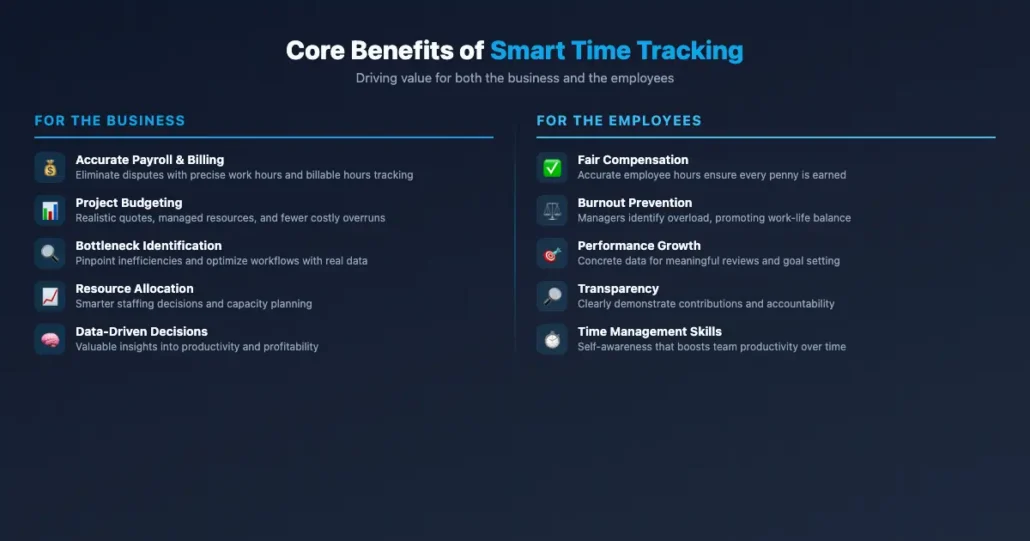
For the Business: Driving Efficiency and Profitability
Imagine a factory floor where you don’t know how long it takes to produce each widget, or which machine is causing bottlenecks. That’s what many businesses operate like without proper time tracking.
Accurate Payroll & Billing: This is the most obvious one. Overpaying or underpaying is a lose-lose situation. Precise time tracking ensures employees are paid exactly for their work hours, and clients are billed accurately for billable hours performed. This eliminates disputes and builds trust.
Project Management & Budgeting: Ever wonder why a project went over budget or missed its deadline? Time tracking shines a light on these issues. By understanding how much time is truly spent on each project phase or task, you can create more realistic quotes, manage resources better, and avoid costly overruns. It’s like having a crystal ball for project forecasting.
Identifying Bottlenecks & Improving Workflow: When you see that a specific task or process consistently takes longer than expected, or consumes disproportionate resources, you’ve identified a bottleneck. Time tracking data pinpoints these inefficiencies, allowing you to optimize workflows, reallocate resources, or provide additional training. It’s like having X-ray vision for your operational processes.
Resource Allocation & Capacity Planning: With clear data on how long tasks take and who is doing what, you can make smarter decisions about who works on which projects, ensuring no one is overloaded or underutilized. This maximizes your team’s output and helps you gauge if and when you need to hire more staff. Effective workforce management starts with understanding exactly where employee work hours are going.
Enhanced Decision-Making: Every business decision, from pricing a new service to expanding a department, benefits from solid data. Time tracking provides valuable insights into productivity, profitability by project or client, and resource utilization, enabling data-driven strategic choices.
For the Employees: Fairness, Clarity, and Empowerment
While businesses reap significant rewards, smart time tracking isn’t a one-sided affair. It also brings tangible benefits to your team, fostering a more equitable and transparent workplace.
Fair Compensation: For hourly employees, accurate time tracking is paramount for ensuring they receive every penny they’ve earned, including overtime. Properly recorded employee hours build trust and minimize payroll disputes.
Workload Management & Burnout Prevention: When team members track their time, they gain a clearer understanding of their own workload. Managers can also identify individuals who are consistently overstretched, allowing for proactive intervention to prevent burnout and promote work-life balance. It’s a proactive step towards a healthier work environment.
Performance Feedback & Goal Setting: Time tracking data provides concrete evidence of effort and output. This objective information makes employee performance reviews more meaningful and helps employees set realistic goals for improvement, fostering professional growth.
Transparency & Accountability: For project-based work, employees can clearly demonstrate their contributions to clients and management. This transparency builds accountability and helps justify the value they bring to the organization.
Time Management Skills Development: The act of tracking time encourages self-awareness about how work time is spent. Over time, employees naturally become better at estimating task durations and managing their schedules more effectively—boosting team productivity across the board.
The "How": Exploring the Different Time Tracking Methods
Just as there are many ways to skin a cat, there are numerous time tracking methods for recording how your team spends their day. Your choice will depend on your specific needs, budget, and company culture.
The Old School: Manual Methods (and Why They Still Exist, for Now)
Before the digital age, businesses relied on entirely manual time entry processes—handwritten timesheets, punch cards, and basic spreadsheets. And while technology has advanced, some of these methods, in modified forms, still persist.
Paper Timesheets: The classic method. Employees manually write down their start times, end times, breaks, and sometimes task details on a physical timesheet.
Pros: Simple, low-cost to implement initially, no technology required.
Cons: Highly prone to errors (forgetfulness, miscalculations), time-consuming for managers to collect and process, difficult to analyze, impossible to verify. Imagine trying to get insights from a pile of handwritten notes!
Punch Clocks and Time Clocks: Physical time clock machines where employees insert a time card to stamp their start and end times.
Pros: Provides a clear, physical record of presence.
Cons: A traditional time clock only tracks attendance, not task details; still requires manual data entry into payroll, susceptible to “buddy punching” (one employee clocking in for another).
Spreadsheets (Excel/Google Sheets): A step up from paper, these digital documents allow employees to enter their hours into a pre-formatted template.
Pros: More organized than paper, some basic calculation capabilities, relatively low cost.
Cons: Still manual time entry, prone to human error, difficult to enforce consistent formatting, limited reporting capabilities, security concerns (who can edit what?), no real-time data.
While these methods might seem appealing for their simplicity or low upfront cost, the hidden costs in terms of errors, wasted administrative time, and lack of actionable insights are significant. They’re like trying to navigate with a paper map in an age of GPS—you might get there, but it’ll be slower, less accurate, and you’ll miss a lot along the way.
The Digital Revolution: Software Apps Leading the Way
This is where modern businesses truly unlock the power of time tracking. Digital time tracking software solutions automate the process, minimize errors, and transform raw data into powerful insights.
Dedicated Employee Time Tracking Software: These are purpose-built platforms designed specifically for time tracking. They often include features for project tracking, client billing, team management, and detailed reporting.
Examples: Clockify, Toggl Track, Time Doctor, When I Work.
Pros: Highly accurate, robust reporting, automation features (e.g., automatic reminders), often integrate with other business tools, scalable for growing teams.
Cons: Can have a learning curve, subscription costs.
Integrated HRIS/Payroll Systems: Many comprehensive Human Resources Information Systems (HRIS) or payroll platforms include time tracking modules as part of their broader all-in-one offering.
Pros: Seamless integration with payroll and HR data, single source of truth for employee information.
Cons: Time tracking features might be less specialized than dedicated time tracking software, can be expensive as part of a larger suite.
Project Management Tools with Time Tracking: Tools like Asana, Jira, or Trello often have built-in time tracking capabilities or integrate with external time trackers.
Pros: Time tracking is directly tied to tasks and projects, enhancing project management insights.
Cons: May lack some standalone time tracking features or detailed reporting.
Mobile Apps and Time Tracking Apps: Most modern time tracking solutions offer a dedicated time tracking app for smartphones or tablets, allowing employees to track their time anywhere, anytime.
Pros: Flexibility for remote teams, freelancers, and employees on the go, often includes GPS tracking for field workers.
Cons: Requires device access, can be battery intensive.
The shift to digital is not just about convenience; it’s about accuracy, efficiency, and intelligence. Modern time tracking tools and automated time tracking capabilities streamline the entire process—from how employees log their hours to how managers analyze productivity data. It’s like upgrading from a bicycle to a high-performance sports car—both get you there, but one offers a vastly superior experience and capabilities.
Key Features to Look For in a Modern Time Tracking Solution
Choosing the right time tracking solution can feel overwhelming with the sheer number of options available. To make an informed decision, focus on these critical features.
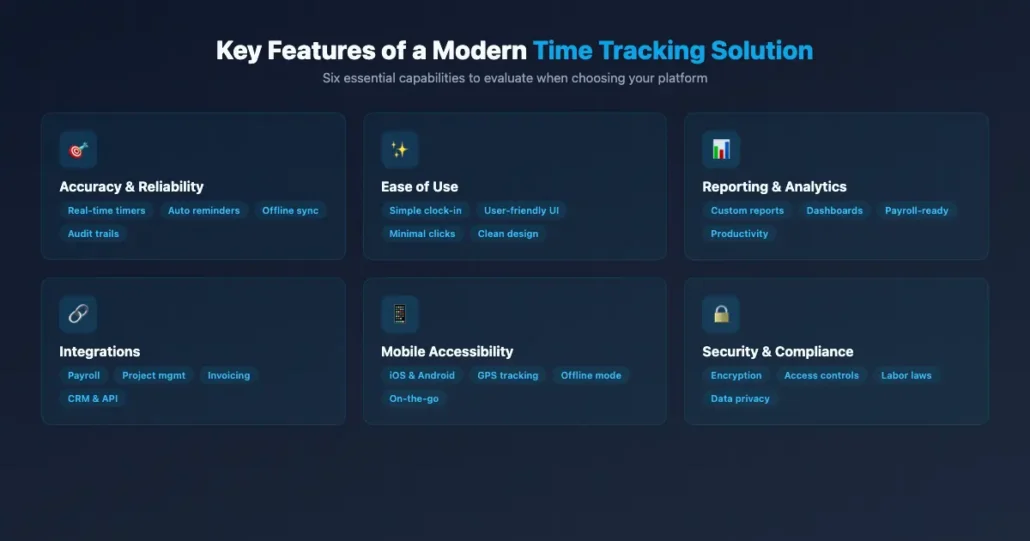
Accuracy and Reliability: The Cornerstone
What’s the point of tracking time if the data isn’t correct? Your chosen solution must be able to accurately capture start/stop times, breaks, and task durations. Look for features like:
Real-time tracking: Not just manual entry, but actual timers that let employees use time trackers to log work time as it happens.
Automatic reminders and notifications: To ensure employees don’t forget to start or stop their timers—push notifications on mobile and desktop keep everyone on track.
Offline tracking: For employees working without constant internet access, with data syncing once connection is restored.
Audit trails: To see who made what changes, ensuring data integrity.
Ease of Use: If It’s Complicated, No One Will Use It
A powerful tool is useless if your team refuses to adopt it. The interface should be intuitive, user-friendly, and require minimal training.
Simple clock-in/out: A big, obvious button is usually best.
Clear task/project selection: Easy dropdowns or search functionality.
Minimal steps: The fewer clicks, the better.
Clean design: Avoid cluttered interfaces.
Reporting and Analytics: Turning Data into Insights
This is where the magic happens—transforming raw time entries into actionable business intelligence.
Customizable reports: To focus on specific metrics (e.g., time by project, client, employee).
Visual dashboards: Graphs and charts make data easier to understand at a glance.
Export options: To integrate data into other systems or for further analysis.
Payroll-ready reports: Simplifying the process of calculating wages.
Productivity reports: To identify trends in individual and team efficiency. Some tools also capture screenshots at configurable intervals to provide visual documentation of employee work activity during the day.
Integrations: Playing Nicely with Your Existing Tools
Your time tracking system shouldn’t be an island. It needs to communicate with other essential business applications.
Payroll systems: To automate wage calculations.
Project management tools: To link time directly to tasks.
Invoicing/accounting software: For accurate client billing.
CRM (Customer Relationship Management) systems: To track time spent on specific client accounts.
API availability: For custom integrations if off-the-shelf options aren’t enough.
Mobile Accessibility: Tracking On-the-Go
In today’s remote and flexible work environment, mobile access is non-negotiable.
Native mobile apps: For iOS and Android with full functionality.
GPS tracking (optional): For field service teams or remote workers where location verification is necessary.
Offline mode: As mentioned before, crucial for seamless tracking.
Security and Compliance: Protecting Your Data and Your Business
You’re dealing with sensitive employee and business data, so security is paramount.
Data encryption: Both in transit and at rest.
Access controls: Role-based permissions to ensure only authorized personnel see specific data.
Regular backups: To prevent data loss.
Compliance features: Helping you adhere to labor laws (e.g., break tracking, overtime calculations).
Privacy policy: Clear guidelines on how data is used and protected.
Navigating the Legal Landscape: Time Tracking and Compliance
Time tracking isn’t just good business practice; it’s often a legal requirement. Understanding the relevant laws is crucial to avoid costly penalties and lawsuits.
Fair Labor Standards Act (FLSA)
In the United States, the FLSA mandates that most employers keep accurate records of hours worked for non-exempt employees. This includes:
Start and end times: For each workday.
Total hours worked: Each day and each workweek.
Break times: Unpaid breaks must be properly recorded and deducted.
Overtime calculations: Accurate tracking is essential for correctly calculating overtime pay for eligible employees. Failure to comply can result in significant fines and back pay liabilities.
State-Specific Regulations
Beyond federal law, many states have their own specific requirements regarding time tracking. These can include:
Meal and rest break laws: Some states mandate specific durations and timing for breaks.
“Reporting time pay” laws: Requiring employers to pay employees for a minimum number of hours if they report for work but are sent home early.
“Predictive scheduling” laws: In some cities and states, requiring advance notice of schedules and compensation for last-minute changes. It’s vital to research and understand the specific laws in all states where your employees work.
Data Privacy Laws
As time tracking systems collect more detailed data, privacy becomes a significant concern. Laws like GDPR (Europe) and CCPA (California) dictate how personal data must be collected, stored, and used.
Transparency: Employees must be informed about what data is being collected and why.
Data security: Robust measures must be in place to protect against breaches.
Data retention policies: How long data can be kept.
Employee consent: In some cases, explicit consent might be required.
Always consult with legal counsel to ensure your time tracking practices and chosen solution are fully compliant with all applicable federal, state, and local laws. This isn’t an area to cut corners.
Implementing Time Tracking: A Step-by-Step Guide to Success
Implementing a new time tracking system can be a smooth transition or a bumpy ride, depending on your approach. Follow these steps for a higher chance of success.
1. Define Your Objectives: What Do You Want to Achieve?
Before you even look at software, ask yourself: Why are we doing this?
- Is it primarily for payroll accuracy?
- To improve project profitability?
- To understand employee productivity?
- To ensure legal compliance?
- A combination of all of the above?
Clearly defined objectives will guide your choice of software and your implementation strategy. Without a clear “why,” you risk implementing a solution that doesn’t meet your business needs or, worse, faces significant employee resistance.
2. Research and Choose the Right Tool: Don’t Rush This Step
Based on your objectives and the key features discussed earlier, begin your research.
Demo multiple solutions: Don’t settle for the first one you see. Ask for demos and free trials.
Involve key stakeholders: Get input from HR, payroll, project managers, and even a few team members who will be using the system daily. Their feedback is invaluable.
Consider scalability: Choose a solution that can grow with your business.
Read reviews: But take them with a grain of salt. Focus on reviews from companies similar to yours.
3. Communicate, Communicate, Communicate: Bring Your Team On Board
This is arguably the most critical step. Employees often view time tracking with suspicion, fearing micromanagement. Proactive, transparent communication can turn skeptics into advocates.
Explain the “why”: Articulate the benefits for them (fair pay, better workload management) and the business (efficiency, stability, job security).
Address concerns directly: Be open about privacy, data usage, and the transition process.
Emphasize trust: Frame it as a tool for mutual understanding and improvement, not surveillance.
Announce well in advance: Give people time to process the change.
4. Training and Onboarding: Set Everyone Up for Success
Even the most intuitive software requires some guidance.
Provide comprehensive training: Offer live sessions, video tutorials, and written guides. Cater to different learning styles.
Designate internal champions: Individuals who are experts in the new system and can assist their colleagues.
Create a Q&A resource: A centralized place where employees can find answers to common questions.
Be patient: People learn at different speeds.
5. Phased Rollout (Optional but Recommended): Start Small, Scale Big
For larger organizations, a phased rollout can reduce risk and allow for adjustments.
Pilot program: Start with a small, receptive team or department. Gather feedback and refine processes.
Gradual expansion: Once the pilot is successful, roll it out to other departments incrementally. This approach allows you to iron out kinks before a full company-wide launch.
6. Monitor and Adjust: Time Tracking is an Ongoing Process
Implementation isn’t the end; it’s the beginning.
Regularly review data: Look for trends, inconsistencies, and opportunities for improvement.
Solicit feedback: Continuously ask employees for their input on the system. Is it working for them? What could be better?
Make necessary adjustments: Be willing to tweak settings, refine training, or even challenge your initial assumptions. The goal is continuous improvement.
Overcoming the Hurdles: Common Challenges and How to Address Them
No implementation is without its challenges. Being aware of potential pitfalls allows you to prepare for and mitigate them.
Employee Resistance: “Big Brother” Syndrome
This is the most common hurdle. Employees fear micromanagement, a loss of autonomy, or that the data will be used against them.
Address: Reiterate the “why” from the employee perspective (fairness, project clarity, workload balance). Emphasize that it’s about insights for improvement, not punishment. Be transparent about data usage. Foster a culture of trust, not surveillance. Show how data helps them, e.g., by justifying resource requests or highlighting their contributions.
Data Entry Errors: The Human Element
Even with digital tools, manual input can lead to mistakes—forgetting to clock out, selecting the wrong project, misremembering times.
Address: Choose a system that minimizes manual entry (e.g., auto-timers, intelligent suggestions). Provide clear training and reminders. Implement approval workflows where managers review timesheets before payroll processing. Regularly audit data for anomalies and provide feedback to employees. Encourage real-time tracking rather than end-of-day data dumps.
Integration Headaches: When Tools Don’t Play Well
You pick a great time tracker, but it won’t talk to your payroll system, leading to more manual work.
Address: Prioritize integrations during the selection process. Test integrations thoroughly before full rollout. If direct integrations aren’t available, explore API connections or third-party integration services (like Zapier) as a bridge. Be prepared to adapt some workflows to fit the integration capabilities. The right solution should streamline your existing processes, not complicate them.
Over-Tracking vs. Under-Tracking: Finding the Right Balance
Some systems track too much detail, feeling intrusive, while others track too little, providing insufficient insights.
Address: Define your tracking granularity based on your objectives (Step 1). Do you need to track by the minute for billable clients, or is a daily project total sufficient for internal analysis? Freelancers and contractors may need different tracking granularity than salaried employees. Start simpler and add complexity only if absolutely necessary. Balance the need for data with respect for employee work patterns and workflow efficiency.
The Future of Time Tracking: What's Next on the Horizon?
Time tracking isn’t static. It’s evolving rapidly, driven by technological advancements and changing work paradigms.
AI and Automation: Smarter, Less Intrusive Tracking
Imagine a system that intelligently suggests tasks based on your calendar or active applications, or even automatically logs time based on your activity, requiring only a quick review for accuracy.
Focus: Reducing manual effort, improving accuracy, and providing predictive insights.
Example: AI-powered systems that learn your work patterns and pre-fill timesheets, helping you use time more wisely and eliminating tedious manual entry.
Enhanced Analytics: Deeper Insights into Productivity
The future holds even more sophisticated reporting, moving beyond just “hours worked” to “impact generated.”
Focus: Correlating time spent with outcomes, identifying top performers, optimizing workflows based on predictive models.
Example: Dashboards that not only show time spent on a project but also its ROI, allowing for more strategic resource allocation.
Integration with HR and Payroll Systems: A Seamless Ecosystem
The trend towards unified platforms will continue, creating a truly seamless flow of information from time tracking to payroll, HR management, and even performance reviews. These integrations will further streamline administrative tasks across the entire employee lifecycle.
Focus: Eliminating data silos, reducing administrative burden, ensuring data consistency across all systems.
Example: A single platform where an employee’s time entry automatically updates their payroll, feeds into performance metrics, and contributes to project billing.
Ready to Master Your Time? Take the Leap.
You now have a comprehensive understanding of employee time tracking—its profound benefits, diverse methods, essential features, legal implications, and best practices for implementation. This isn’t just about clocking in and out; it’s about gaining clarity, driving efficiency, fostering fairness, and making data-driven decisions that propel your business forward.
The path to mastering your team’s time is within reach. Embrace the tools, communicate with your team, and leverage the insights. The investment you make in smart time tracking today will pay dividends for years to come, transforming how your business operates and paving the way for a more productive, transparent, and profitable future. Take the leap—your business and your team will thank you for it.
Start your outsourcing company’s transformation today!
Say hello to productivity, accuracy, and profitable growth. Streamline your operations and project management with HiveDesk.