

See What Your Team Is Actually Doing — Without Micromanaging
Your agents work. HiveDesk captures periodic screenshots, tracks activity levels, and records time by task and project — giving you the visibility you need without constant check-ins. Built for contact centers, BPOs, and remote teams.
No credit card required · $5/user/month · Works on Windows, macOS, Linux, iOS, Chrome
Managing Remote Agents Without Visibility Is Guesswork
When you cannot see what agents are doing, you rely on self-reported hours and trust. That works until it does not.
Without agent monitoring
- No way to verify what agents are working on during shifts
- Managers resort to constant check-ins that disrupt productivity
- Unproductive time goes undetected until deadlines slip
- Client billing relies on unverified self-reported hours
With HiveDesk
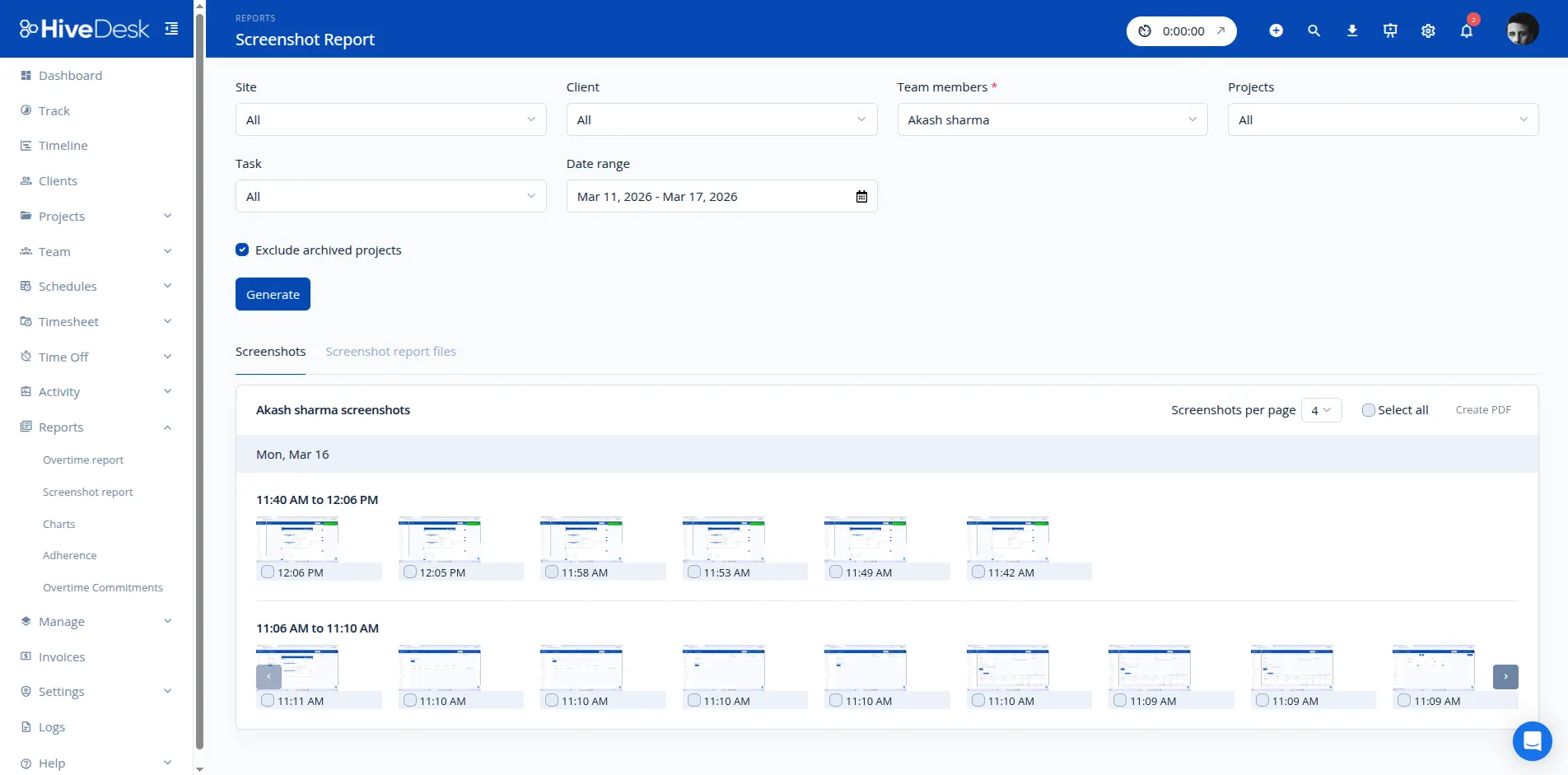
- Periodic screenshots show exactly what agents are working on
- Activity levels track engagement without interrupting work
- Real-time dashboards show who is online and active right now
- Screenshot reports give clients verifiable proof of work
How Agent Monitoring Works
A simple workflow that gives you visibility without complexity.
Agents install the app
Desktop app for Windows, macOS, or Linux. Agents select a project and task, then click start.
HiveDesk tracks automatically
Time is recorded, screenshots are captured at configurable intervals, and activity levels are logged.
Managers review reports
View screenshots, activity levels, timesheets, and attendance from the web dashboard.
What You Can Monitor
Everything you need to manage agent productivity and accountability.
Periodic Screenshots
Capture agent screens at configurable intervals. Review what agents are working on from the manager dashboard.
Activity Level Tracking
Keyboard and mouse activity levels measure active vs. idle time. See activity percentages for each agent across work sessions.
Time Tracking Per Task
Agents select a project and task before tracking. See exactly how much time each agent spends on each task.
Timesheets & Reports
Auto-generated timesheets from tracked time. Review, approve, and export as PDF or Excel for payroll and client billing.
Attendance & Scheduling
Create shifts, track clock-in/out times, and monitor attendance. See which agents are online and working at any time.
Role-Based Access
Assign manager roles with different access levels. Managers see only the teams and projects they are responsible for.
Built for Contact Center Teams
Teams across 6 continents use HiveDesk to monitor and manage remote agents. Since 2011.
Frequently Asked Questions
Common questions about agent monitoring with HiveDesk.
HiveDesk captures periodic screenshots of agent screens, tracks keyboard and mouse activity levels, and records time spent on tasks and projects. Managers can view screenshots, activity reports, and timesheets from the web dashboard.
Yes. HiveDesk uses GDPR-compliant practices. Monitoring is transparent — agents always know when the desktop app is running and tracking is active. Data is encrypted in transit and at rest on secure AWS infrastructure.
Agents install the HiveDesk desktop app on their computer (Windows, macOS, or Linux). When they start working, they select a project and task, and the app begins tracking time and capturing periodic screenshots. Managers review activity from the web dashboard in real time.
Yes. Managers can configure how often screenshots are captured. You can set different frequencies based on your monitoring needs — from frequent intervals for new agents to less frequent for experienced team members.
HiveDesk provides visibility without requiring constant check-ins. Agents work independently while the app tracks time and captures screenshots in the background. Managers review reports on their own schedule rather than interrupting agents throughout the day.
Managers can view screenshot timelines, activity level reports, timesheets by project and task, attendance reports comparing clock-in times against scheduled shifts, and overtime reports. All reports can be exported as PDF or Excel.
The HiveDesk desktop app works on Windows, macOS, and Linux. There is also a Chrome browser extension, a web app for manual entries, and an iOS mobile app with GPS tracking for field workers.
HiveDesk integrates with Asana for project and task management. You can assign tasks in Asana and track time against them in HiveDesk. Timesheet data exports to Excel and PDF for use with any payroll or accounting software.
HiveDesk is $5/user/month with all features included — time tracking, screenshots, activity monitoring, scheduling, leave management, and reporting. One plan, no tiers. There is a 14-day free trial with no credit card required.
Most teams are up and running the same day. Sign up, create projects, and invite agents. Agents install the desktop app and start tracking immediately. No complex setup or IT department required.
Ready to Get Started?
Join teams worldwide who trust HiveDesk for workforce management, time tracking, and employee monitoring. $5/user/month, all features included.