

Audit-Ready Reports for Labor Laws You Cannot Afford to Violate
HiveDesk tracks work hours, break times, overtime, and attendance automatically — so your records are always audit-ready. Generate compliant timesheets and reports, and export them as PDF or Excel whenever you need them.
No credit card required · $5/user/month · Works on Windows, macOS, Linux, iOS, Chrome
Incomplete Records Turn Audits into Emergencies
When an audit happens, you need accurate records of every hour, break, and overtime period. Scrambling to reconstruct data from spreadsheets is not a compliance strategy.
Without automated compliance records
- Manual records have gaps, errors, and missing break data
- Overtime hours are inaccurate or untracked entirely
- Audit requests trigger weeks of data reconstruction
- Attendance records do not match actual shift adherence
With HiveDesk
- Work hours, breaks, and overtime tracked automatically every day
- Attendance records compare clock-in times against scheduled shifts
- Reports export as PDF or Excel in seconds — always audit-ready
- Leave policies with balances and approval records maintained continuously
Compliance Areas Covered
HiveDesk provides the records you need for common labor law compliance areas.
Work Hours & Overtime
Accurate daily and weekly hour totals with overtime tracking. Supports FLSA-related record-keeping requirements.
Break Time Records
Track meal breaks and rest periods. Break time records are included in timesheets for state labor law compliance.
Attendance & Scheduling
Clock-in/out records, shift adherence, and absence tracking. Compare actual attendance against scheduled shifts.
Leave & Time Off
Custom leave policies with balance tracking. Request and approval workflow for PTO, sick leave, and vacation.
HiveDesk also provides country and state compliance guides to help you understand local labor law requirements.
From Tracking to Reporting
HiveDesk captures the data automatically. You export what you need when you need it.
Track automatically
HiveDesk records work hours, breaks, overtime, and attendance as your team works. No manual entry required.
Review & approve
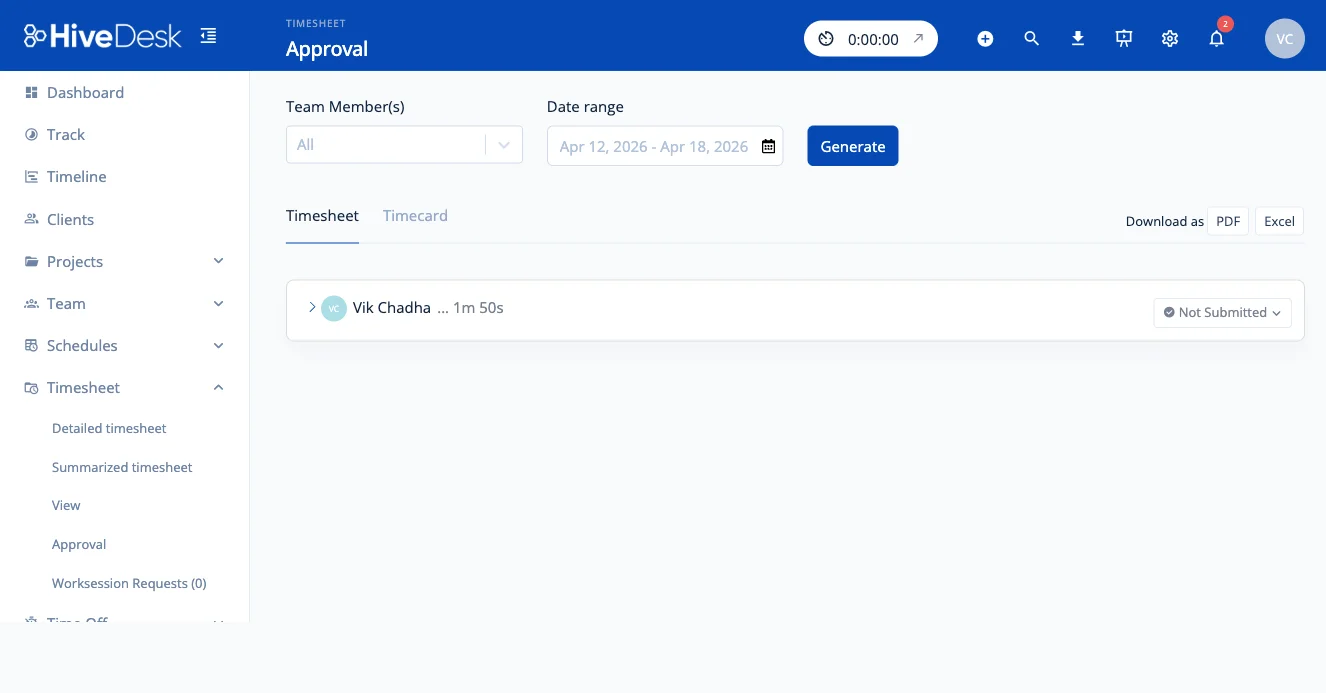
Managers review timesheets and approve them. Catch discrepancies before they become compliance issues.
Export reports
Generate timesheets, attendance, and overtime reports. Export as PDF or Excel for payroll, billing, or audits.
Compliance Reporting Tools
Everything you need to stay on top of compliance.
Work Hours Tracking
Automatically track daily and weekly hours for every employee. See total hours worked, start/end times, and compare against schedules.
Break Time Tracking
Track meal breaks, rest breaks, and paid/unpaid time off. Break time records are included in timesheets for compliance documentation.
Overtime Tracking
Track overtime hours automatically based on total hours worked. See overtime in timesheets and reports for payroll and compliance.
Attendance Management
Track clock-in/out times, attendance patterns, and absences. Compare actual attendance against planned shifts.
Leave Management
Set up leave policies, track balances, and manage time-off requests with an approval workflow.
Timesheets & Reports
Auto-generated timesheets with approval workflow. Export reports as PDF or Excel for payroll, billing, or audit documentation.
Frequently Asked Questions
Common questions about compliance reporting with HiveDesk.
HiveDesk automatically tracks work hours, break times, overtime, and attendance for every employee. This gives you accurate records you can use to verify compliance with federal, state, and local labor laws. Records are exportable as PDF or Excel for audits.
HiveDesk generates timesheets with daily and weekly hour totals, attendance reports comparing clock-in times against scheduled shifts, overtime reports by team or individual, break time records, and leave balance reports. All reports can be exported as PDF or Excel.
Yes. HiveDesk includes break time tracking. Employees can log meal breaks and rest periods, and managers can see break time records in timesheets and reports. This supports compliance with state break time requirements.
HiveDesk tracks total hours worked per day and per week. Overtime hours are visible in timesheets and reports for accurate payroll processing. The FLSA requires employers to keep accurate records of hours worked — HiveDesk captures this data automatically.
Yes. Create custom leave policies (PTO, sick leave, vacation, etc.), set accrual rules, and track leave balances. Employees request time off through HiveDesk and managers approve or deny requests. All leave data is recorded for compliance documentation.
Managers review employee timesheets and approve or reject them before they are used for payroll. This approval step helps ensure accuracy, catch discrepancies, and create a documented chain of approval for audit purposes.
Yes. HiveDesk provides labor law compliance guides for 45 countries and 25 US states. These guides cover working hours, overtime rules, break requirements, and record retention mandates for each jurisdiction.
Yes. Data is encrypted in transit with TLS 1.2+ and at rest with AES-256, hosted on secure AWS infrastructure. HiveDesk follows GDPR-compliant practices with role-based access controls.
HiveDesk is $5/user/month with all features included — time tracking, break tracking, overtime tracking, attendance, leave management, scheduling, and reporting. 14-day free trial, no credit card required.
Ready to Get Started?
Join teams worldwide who trust HiveDesk for workforce management, time tracking, and employee monitoring. $5/user/month, all features included.