

Spot Overtime Before It Becomes a Payroll Surprise
HiveDesk tracks daily and weekly hours in real time so overtime is visible as it happens — not when payroll runs. See overtime by team member, team, and project. Activity monitoring shows whether extended hours are actually productive.
No credit card required · $5/user/month · Works on Windows, macOS, Linux, iOS, Chrome
Overtime You Cannot See Is Overtime You Cannot Control
Most teams discover overtime at payroll. By then, the costs are already locked in and the budget impact is done.
Without overtime visibility
- Overtime costs surface at payroll, too late to prevent
- No way to tell which teams or individuals are overworking
- Extended hours may not be productive — but you cannot tell
- Scheduling gaps cause unnecessary overtime every week
With HiveDesk
- Daily and weekly hours tracked in real time — overtime visible as it happens
- Filter overtime reports by team, individual, or project
- Activity monitoring shows whether extended hours are productive
- Compare scheduled vs. actual hours to fix scheduling gaps
How Overtime Tracking Works
Get visibility into overtime across your team in minutes.
Set up schedules
Create shift schedules with defined hours. Add hourly rates to team members and projects to track labor costs.
Track hours automatically
Team members track time using the app. HiveDesk monitors daily and weekly hours. Overtime is visible as it happens.
Review & export
Review overtime reports by team or individual. Approve timesheets with overtime hours. Export for payroll.
Overtime Management Tools
Track, report, and manage overtime across your team.
Overtime Reports
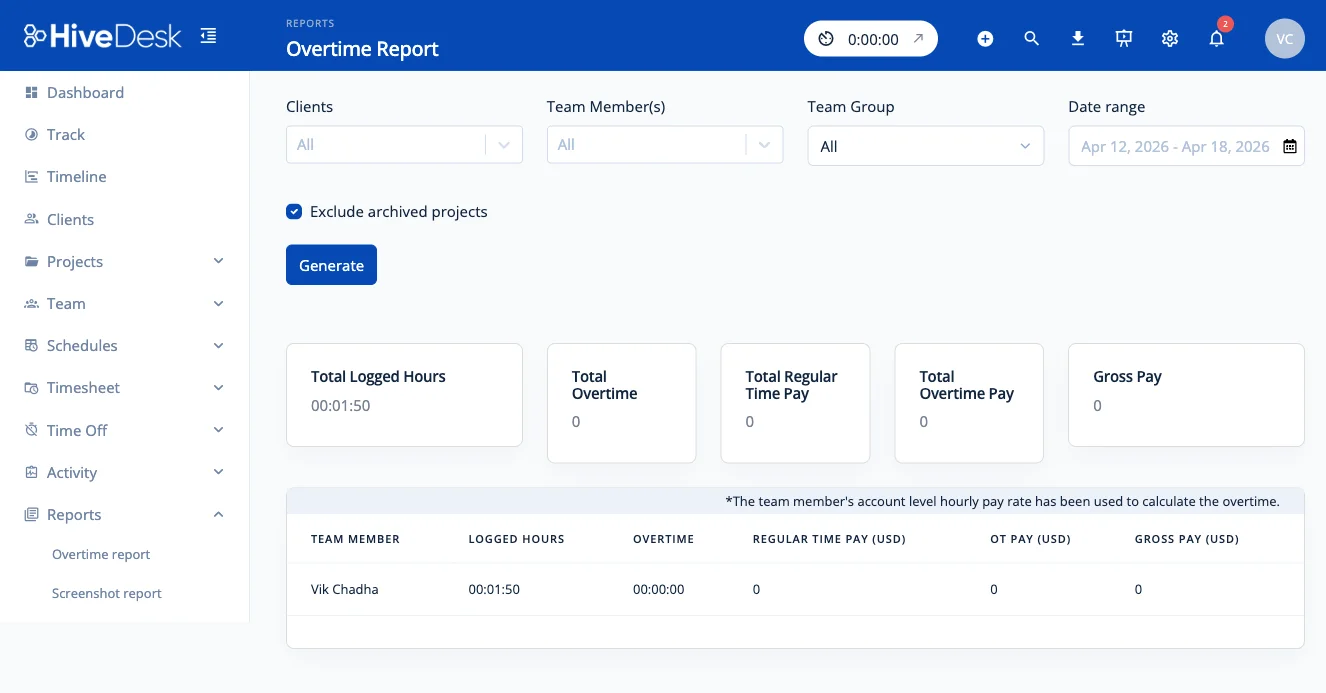
See hours beyond your weekly overtime threshold per team member, with overtime pay calculated from your multiplier. Filter by date range, team, or individual. Export as PDF or Excel.
Real-Time Hour Tracking
Daily and weekly hours tracked as team members work. Overtime is visible in real time — not just at payroll.
Shift Scheduling
Create shifts with defined hours. Compare scheduled vs. actual hours to understand where overtime is happening.
Labor Cost Tracking
Add hourly rates to see the cost impact of overtime across your team. Track labor costs per project or client.
Activity During Overtime
Screenshots and activity levels during overtime sessions show whether extended hours are productive.
Timesheet Approval
Timesheets include overtime hours with activity data. Managers review and approve before export.
Plan Overtime With Slots, Thresholds, and Reports
Overtime works best when it is offered, committed to, and costed before anyone works it.
Overtime slots
Managers post overtime slots, or import a batch of them, for the hours that need extra coverage. Members see the open slots and commit to the ones they want. The Overtime Commitments report lists every commitment, so you know which slots are covered.
Weekly threshold and pay multiplier
Set the number of hours per week after which time counts as overtime, and an overtime pay multiplier (for example 1.5). HiveDesk calculates overtime pay as the multiplier times each member's hourly rate.
Overtime report
Review overtime hours and cost per member for any date range, then approve timesheets and export to PDF or Excel for payroll. Check the threshold against the overtime rules that apply where your team works.
Frequently Asked Questions
Common questions about overtime management with HiveDesk.
HiveDesk tracks daily and weekly hours for each team member automatically as they work. You set a weekly overtime threshold in hours, and anything above it is counted as overtime in the Overtime report and timesheets, so managers see it before payroll — not after. Overtime pay is calculated as a multiplier you choose times each member's hourly rate.
The Overtime report shows hours beyond your weekly overtime threshold per team member, with overtime pay based on your multiplier and each member's hourly rate. The Overtime Commitments report shows which overtime slots agents committed to. Filter by date range, team, or individual. Export as PDF or Excel for payroll processing.
Create shift schedules with defined start and end times. When you can see scheduled hours alongside actual tracked hours, it is easier to spot where overtime is happening and adjust schedules to prevent it from recurring.
Yes. Add hourly rates to team members and projects. HiveDesk calculates labor costs from tracked hours, so you can see the financial impact of overtime across your team and by project.
Activity monitoring shows whether overtime hours are productive. Keyboard and mouse activity levels and periodic screenshots during overtime sessions help managers understand if extended hours are necessary or if workload redistribution would be more effective.
HiveDesk tracks daily and weekly hours accurately, which supports FLSA record-keeping requirements. Overtime hours are visible in timesheets and reports. However, you should consult with a legal professional for specific compliance guidance.
Yes. HiveDesk tracks hours regardless of where team members are located. The dashboard shows hours worked per day and per week for each person, making overtime visible even for distributed teams across multiple time zones.
Timesheets include both regular and overtime hours with activity data. Managers review and approve timesheets before export. Overtime is clearly visible in the approval workflow so nothing gets approved blindly.
Yes. Managers post overtime slots in HiveDesk, or import them in bulk, and members commit to the slots they want to work. The Overtime Commitments report shows who committed to which slot, so planned overtime is staffed by volunteers and visible before the week starts.
HiveDesk is $5 per user per month — one plan with all features included. Overtime tracking, scheduling, time tracking, screenshots, and reporting are all included. 14-day free trial, no credit card required.
Most teams are up and running the same day. Team members download the app and start tracking time. Set your weekly overtime threshold and pay multiplier once in settings, and overtime is calculated automatically from tracked hours.
Ready to Get Started?
Join teams worldwide who trust HiveDesk for workforce management, time tracking, and employee monitoring. $5/user/month, all features included.