

Best project management tools for small businesses

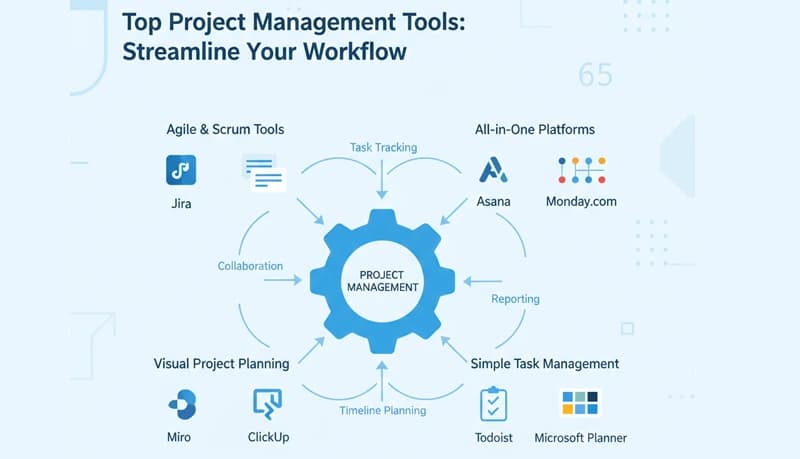
Are you looking for the best project management tool to manage your projects and team members? We have compiled a list of the best project management tools for service businesses and remote teams.
As a business owner or team manager, you have to juggle multiple roles. You supervise your team, manage client relationships, do sales, and keep track of finances. You need a strong process and the right project management tool to make sure you're on top of the work your team does.
A solid project management process is critical to the success of all teams. Using the right project management tools and techniques can help your team ensure timely delivery, stay productive, and manage cost.
What is a project management tool?
Project management is the discipline of planning, organizing, and managing resources to complete a project. Any task that involves multiple related activities can be considered a project. A project can be simple or complex.
Henry Ford once said "Nothing is particularly hard if you divide it into small jobs."
You use a project management tool to break down a project into smaller, more manageable tasks. You can assign these tasks to different team members and track them to completion. With the right tool, you can track how much time is spent on each task, whether it's done on time, and how much it cost. You can also see who your most productive team members are, which clients or projects are most profitable, and where you may be losing money.
Example
Let's say you need to deliver a new website design to a client in four weeks. You can break down this project into many smaller tasks like collecting the business requirements, drawing wireframes, designing user interface and user experience, and laying out each page. Each of these tasks can be further broken down into more granular tasks.
Once you've created the list of tasks in your project management tool, you can assign due dates to each of them in a way that ensures the project will finish on time. Then you assign each task to a team member to complete.
You can then monitor each task and the overall project progress by tracking which tasks are on track and which ones are behind schedule. Most top project management tools can also track how much time team members spend on each task and how much it costs.
Why should you use a project management tool?
At a high level, a project management tool streamlines your business, ensures you meet clients' expectations, and helps you invoice them correctly. But there are many other benefits:
- Better collaboration between team members due to improved visibility of each other's work. For teams that also need time tracking and activity monitoring, a dedicated employee time tracking solution complements your project management tool
- Accurate task tracking that shows which tasks are at risk of going past their due date, potentially derailing the project
- Better project tracking as you see how much cost and effort is going into each project and why
- Accurate time tracking for each task and overall project
- Improved team productivity due to better collaboration, accurate tracking, and real-time feedback
- Centralized data storage for projects for future bids and estimates
- Automated and real-time reporting
How to select the best project management tool
As you set up and execute your project, you will need a robust tool to manage it effectively. Project management tools come in many different flavors and can have many different features. What you need is a tool that meets your business needs and budget.
A software that helps NASA launch rockets is very powerful but also complex to use and expensive. A software that allows you to manage only a to-do list will be super easy to use but will not be useful in managing a marketing project.
When selecting the best project management tool for your business, make a list of features the software must have. It's also a good idea to decide how much you are willing to spend, as the cost varies a lot from one tool to another.
In addition to your specific needs, make sure your preferred tool has these qualities:
- Easy to use and would not need a lot of training and support to implement
- Cloud-based (or SaaS) so your team members can access it whether they are working in the office or from home
- Your data is secure
- Fits your budget
Best project management tools for small businesses
Asana
Asana is a cloud project management tool focused on improving project outcomes. It allows you to manage projects and tasks online. Asana is one of the easiest project management tools out there, and its popularity stems from its ease of use as well as powerful features for managing even complicated projects.
Asana works on the concept of Workspaces. When you sign up, you create your individual account that gives you access to Organizations and Workspaces. Workspaces include projects that in turn include tasks.
You can create a separate workspace for each of your clients and manage projects and tasks in corresponding workspaces. You create projects first, then add tasks to them. You can create subtasks and recurring tasks. In each task, you can add notes, comments, attachments, and tags.
Team members update tasks as they complete them. They can update the status, add comments, and attach documents. Clients can follow projects and tasks. When the state of a project or task changes, they get email updates in their inboxes.
Pricing: Free plan limited to 15 team members. Premium starts at $9.99/user/month.
Basecamp
Basecamp is a web-based project management tool. It offers to-do lists, wiki-style web-based text documents, milestone management, file sharing, time tracking, and a messaging system.
Client collaboration
Basecamp offers a feature called "Clientside" designed for keeping clients updated on the project. Your client will receive updates via email without needing to create an account, sign into anything, or install any apps.
In the team section, you can outline work, mark deadlines, and discuss strategies. All projects are private to your team. When you're ready to share a message, a to-do, or a file with the client, just select the option to allow clients to see it.
One of the best things about Basecamp is that it keeps central, official versions of entire conversations. You can avoid costly disputes with clients later. When you present work with Basecamp, your team sees exactly what the client said. You can follow up with revisions and the entire thread is captured on a single page. It's always clear who said what.
Pricing: Flat fee of $99 for unlimited users. Free version limited to 20 team members and 3 projects.
Trello
Trello is a Kanban project management tool that's very popular with freelancers and small businesses. It's best suited for managing projects with simple tasks. It does not have advanced features like resource management, dependencies, and Gantt charts, but it makes up for that with its ease of use.
The Trello dashboard offers an overview of all tasks in a project and their current status. You can create a Kanban board for each of your clients or projects.
You create lists to organize related tasks. For example, if you are managing a marketing project, you can create a list for each campaign. You add tasks as cards to the appropriate list. You can drag and drop cards between lists — for example, from a "to-do" list to a "completed" list.
You can assign tasks to yourself or others on your team. You can also grant access to clients on a business plan. You add clients as Observers to their respective boards. An observer can view the board and cards but cannot edit or move cards around.
Pricing: Free tier with limited features. Business Class plan costs $9.99/user/month.
Zoho Projects
Zoho Projects is a powerful web-based project management tool with advanced features. You can plan your project activities, assign tasks to team members, and collaborate with them to get things done on time.
Gantt charts and automation
You can use Gantt charts to visualize your project. The Gantt chart shows dependencies between tasks and the critical tasks you must finish for the project to meet the deadline. It's great for ensuring your project stays on track.
A unique feature of Zoho Projects is workflow automation. You can use a drag-and-drop interface to visualize and deploy workflow automations quickly and easily, saving time on routine tasks.
Zoho Projects also has a time tracker that records how much time your team members spend on each task. If you add hourly rates for your resources, Zoho can calculate and track cost for each task and project.
Pricing: Free plan limited to 3 users and 2 projects. Paid plans start at $7/user/month (minimum 15 users).
MS Project
Microsoft Project is one of the best project management tools for managing large and complex projects. It's a versatile tool with many features for organizing, tracking, and monitoring a project.
MS Project goes beyond the basics. It is a full-fledged application with its own database, user interface, and reporting system. You can organize, analyze, carry out complex scheduling and resource assignments, and generate reports that help you identify problem areas quickly.
It has all the features you would expect in a comprehensive project management tool — task management, resource management, costing, estimation, Gantt chart, PERT CPM analysis, Kanban board, collaboration, and road mapping.
MS Project comes in two variants — cloud-based and on-premise. It was the de-facto project management tool before Asana and other web-based tools were launched.
Pricing: Online version starts at $10/user/month and goes up to $50/user/month. On-premise version starts at $599 per seat.
ClickUp
ClickUp is a highly rated project management tool with more features than most small businesses need. It is one of the most customizable options on the market.
Customization and views
You can create custom views, statuses, and fields to suit your specific needs. Custom views allow you to see your project in Kanban, list, and box styles. There is also a "Me" view that lists only your tasks.
ClickUp is one of the few newer tools that have a built-in Gantt chart feature. You can also embed MS Excel or Google Docs spreadsheets right into your project space.
You can comment on tasks and assign comments to a specific team member, ensuring they get alerts and follow up. ClickUp also has a time tracker and supports integration with dozens of other tools.
Pricing: Free version limited to 100MB storage. Paid version starts at $5/user/month.
While ClickUp is loaded with features and reasonably priced, it can be difficult for users who are not experienced with project management tools. Most small business users get overwhelmed by the complexity of the interface.
Wrike
Wrike is one of the best project management tools for agile teams.
Its award-winning three-pane interface makes it easy to use and track your work. The left pane contains the project hierarchy where you can edit and adjust tasks and subtasks. The middle pane lists your current tasks. The right pane shows detailed information about your tasks.
You can customize Wrike with custom dashboards, workflows, and automation that streamline your project management processes. It has real-time commenting, notifications, live editing, and dynamic reports. You can instantly see what your team members are doing or saying, eliminating the need for unnecessary emails and status meetings.
Wrike supports Gantt charts for visual tracking and shows resource allocation so you can easily see who in your team is overloaded and who has capacity. It integrates with many popular third-party apps.
Pricing: Free plan limited to 5 users with shared task list only. Paid plans start at $10/user/month.
Wrike is targeted at bigger businesses with its wide range of features. It can be overkill for most small businesses with simpler needs.
Monday
Monday is a popular and flexible online project management tool. It has been gaining rapid popularity as a scalable solution for managing projects and tasks.
Customization
One of Monday's most powerful features is its customizability. It works like creating a worksheet — you can add new columns and fields to your tasks to suit your project needs, using pre-defined fields or creating your own.
You start by creating a board for anything you use to organize your work — projects, clients, or departments. You can add as many columns as you need and customize them.
You can assign tasks to team members and track progress. It also has a time tracker and a powerful dashboard that shows you the status of your boards at a glance. You can assign capacity to each team member and see if anyone is overloaded or underloaded so you can redistribute work.
Monday integrates with almost any third-party app and you can even create custom apps on top of the platform.
Pricing: No free version but offers a free trial. Paid plans start at $8/user/month (minimum 5 users). Calendar and Timeline views require the $10/user/month plan.
Monday is one of the most flexible tools on this list, but this power comes at the cost of simplicity. It's targeted at larger organizations that need flexibility and have resources to customize it.
Hive
Hive is a well-established project management tool with most modern features you would expect.
You can organize your projects in a Gantt chart, Kanban board, table, or calendar view, and switch between these views as needed. Any updates are reflected immediately across all views.
One useful feature is the ability to combine multiple projects to get a big-picture view across your company or department. You can plan and repeat tasks using action templates that assign work to the right people at the right time.
Each task has an Action card where you can see all task information, assign team members, attach files, create subactions, set dependencies, and comment directly. Hive also makes it easy to get feedback and approve work with approval cycles.
Pricing: No free plan. 14-day free trial. Single pricing plan at $12/user/month with optional add-on features.
Hive is one of the more expensive tools and is geared towards larger businesses that need advanced reporting and features.
HiveDesk
Unlike other software on this list, HiveDesk is not a full-fledged project management tool. You can create tasks in your projects and assign them to your team members, track task status, and see which ones are completed and which ones are past their due date. At its core, it's a tool for managing remote or distributed teams.
Time tracking and cost management
HiveDesk has a desktop application that tracks time your team members spend on each project. Automatic time tracking ensures an accurate timesheet you can rely on for paying your employees and billing clients. You can generate individual timesheets for each employee or a combined timesheet for the project.
You can track your cost for each project by assigning an hourly cost to each team member. HiveDesk automatically calculates how much cost you've incurred on each project by multiplying the hourly rate with actual time spent.
Most small businesses find HiveDesk very well suited to their needs and simple to use. The user interface is straightforward with no confusing features that can overwhelm your team.
Pricing: 14-day free trial, no credit card required. Plans start at $5/user/month with all features included.
HiveDesk is best for small and growing businesses that don't need to manage complex projects. It works really well for teams that have remote employees or those working from home.
Conclusion
Finding the best project management software for your small business isn't easy given the number of great options available.
While all tools on this list are good, only a handful will be a good match for your specific needs. Buying software that has more features than you need will cost you more money and add unnecessary complexity. Choose one that has everything you need while being simple enough for your team to use effectively.
