

Timesheet Approval Process — How It Works and Why

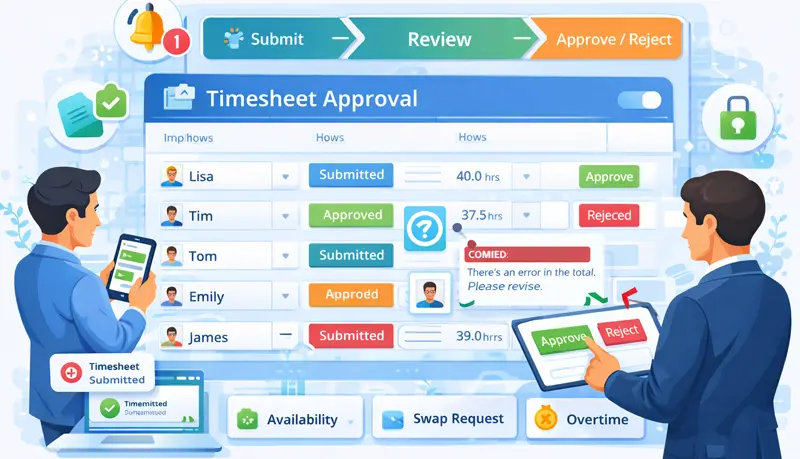
The timesheet approval process is a workflow where employees submit their recorded work hours for review, and managers verify the accuracy before the data is used for payroll or client billing. It's a quality control step that catches errors, prevents overpayments, and keeps your business compliant with labor laws.
Without an approval process, timesheet errors flow directly into payroll — leading to incorrect payments, billing disputes, and compliance problems.
How the timesheet approval process works
The workflow follows a straightforward cycle:
1. Employees record time
Employees track their hours using a desktop app, mobile app, or browser extension. They log time against specific projects and tasks throughout the workday.
2. Employees submit for approval
At the end of the pay period (weekly or biweekly), employees review their timesheet for accuracy and submit it for approval. Once submitted, the timesheet is locked — employees can't edit it unless they withdraw it first.
3. Manager reviews
The manager receives a notification that a timesheet is waiting for review. They check the hours, verify them against expected work, and look for discrepancies.
4. Approve, edit, or reject
- Approve — The timesheet is locked permanently and forwarded for payroll processing.
- Edit — The manager can make corrections before approving (e.g., removing time logged in error).
- Reject — The timesheet is returned to the employee with comments explaining the issue. The employee corrects it and resubmits.
5. Payroll processing
Approved timesheets feed into payroll or billing. Since the data has been reviewed and verified, the resulting payments and invoices are accurate.
Why timesheet approval matters
Payroll accuracy
The primary purpose is ensuring employees are paid correctly. Automated time tracking eliminates most errors, but an approval step catches edge cases — accidental timer runs, time logged to the wrong project, or hours that don't match expected work patterns.
Client billing
For businesses that bill by the hour, approved timesheets provide verified data that clients can trust. If a client questions an invoice, you have a documented review process backing it up.
Compliance
Many labor laws require accurate records of hours worked. A formal approval process creates an audit trail showing that timesheets were reviewed and verified — not just auto-generated.
Accountability
When employees know their timesheets will be reviewed, they're more careful about recording time accurately. The process promotes transparency and accountability without being heavy-handed.
Who should approve timesheets?
The direct supervisor or manager is usually the best person to approve timesheets. They know what the employee is working on, what hours are expected, and can spot discrepancies quickly.
The approver should:
- Understand the company's time tracking and payroll policies
- Know the employee's assignments and expected workload
- Review timesheets promptly to avoid delaying payroll
In larger organizations, you may need a multi-level approval process — team leads approve first, then a department manager or HR gives final sign-off.
How to handle errors
Before approval
If an employee spots an error after submitting, they withdraw the timesheet, make corrections, and resubmit. If the manager spots an error, they can either edit the timesheet directly or reject it with comments explaining what needs to be fixed.
After approval
Once approved, timesheets should be locked to maintain data integrity. If a significant error is discovered post-approval, authorized personnel (typically HR or payroll administrators) can unlock and amend the timesheet, with the change logged for audit purposes.
Best practices
Set clear deadlines
Define when timesheets must be submitted and how quickly managers should approve them. For example: employees submit by Monday morning, managers approve by Tuesday end of day. Clear deadlines prevent payroll delays.
Use automated time tracking
Manual timesheet entry is error-prone. Automated time tracking with timesheet software captures hours as employees work, reducing errors and the time employees spend filling out timesheets. The approval step then focuses on verifying data rather than catching data entry mistakes.
Keep the process simple
A timesheet approval process only works if people follow it consistently. If it's too complicated or time-consuming, employees will delay submissions and managers will rubber-stamp approvals without actually reviewing them. Keep it simple — submit, review, approve.
Review regularly, not just at approval time
Don't wait until the end of the pay period to look at timesheets. Checking in on time data during the week helps you catch issues early — like an employee who forgot to start their timer or one who's logging significantly more hours than expected.
Communicate rejections clearly
When rejecting a timesheet, always include specific comments about what needs to be corrected. Vague rejections waste time and frustrate employees. Clear feedback means faster resubmission and approval.
