

One Dashboard for Teams Across Every Time Zone
Your team is in Manila, Mumbai, Nairobi, and Louisville. HiveDesk shows all of them in one place — with schedules in their local time, attendance that accounts for timezone differences, and reports that make sense across regions.
No credit card required · $5/user/month · All features included
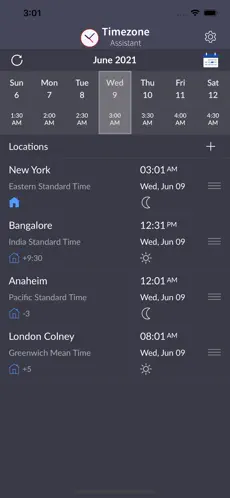
Timezone Chaos Slows Everything Down
Managing distributed teams across time zones creates confusion in scheduling, attendance, and reporting. HiveDesk handles the timezone complexity so you can focus on managing your team.
Without timezone-aware tools
- Scheduling in one timezone confuses employees in another
- Attendance tracking requires manual timezone conversion
- Timesheets show hours in the wrong timezone for payroll
- Shift handoffs between regions are poorly coordinated
- DST changes break schedules twice a year
- Overtime calculations are wrong when timezone is not accounted for
With HiveDesk
- Schedules display in each employee's local timezone
- Attendance is tracked against local shift times automatically
- Timesheets reflect hours in local time with timezone context
- Dashboard shows which teams are active across all regions
- DST changes are handled automatically — no manual adjustments
- Overtime tracked per region using correct local hours
Timezone-Aware Workforce Management
Every feature works across time zones without manual conversion.
Cross-Timezone Scheduling
Create shifts that display in each employee's local time. Recurring schedules for rotations across regions. Track attendance against local shift times.
Timezone-Aware Time Tracking
Employees track time in their local timezone using desktop, mobile, or browser apps. Managers see all hours from one dashboard.
Activity Monitoring
Screenshots and activity levels work identically across all timezones. See what team members are working on regardless of location.
Attendance Tracking
Compare clock-in/out times against scheduled shifts in each employee's local time. No manual timezone math.
Leave Management
Set up region-specific holiday calendars and leave policies. Employees request time off from the app. Coverage planning accounts for regional differences.
Reports & Timesheets
Timesheets show hours in local time with timezone context. Filter by team, region, or individual. Export for multi-region payroll.
Manage Your Global Team in Three Steps
Set up teams by region
Create teams organized by region or function. Set up shift schedules, leave policies, and holiday calendars for each region.
Track and monitor
Team members track time in their local timezone. Managers see real-time activity, attendance, and hours across all regions from one dashboard.
Report and export
Generate timesheets and reports across regions. Export data for multi-region payroll. Use the timezone converter for quick reference.
Frequently Asked Questions
Common questions about managing teams across time zones.
HiveDesk tracks time in each team member's local timezone. Managers see hours logged, attendance, and activity across all regions from a single dashboard. Shift schedules display in each employee's local time automatically.
Yes. Create shifts with start and end times, and HiveDesk displays them in each team member's local timezone. Set up recurring schedules for shift rotations across regions. Attendance tracking compares clock-in times against scheduled shifts regardless of timezone.
HiveDesk compares actual clock-in and clock-out times against scheduled shifts in each employee's local timezone. Attendance reports show on-time, late, and absent data across all regions. No manual timezone conversion needed.
Yes. Timesheets are generated from tracked hours and show time in each team member's local timezone. Managers can filter reports by team, region, or individual. Export as PDF or Excel for payroll across regions.
Yes. HiveDesk uses timezone-aware timestamps, so daylight saving time changes are handled automatically. You do not need to manually adjust schedules or reports when clocks change.
Yes. Create leave categories and policies per team or region to account for local holidays and regulations. Each team can have its own holiday calendar. Team members request time off through the app, and managers approve from the dashboard.
Create overlapping shifts between teams in different time zones. The schedule view shows which teams are active at any given time. Real-time dashboards let you see who is currently online across all regions.
Yes. HiveDesk includes a free timezone converter tool at /timezone-converter that shows current times across multiple zones and handles daylight saving time changes automatically.
HiveDesk is $5 per user per month with all features included — timezone-aware scheduling, time tracking, attendance, activity monitoring, leave management, and reporting. There is a 14-day free trial with no credit card required.
Desktop apps for Windows, macOS, and Linux. An iOS mobile app with GPS tracking. A Chrome browser extension. And a web dashboard accessible from any browser. All platforms sync to the same account regardless of timezone.
Ready to Get Started?
Join teams worldwide who trust HiveDesk for workforce management, time tracking, and employee monitoring. $5/user/month, all features included.