

Helpdesk Workflow in Call Centers — Design and Fixes

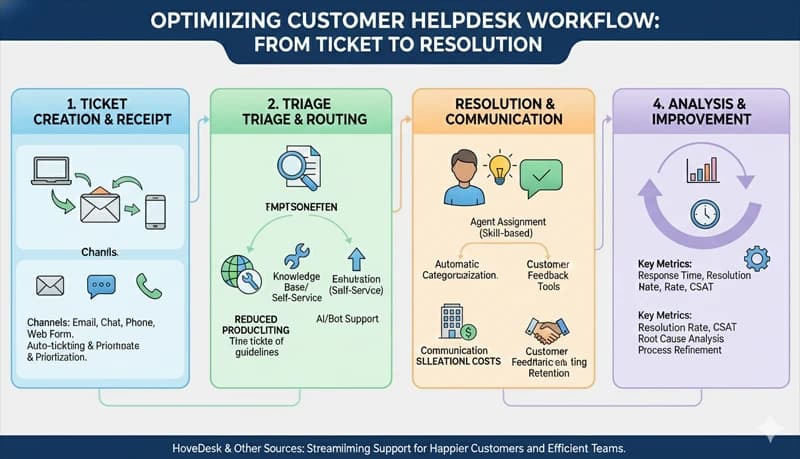
A helpdesk workflow is the sequence of steps a customer issue follows from the moment it arrives to the moment it is resolved and closed. In a call center, every call, email, and chat follows this workflow — whether it is formally designed or not. The difference between an operation that resolves issues efficiently and one that loses time, drops follow-ups, and generates repeat contacts is usually not the agents — it is the workflow they are working within.
When the workflow is well-designed, agents know exactly what to do at each stage, issues are routed to the right person on the first attempt, follow-ups do not fall through the cracks, and supervisors can see where work is stuck. When the workflow is poorly designed — or has grown organically without structure — agents spend time on routing decisions instead of resolution, issues bounce between queues, and customers call back because their issue was never closed. A call center management solution that tracks agent time alongside ticket data helps you see where the workflow is actually breaking down.
The five stages of a helpdesk workflow
Every helpdesk workflow, regardless of channel (phone, email, chat), follows the same five stages. Problems in any stage cascade forward.
| Stage | What happens | Output |
|---|---|---|
| 1. Intake | The issue arrives and is categorized — what type of issue is it, who is the customer, what is the priority | A ticket or case record with the correct category, priority, and customer context |
| 2. Routing | The issue is assigned to the right agent, team, or queue based on issue type, skill required, and availability | The issue lands with someone who can resolve it |
| 3. Diagnosis and resolution | The agent investigates the issue, determines the cause, and takes the resolution action | The customer's issue is resolved (or escalated with the right information) |
| 4. Follow-up | Any post-resolution actions are completed — confirmation sent, system updated, related ticket closed, callback scheduled if needed | All downstream tasks are done, not just the customer-facing resolution |
| 5. Closure | The ticket is closed with documentation, disposition code, and quality verification | A complete record that supports reporting, forecasting, and QA evaluation |
Where workflows break: diagnosing by stage
Each stage has characteristic failure modes. Diagnosing which stage is broken determines the fix.
Stage 1 failures: intake
| Symptom | Root cause | Fix |
|---|---|---|
| Issues are frequently miscategorized | Too many categories (agents guess), or categories do not match actual issue types | Reduce to 15–20 categories that map to your actual call type distribution. Audit "Other" and "General" entries monthly |
| Priority is inconsistently assigned | No clear priority criteria — agents assign based on how urgent the customer sounds, not on objective criteria | Define priority levels with specific criteria (see priority matrix below) |
| Customer context is missing from the ticket | Agent does not pull account history before starting, or the system does not display relevant context | Ensure account status, recent interactions, and open tickets are visible when the agent picks up the call or opens the chat |
| Duplicate tickets created for the same issue | Customer contacts through multiple channels (called, then emailed, then chatted) and each creates a separate ticket | Link tickets by customer ID. When a new contact arrives, check for open tickets from the same customer on the same issue |
Priority matrix example:
| Priority | Criteria | Response target | Resolution target |
|---|---|---|---|
| Critical | Service completely unavailable, revenue-impacting, affects multiple customers | Immediate | 4 hours |
| High | Service degraded, single customer significantly affected, compliance-related | 1 hour | 8 hours |
| Medium | Feature issue, workaround available, single customer moderately affected | 4 hours | 24 hours |
| Low | Information request, minor inconvenience, enhancement request | 8 hours | 48 hours |
Stage 2 failures: routing
| Symptom | Root cause | Fix |
|---|---|---|
| Issues bounce between queues (agent receives an issue, realizes they cannot handle it, transfers to another queue) | Routing rules do not match agent skills, or skill assignments are outdated | Map each issue category to the required skill set. Ensure agent skill profiles are current. Review routing rules quarterly |
| Some agents are overloaded while others are idle | Routing is round-robin without considering current workload or occupancy | Route based on availability and current queue depth, not just rotation |
| Escalations take too long | No clear escalation path — agent does not know who handles Tier 2 for each issue type, or Tier 2 queue is not monitored | Define escalation paths per issue category. Specify exactly which queue or person receives each escalation type |
| BPO multi-account routing errors | Cross-trained agents receive calls for an account they are not currently assigned to | Ensure routing aligns with schedule assignments. Update routing tables when agents move between accounts during intraday management |
Stage 3 failures: diagnosis and resolution
| Symptom | Root cause | Fix |
|---|---|---|
| AHT varies widely between agents on the same issue type | No standard diagnostic process — each agent approaches the same issue differently | Build troubleshooting flowcharts for the top 5–10 issue types |
| Agents put customers on hold frequently | Agent is searching for information that should be immediately available | Audit hold reasons. If agents are looking up policies, procedures, or account details, the information is not accessible enough |
| FCR is low — customers call back on the same issue | Agents are resolving the symptom but not the underlying cause, or the resolution requires a follow-up step that is being skipped | Review callbacks. Identify which resolution steps are being missed. Add them explicitly to the flowchart or process |
| Escalation rate is high — agents escalate issues they could resolve | Agent lacks authority (credit limits, policy exceptions) or lacks knowledge for certain call types | Increase agent authority for routine resolutions. Identify knowledge gaps and provide targeted coaching |
Stage 4 failures: follow-up
| Symptom | Root cause | Fix |
|---|---|---|
| Customers call back asking for updates on unresolved issues | No system for tracking open issues and proactively updating customers | Set a follow-up cadence for each priority level. Assign ownership — one agent or team owns the issue until closure |
| Tasks generated during calls (send email, create ticket, schedule callback) are not completed | Follow-up tasks are noted but not tracked in a system — they depend on the agent remembering | Create follow-up tasks as system records (tickets, tasks, or reminders) — not notes. Tasks without a system record will be forgotten |
| Escalated issues sit in Tier 2 queues for days | No SLA on internal escalation queues. Tier 2 has no visibility into aging tickets | Set internal response targets for escalation queues. Make queue age visible to Tier 2 supervisors |
| Confirmation emails or reference numbers not sent | The step is optional or informal — agents skip it when busy | Make it a required step in the resolution workflow. If possible, automate it (system sends confirmation when ticket status changes to "resolved") |
Stage 5 failures: closure
| Symptom | Root cause | Fix |
|---|---|---|
| Tickets are left open indefinitely | No closure criteria defined — agents are not sure when a ticket is "done" | Define closure criteria for each issue type. Example: resolved + confirmation sent + no callback within 48 hours = auto-close |
| Disposition codes are inaccurate | Agents select the closest code rather than the correct one, or the code list does not match actual issue types | Simplify the code list. Organize by category. Audit a sample monthly |
| Call notes are missing or unhelpful | No documentation standard — agents write too much, too little, or nothing | Define what must be documented for each outcome type (routine resolution = code only, escalation = code + details + next steps) |
| Closed tickets are reopened because the issue recurred | The original resolution was incomplete, or a related issue was not addressed | Review reopen rates by issue type. If a specific issue type has a high reopen rate, the resolution process for that type needs revision |
Measuring workflow health
Track these metrics to identify which workflow stage is underperforming. Each metric maps to a specific stage.
| Metric | What it measures | Target | Stage it reflects |
|---|---|---|---|
| Miscategorization rate | % of tickets recategorized after initial intake | Fewer than 10% | Intake |
| Transfer rate | % of calls or tickets transferred to a different queue | Fewer than 15% | Routing |
| AHT by call type | Average handle time per issue category | Within 10% of target per type | Diagnosis/resolution |
| FCR | % resolved on first contact | 70–80% | Diagnosis/resolution |
| Follow-up completion rate | % of follow-up tasks completed within the defined timeframe | 95%+ | Follow-up |
| Escalation aging | Average time escalated tickets sit before Tier 2 picks them up | Fewer than 2 hours for high priority | Follow-up |
| Reopen rate | % of closed tickets reopened within 7 days | Fewer than 5% | Closure |
| ACW duration | Time spent on post-call documentation and tasks | Fewer than 60 seconds for routine calls | Closure |
Process changes that reduce resolution time
Reduce routing steps
Every transfer adds 30–60 seconds of handle time (transfer setup, re-verification, context recap) and reduces customer satisfaction. The goal is to route correctly on the first attempt.
| Current state | Change | Expected impact |
|---|---|---|
| Agent answers, listens, then decides which queue to transfer to | Route based on IVR selection or issue category before the agent picks up | Eliminates one transfer for issues that were always going to a specific team |
| All issues go to a general queue, then get routed | Create skill-based queues — billing issues go directly to billing-trained agents | Reduces transfers by 30–50% for categorizable issues |
| Escalation requires supervisor approval before transferring | Define pre-approved escalation criteria — if the issue meets criteria X, the agent escalates directly without waiting for approval | Reduces escalation time from minutes (waiting for supervisor) to seconds |
Standardize the diagnosis process
Inconsistent diagnosis is the largest source of AHT variance between agents. When each agent approaches the same issue differently, some find the answer in 2 minutes and others take 8.
| Action | How to implement |
|---|---|
| Build troubleshooting flowcharts for top call types | Follow the diagnostic sequence of your top performers, not the process documentation |
| Create quick-reference guides for the top 20 call types | One page per call type: common causes, diagnostic steps, resolution actions, disposition code |
| Set agent authority thresholds | Define what agents can do without supervisor approval (credits up to $X, plan changes, waived fees). More authority = fewer holds and escalations |
Eliminate unnecessary follow-up steps
Every step in the workflow that does not contribute to resolution or compliance is waste. Audit your workflow for steps that exist because they were added at some point and never removed.
| Common unnecessary step | Why it exists | Alternative |
|---|---|---|
| Agent sends a manual confirmation email after every call | A manager required it years ago. Nobody reads them | Automate confirmation emails for issue types that need them. Eliminate for routine calls |
| Agent updates two systems with the same information | Systems are not integrated | Integrate or designate one as the system of record |
| Agent writes detailed notes for routine, fully-resolved calls | Documentation requirements are undefined — agents default to writing everything | Define documentation standards: routine resolved calls need a disposition code only |
| Supervisor reviews every escalation before it is sent | Added after a bad escalation incident. Most escalations are routine | Define criteria for escalations that require supervisor review vs. those the agent sends directly |
Workflow design for BPOs
BPO operations run the same five-stage workflow but with additional requirements at each stage.
| Stage | BPO-specific requirement |
|---|---|
| Intake | Ticket must be tagged with the client account. Each client may have different priority matrices and SLA requirements |
| Routing | Agents are account-specific. Routing must respect account assignments, and cross-trained agents must be routed to the correct account based on their current assignment |
| Diagnosis/resolution | Each client has different processes, systems, and resolution authorities. Agents handling multiple accounts must switch context between different procedures |
| Follow-up | Internal escalation paths differ per client. Tier 2 for Client A may be a different team than Tier 2 for Client B |
| Closure | Reporting and documentation requirements differ per client. Disposition codes, note formats, and SLA metrics vary |
The biggest BPO workflow mistake is using a single generic workflow across all client accounts. Each client account should have its own workflow documentation — even if the five stages are the same, the details within each stage (categories, priorities, routing rules, escalation paths, documentation requirements) will differ.
Where to start
If your workflow has multiple problems across stages, fix them in order:
- Routing first. If issues are going to the wrong agents, nothing downstream will work. Fix routing rules and skill assignments
- Diagnosis second. Once issues reach the right agent, ensure they have flowcharts, knowledge, and authority to resolve them
- Intake third. Improve categorization and priority assignment so routing receives accurate inputs
- Follow-up and closure last. These stages matter, but they affect fewer interactions than routing and resolution. Fix the high-volume problems first
Measure workflow health metrics before making changes so you have a baseline. Then track the same metrics weekly for 4–6 weeks after each change to confirm improvement.
