

How to Set Up Direct Deposit for Employees

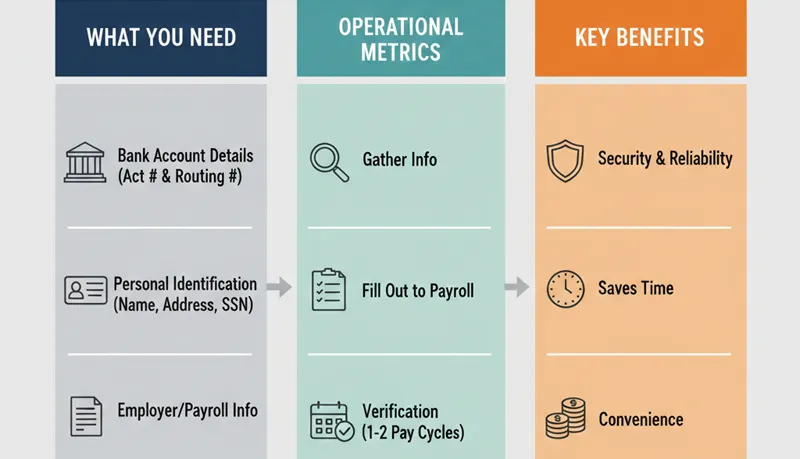
Direct deposit is the standard method of paying employees in the United States — roughly 93% of US workers receive their pay electronically. For call centers and BPOs with large hourly workforces paid on weekly or biweekly cycles, direct deposit eliminates the administrative burden of issuing, distributing, and reconciling paper checks for hundreds of employees across multiple shifts and locations.
Setting it up is straightforward, but there are legal requirements, timing considerations, and common mistakes that can create problems if overlooked. Pairing direct deposit with accurate employee time tracking ensures the hours feeding your payroll system are reliable.
The setup process
1. Choose a payroll provider (or confirm your current one supports ACH)
Direct deposit works through the Automated Clearing House (ACH) network — a batch processing system that transfers funds between bank accounts. You do not interact with ACH directly. Your payroll provider or bank handles the ACH transactions.
If you already use a payroll provider (ADP, Gusto, Paychex, QuickBooks Payroll, etc.), direct deposit is a built-in feature. If you run payroll manually or through a basic accounting system, you will need either:
- A payroll provider that includes direct deposit
- A direct deposit service through your business bank, which typically involves signing an ACH origination agreement
Cost: Most payroll providers include direct deposit in their base pricing. Bank-originated ACH transactions typically cost $0.25–$1.50 per transaction, plus a monthly fee. For a 200-employee operation paid biweekly, bank ACH fees would be $100–$600 per month — usually more expensive than a payroll provider that bundles the cost.
2. Complete the ACH origination agreement
Whether through your payroll provider or bank, you will sign an agreement that authorizes you to originate ACH transactions (debits from your business account, credits to employee accounts). This agreement typically requires:
- Your business bank account and routing number
- Your Employer Identification Number (EIN)
- Business verification documents
- Authorized signers
Processing time for approval: 1–5 business days for payroll providers, up to 2 weeks for bank-originated setups.
3. Collect employee authorization
You must obtain written authorization from each employee before depositing funds into their account. This is not optional — NACHA (the organization governing ACH) rules require it, and many state laws reinforce it.
The authorization form should include:
- Employee's full name
- Bank name
- Bank routing number (9 digits)
- Account number
- Account type (checking or savings)
- Whether to deposit the full paycheck or a specific amount (for split deposits)
- Employee signature and date
- A statement that the employee authorizes the employer to deposit funds electronically and can revoke authorization at any time
Verification: Request a voided check or bank letter confirming the routing and account numbers. A voided check is the most reliable method because it contains pre-printed routing and account information. For employees who use online-only banks or do not have checks, a bank verification letter or a screenshot of routing/account numbers from their bank's website works.
4. Run a prenote
Before sending the first live deposit, most payroll systems send a prenote (pre-notification) — a zero-dollar test transaction that verifies the routing and account numbers are valid. The prenote goes through the ACH network and confirms that the bank accepts the transaction.
Timeline: Prenotes take 2–3 business days to process. Some payroll providers require a prenote period of up to 10 business days before allowing live deposits. Plan for this — if you collect employee information on Monday, the first actual deposit may not be possible until the following pay period.
What happens if a prenote fails: The bank rejects the transaction, typically because the account number is wrong, the account is closed, or the routing number is invalid. You will need to collect corrected information from the employee and run another prenote.
5. Process the first live payroll
Once prenotes clear, enter employees into the direct deposit payroll cycle. Key timing:
- ACH processing takes 1–2 business days. If payday is Friday, you typically need to submit the payroll file by Wednesday (or earlier, depending on your provider).
- Funding: Your business account must have sufficient funds when the ACH debit is processed. Insufficient funds will cause the entire payroll batch to fail — not just one employee's deposit.
- Pay stubs: Even with direct deposit, you must provide pay stubs (physical or electronic) showing gross pay, deductions, taxes, and net pay. Most payroll providers generate these automatically.
State laws affecting direct deposit
Mandatory vs. voluntary
Federal law does not require employers to offer direct deposit, nor does it prohibit employers from requiring it. However, state laws vary significantly:
States that allow mandatory direct deposit (employer can require it as the only payment method): Most states permit mandatory direct deposit, but many require that the employer pay any account fees the employee incurs, or that the employee be offered a payroll card as an alternative.
States that require employee consent (employer cannot mandate direct deposit): California, Kansas, Maryland, Minnesota, Missouri, Nebraska, New York, Oregon, Pennsylvania, Texas, Virginia, and several others require employees to voluntarily opt in. In these states, you must offer an alternative payment method (paper check or payroll card) for employees who decline.
Bottom line: Unless you have confirmed that your state allows mandatory direct deposit, treat it as opt-in. For multi-state operations — common in BPOs with remote agents — the safest approach is to make direct deposit the default but allow employees to opt out.
Final pay timing
State laws also govern how quickly final pay must be delivered when an employee is terminated or resigns. Some states require immediate payment on the last day of work (California, for example), while others allow payment on the next regular payday.
Direct deposit complicates this because ACH transactions take 1–2 business days to process. If a state requires same-day final pay and the employee is terminated mid-cycle, you may need to issue the final payment by paper check or same-day wire transfer rather than waiting for ACH processing.
Split deposits and payroll cards
Split deposits
Many employees want to split their direct deposit across multiple accounts — for example, $200 per paycheck into a savings account and the remainder into checking. Most payroll providers support split deposits natively. Allow employees to specify:
- Number of accounts (typically up to 3–4)
- Dollar amount or percentage for each account
- Which account receives the remainder
Payroll cards
For employees without bank accounts (approximately 6% of US households are unbanked), payroll cards provide an alternative to paper checks. A payroll card is a reloadable prepaid debit card onto which wages are deposited electronically.
Requirements:
- Employees must be able to make at least one free withdrawal per pay period (to access their full wages without fees)
- Employees cannot be required to use a payroll card — it must be one option among others
- Card fees must be disclosed in advance
- The card must be FDIC-insured
Payroll cards are particularly relevant for call centers with large hourly workforces where a percentage of employees may not have traditional bank accounts.
Ongoing management
Employee changes
Employees will change bank accounts, close accounts, or need to update their information. Build a process for handling changes:
- Change request form: Require a new authorization form for any change to banking information
- Verification: Run a prenote for the new account before switching
- Timing: Changes submitted after a payroll cutoff date take effect the following pay period — communicate this clearly so employees are not surprised when a deposit goes to their old account
- Fraud prevention: If an employee submits a change to banking information through an unusual channel (email rather than in person, for example), verify the request directly with the employee before processing. Payroll redirect fraud — where an attacker impersonates an employee and submits new banking details — is increasingly common.
Returned deposits
ACH deposits can be returned (rejected) by the receiving bank for several reasons:
| Return code | Meaning | What to do |
|---|---|---|
| R01 | Insufficient funds (at employee's bank — rare for credits) | Contact employee to verify account status |
| R02 | Account closed | Collect new banking information, run prenote |
| R03 | No account / unable to locate | Verify account number with employee |
| R04 | Invalid account number | Collect corrected information |
| R08 | Payment stopped by employee | Contact employee — they may have revoked authorization |
When a deposit is returned, the funds go back to your business account. You must then issue payment to the employee through an alternative method (paper check) and resolve the banking issue before the next pay period.
Record keeping
Retain direct deposit authorization forms for as long as the employee is active, plus the retention period required by your state (typically 3–4 years after separation). If you receive authorization electronically (e-signature), ensure the system meets the E-SIGN Act requirements for electronic records.
Common mistakes
Not allowing enough lead time for setup. Between collecting forms, running prenotes, and waiting for ACH processing, the first direct deposit can take 2–3 weeks from when the employee submits their information. Communicate this timeline during onboarding so new hires expect their first paycheck by paper check.
Missing the payroll submission deadline. ACH is not instant. If your provider requires payroll submission 2 business days before payday and you submit late, employees will not be paid on time. Build the submission deadline into your payroll calendar and treat it as non-negotiable.
Not verifying banking information. Transposing a digit in a routing or account number sends the deposit to the wrong account or causes a return. Always verify against a voided check or bank letter — do not rely on employee-provided numbers alone.
Requiring direct deposit in a state that prohibits it. If you mandate direct deposit in a consent-required state, employees who were not given a choice can file wage complaints. Check your state's rules before setting policy.
No process for terminated employees. When an employee is terminated, their final pay may need to be delivered faster than ACH processing allows. Have a backup process (paper check, same-day payment) for final pay situations where ACH timing does not meet state requirements.
