

Call Center Time Tracking Software with Shift Scheduling
HiveDesk is an all-in-one platform for call centers to achieve world-class operations, higher revenue, lower costs and increased profits. One tool that does it all — time tracking, activity monitoring, agent shift scheduling, attendance tracking, time off management, and invoicing.
No credit card required · 14-day free trial · $5/user/month

Grow Your Call Center Profitably
Before HiveDesk
- Overwhelmed with managing agents, clients, and work
- Adhoc scheduling causing staffing issues and overtime
- No visibility into hours worked by agents
- Unsure about compliance with labor laws
- Difficulty tallying billable and non-billable hours
- Limited data on client profitability
After HiveDesk
- Streamlined operations with key metrics in one place
- Optimal staffing and less overtime with shift scheduling
- Full visibility with automatic time tracking
- Compliant with data on break time, attendance, and time off
- Billable and non-billable time clearly identified
- Real-time tracking of cost and billable time
Automatic Time Tracking
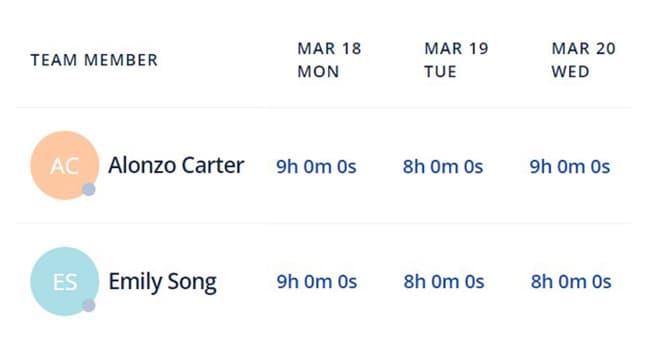
Track billable and non-billable hours
Improving efficiency, cost control, and resource management in your call center with HiveDesk time tracking software. Track billable and non-billable hours, break times, meal times and meeting hours. By tracking billable and non-billable hours, call centers can ensure clients are invoiced only for actual work hours, reducing invoicing errors and client disputes. Understanding how much time is spent on breaks, meals, and meetings helps identify inefficiencies or time mismanagement. Managers gain visibility into when agents are on breaks, in meetings, or available to handle calls. This allows for better resource planning and real-time workforce adjustments. Call centers can use the data to analyze patterns and optimize schedules, minimize non-billable hours, and improve overall efficiency.
Workforce Management
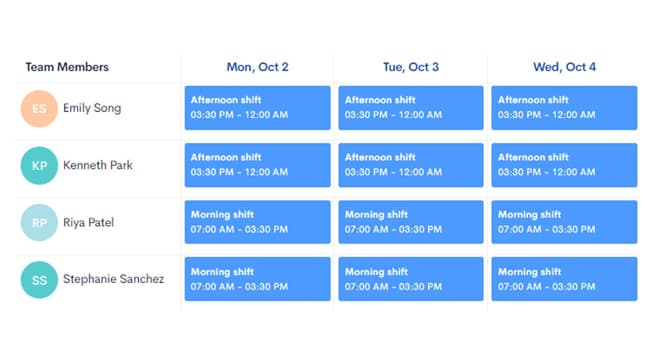
Use employee shift scheduling to increase utilization and productivity
Employee shift scheduling, attendance tracking, and time-off management play a critical role in improving resource utilization and productivity in call centers. Call centers work in shifts and require a certain number of agents to provide coverage for expected call volumes. The agent shift scheduling feature in HiveDesk lets you create custom shifts and agent schedules. Attendance monitoring ensures managers know who is available to take calls. By tracking planned and unplanned leave, managers can plan for absences in advance.
Regulatory Compliance
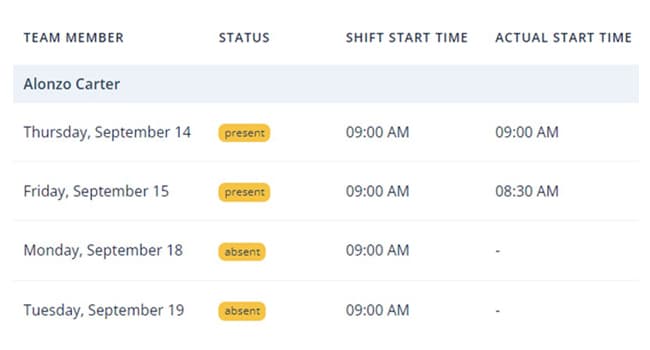
Stay compliant with labor laws
Our call center time tracking software does more than just track agent time. It has attendance monitoring, time-off management, and overtime tracking features that help call centers maintain compliance with labor laws. These features ensure that employees’ working hours, breaks, and leave adhere to legal requirements.
Billing
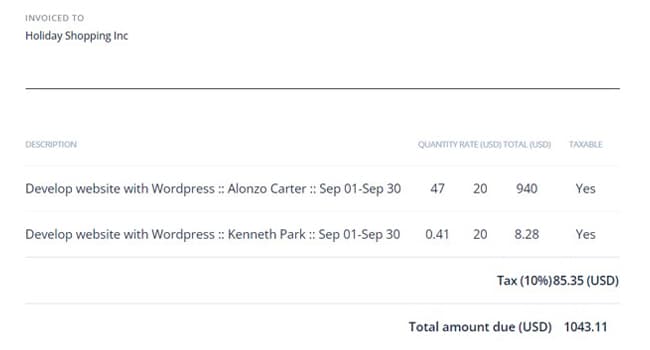
Improve trust with clients with accurate and verifiable invoices
Tracking non-billable and billable time ensures your invoices are accurate and builds trust with clients. With HiveDesk call center time tracking software, you can categorize non-billable hours into meal breaks, rest breaks, and meeting time. By tracking overtime hours worked by your call center agents, you can ensure that you don’t miss billing those hours while providing verifiable invoices to your clients.
Business Growth
Keep clients happy and grow your call center profitably
By using our call center tracking time software, employee scheduling, attendance tracking, time-off management, and invoicing, call centers gain accurate labor cost control, optimize productivity, ensure compliance, and improve client trust through transparency. Call centers maximize workforce efficiency with HiveDesk by measuring shrinkage and adherence, balancing workloads, and addressing gaps early.

Built for every role in call centers

COO
Oversees productivity, manages budget/P&L, reviews workforce attendance, ensures labor compliance, oversees scheduling.
Learn more →
Team Leader
Assigns tasks to team members, verifies timesheets, manages progress reporting.
Learn more →
HR Manager
Oversees attendance policies, manages time-off requests, ensures shift availability, creates and manages HR policies.
Learn more →
Trusted by Teams Worldwide Since 2011
“One of the first employee tracking software I ever used and I compare all the latest programs to HiveDesk. It is a definite contender in this space. Easy to use as the most important thing for time tracking is making sure that the program keeps track at a click of a button.”
“In today’s world, remote work is a given. We use this software to handle those challenges. We tried a lot of the competitors and for many reasons HiveDesk won. Plus, team loves their support. Fast and attentive. We love HiveDesk. It allows us to track people’s use and find areas of weakness. Their price level is perfect for us and we love their reporting.”
Built for Contact Center Operations
Beyond the timer: the reports and controls operations managers use to run shifts, measure shrinkage and adherence, and plan overtime.
Shrinkage Report
For every agent and date, see scheduled start and end, actual start and end, scheduled hours, actual hours worked, shrinkage hours, and shrinkage %. Filter by site, client, team group, project, member, shift, or timezone, and export to PDF or Excel.
Shrinkage management →Adherence Report
Compare check-in time with shift start (check-in adherence) and check-out time with shift end (check-out adherence). Filter by site, client, team group, project, member, timezone, or status, and export to Excel or PDF.
Attendance management →Scheduled Activity
Live per-shift counts of agents who are present, absent, not logged in, ongoing, on half day, on leave, on holiday, or on a week off, with check-in and check-out times and Excel export. Ongoing Sessions shows who is working right now.
Live views →Overtime Slots and Commitments
Post or import overtime slots, let agents commit to the ones they want, and review the Overtime Commitments report. A weekly overtime threshold and pay multiplier feed the Overtime report.
Overtime management →Shift Change Requests
Agents request a change to their shift and managers approve or decline it, so the published schedule stays accurate without side-channel messages.
Call center scheduling →Multi-Site Operations
Set up countries and sites for operations that span several locations, then filter shrinkage, adherence, and attendance reports by site.
Timezone management →Break Types with Short Codes
Define custom break types, each with a short code, and schedule breaks such as lunch or meetings inside shifts. Managers can add, edit, or delete breaks in a live session.
Agent time tracking →Roles and Permissions
Create custom roles and decide what each one can see and do, so team leads, supervisors, HR, and finance each get the access they need.
Agent monitoring →Email Summaries and Exports
Send daily summary emails to selected recipients, including clients or executives who are not team members. Schedule raw-data emails of schedule and worksession data, and export reports to PDF or Excel.
Performance analytics →Public API on Request
Need HiveDesk data in your own reporting tools or a custom integration? The Public API is available on request alongside the Asana integration.
Integrations →Why Time Tracking Matters for Contact Centers
In contact center operations, accurate time tracking is not just an HR function — it directly impacts service levels, costs, and client relationships.
Agent utilization. Contact centers live and die by utilization rates. If agents are scheduled for eight hours but only productive for six, you are paying for two hours of lost capacity per agent per day. Time tracking with activity monitoring gives managers visibility into how agent hours are actually spent — by project and client, on breaks, and at what activity level. This data helps optimize schedules and identify where productive time is being lost.
Schedule adherence. When agents do not start shifts on time, leave early, or take extended breaks, service levels suffer. Scheduled Activity lets managers see during the shift who is present, who is absent, and who has not logged in, and the Adherence report shows late check-ins and early check-outs. Over time, adherence data reveals patterns that can be addressed through coaching, schedule adjustments, or policy changes.
Overtime management. Unplanned overtime is one of the fastest ways to blow a contact center budget. HiveDesk lets you set a weekly overtime threshold in hours and an overtime pay multiplier applied to each agent’s hourly rate, and the Overtime report shows who worked overtime and how much it costs. When you need extra coverage, post or import overtime slots that agents commit to, then track them in the Overtime Commitments report. That keeps overtime planned instead of accidental, which matters most for centers that run multiple shifts.
Multi-state labor law compliance. Contact centers with remote agents often have employees in multiple states, each with different rules for overtime, breaks, meal periods, and record-keeping. Automated time tracking creates the digital records needed to demonstrate compliance during audits and reduces the risk of wage and hour violations.
Billable hours for BPO clients. For outsourced contact centers, accurate time tracking is the foundation of client billing. Clients expect invoices backed by verifiable data. HiveDesk tracks billable and non-billable hours by client and project, and screenshot reports provide proof of work that reduces billing disputes and builds client trust.
Guides and Resources
In-depth guides on contact center operations, compliance, and team management.
- Contact Center Technology Stack
The essential tools and platforms every contact center needs to operate effectively.
- Contact Center Compliance: Labor Laws
Key labor law requirements for contact centers including overtime, breaks, and record-keeping.
- How to Build a Remote Contact Center
Step-by-step guide to setting up and managing a remote contact center operation.
- Contact Center Team Meetings
How to run effective team meetings that improve agent performance and engagement.
- BPO Pricing Guide 2026
A comprehensive guide to BPO pricing models, rates, and cost structures.
- Managing Offshore CX Teams
Best practices for managing customer experience teams across time zones and geographies.
Frequently Asked Questions
Common questions about call center time tracking software.
Call center time tracking software records agent work hours, tracks billable and non-billable time, monitors schedule adherence, and generates timesheets for payroll and client invoicing. HiveDesk combines time tracking with shift scheduling, attendance monitoring, and activity verification — giving call center managers a complete workforce management platform.
Agents start the HiveDesk timer using the desktop app (Windows, macOS, Linux) or Chrome extension when their shift begins. The software automatically records hours by task, project, and client. On the desktop apps, periodic screenshots and activity levels are captured as well. When agents stop the timer, their hours are logged and flow into timesheets that managers review and approve.
Yes. HiveDesk lets you categorize time by project and task, making it easy to distinguish billable client work from non-billable activities like training, meetings, and breaks. This gives you accurate client invoices and clear visibility into where non-billable time is going.
Managers create custom shifts in the HiveDesk dashboard — define start time, end time, break periods, and assign agents. HiveDesk supports custom schedule types, draft schedules you publish when ready, and Copy Schedule to carry a week forward. Agents can submit shift change requests for manager approval. When agents clock in, HiveDesk compares actual check-in and check-out times against their scheduled shifts in the Adherence report.
Yes. Scheduled Activity shows, for each shift, how many agents are present, absent, not logged in, ongoing, on half day, on leave, on holiday, or on a week off, with check-in and check-out times. Ongoing Sessions shows who is working right now. You set the late threshold and shift tolerance in minutes, and the Adherence report compares check-in time with shift start and check-out time with shift end, filterable by site, client, team group, project, member, and timezone.
HiveDesk automatically tracks hours worked, break times, overtime, and attendance. This data is critical for compliance with the FLSA, state labor laws, and international regulations. All records are maintained digitally and can be exported for audits. For call centers operating across multiple states or countries, this eliminates the compliance risk of manual tracking.
HiveDesk costs $5 per agent per month — one plan that includes every feature. Time tracking, shift scheduling, attendance, screenshots, timesheets, and reporting. No per-feature tiers. For a 50-agent call center, that is $250/month for a complete workforce management platform.
Yes. HiveDesk records billable hours by client and project. You can create custom invoices or auto-generate them from tracked time, with your company tax rate, Tax/VAT number, and logo. Screenshot reports provide verifiable proof of work that clients can review, reducing billing disputes and building trust.
Absolutely. HiveDesk was built for distributed teams. Remote agents track time from any device, their screenshots verify activity, and managers get the same real-time visibility as they would in a physical call center. The iOS app records GPS location at clock-in and clock-out for field or mobile agents.
Sign up for a free 14-day trial — no credit card required. Add your agents, create shift schedules, and start tracking time immediately. Most call centers are fully operational on HiveDesk within a day. Our support team is available if you need help with setup.
Ready to Get Started?
Join teams worldwide who trust HiveDesk for workforce management, time tracking, and employee monitoring. $5/user/month, all features included.