

One Click to Start. Accurate Hours Captured Automatically.
Your team clicks one button and gets back to work. HiveDesk handles the rest — recording hours by project and task, monitoring activity, capturing screenshots, and generating timesheets ready for manager approval.
No credit card required · $5/user/month · Windows, macOS, Linux, iOS, Chrome
If Time Tracking Requires Effort, It Will Not Happen
The best time tracking is the kind your team does not think about.
Without automatic time tracking
- Employees forget to log hours or fill timesheets from memory
- Managers spend hours chasing people for overdue time entries
- No way to verify if reported hours reflect actual work done
- Billable hours go untracked, leading to revenue leakage
With HiveDesk time tracking
- One click to start — hours are captured automatically by project and task
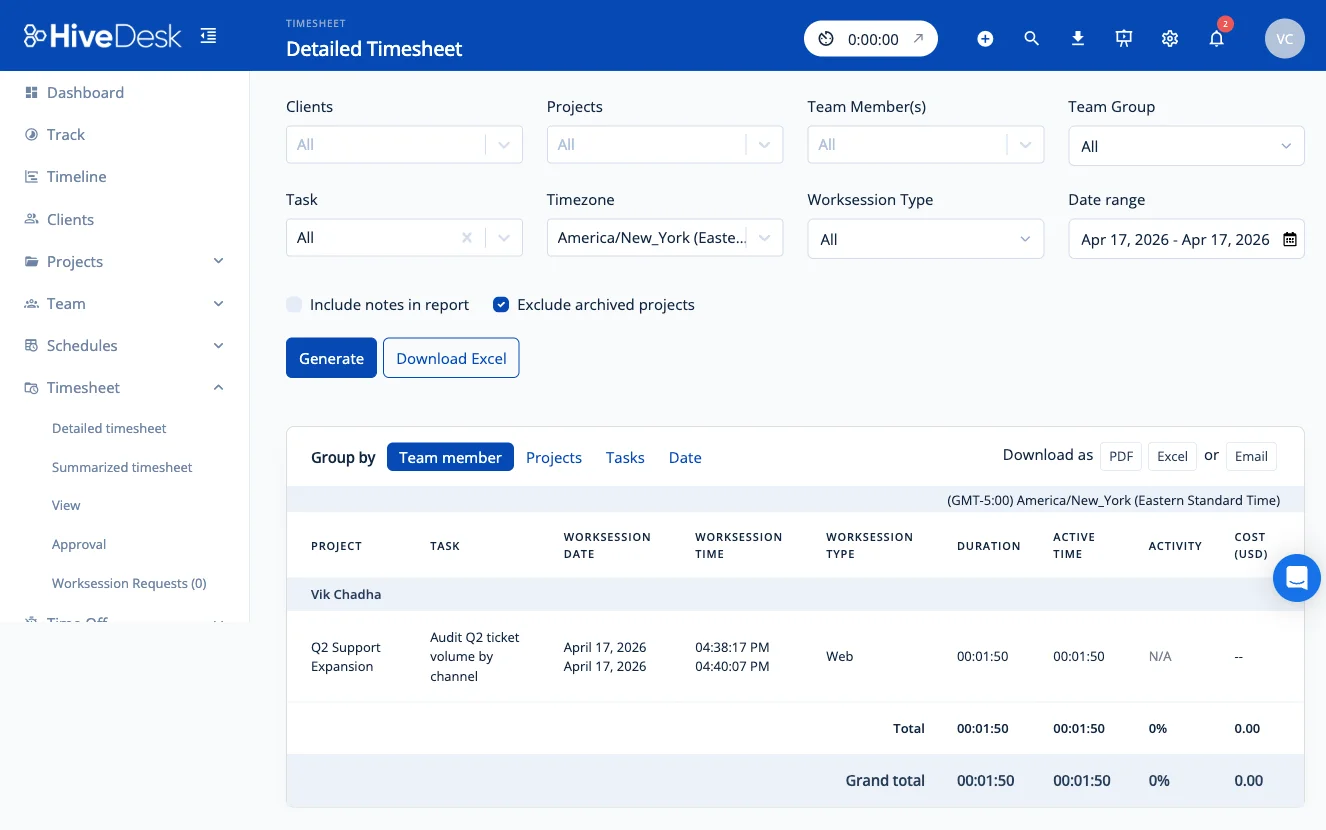
- Timesheets are generated without any manual step from employees
- Screenshots and activity data verify every tracked hour
- Every billable minute is captured and ready for client invoicing
Time Tracking That Does the Work for You
Automatic hours, activity monitoring, and timesheets — all from one timer click.
One-Click Timer
Employees select a project and task, then click start. Hours are recorded automatically. No manual entries, no forms, no end-of-day submissions. Works on desktop, mobile, and browser.
Activity Monitoring
Keyboard and mouse activity levels are tracked during work sessions. Periodic screenshots provide visual verification. Employees always know when monitoring is active.
Automatic Timesheets
Timesheets are generated from tracked hours without any manual step. Managers review, approve, and export as PDF or Excel for payroll. Activity data backs every hour.
Break & Idle Detection
Employees log breaks during shifts. The system flags periods of no activity so managers can distinguish between active work, breaks, and idle time in reports.
Project & Task Time
Track time against specific projects and tasks. See exactly where hours are going across client accounts, departments, and team members. Add hourly rates for cost tracking.
Reports & Dashboards
Real-time dashboards show who is working and what they are on. Detailed reports cover time, activity, attendance, and overtime. Export everything as PDF or Excel.
How It Works
From timer start to approved timesheet in three steps.
Start the Timer
Employees open the desktop, mobile, or browser app. Select a project and task, then click start. Tracking begins immediately.
Work Is Captured
Hours are recorded by project and task. Activity levels and periodic screenshots are captured automatically during the work session.
Review & Export
Managers review timesheets with activity data. Approve in one click and export as PDF or Excel for payroll or client billing.
Frequently Asked Questions
Common questions about time tracking with HiveDesk.
Employees start the HiveDesk timer using the desktop app (Windows, macOS, Linux), mobile app (iOS), Chrome browser extension, or directly inside Asana. The software records hours by task and project, takes periodic screenshots for activity verification, and logs keyboard and mouse activity levels.
Yes. HiveDesk operates transparently. Employees can see their own time tracking data and activity levels. Screenshot frequency is configurable by managers, and employees always know when tracking is active. There is no hidden surveillance.
Employees open the app, select their project and task, and click start. That is it. Hours are recorded, activity is monitored, and screenshots are captured automatically. There are no forms to fill out, no manual entries, and no end-of-day timesheets to submit.
Employees can log breaks during their shift. Break times are recorded in timesheets. If the system detects no keyboard or mouse activity for a configurable period, idle time is flagged separately so managers can distinguish between active work and downtime.
Yes. HiveDesk works for remote, hybrid, and in-office teams. Remote employees track time via the desktop or mobile app. The iOS mobile app includes GPS location tracking for field workers. All data flows into the same dashboard.
HiveDesk provides timesheets, activity reports with screenshots, attendance reports, project and task time reports, and overtime reports. All reports can be filtered by date range, team, or individual and exported as PDF or Excel.
HiveDesk integrates with Asana for project and task management — you can track time directly inside Asana tasks. Timesheet data exports to Excel and PDF for use with any payroll or accounting software.
Desktop apps for Windows, macOS, and Linux. An iOS mobile app with GPS tracking. A Chrome browser extension. And a web dashboard accessible from any browser. Your team can track time from whatever device they prefer.
Timesheets are generated automatically from tracked hours. They show time broken down by project, task, and date. Managers review and approve timesheets from the dashboard, then export as PDF or Excel for payroll or client billing.
HiveDesk is $5/user/month with all features included — time tracking, activity monitoring, screenshots, scheduling, attendance, leave management, and reporting. There is a 14-day free trial with no credit card required.
Related Pages
Employee Time Tracking Software
Full product page with feature comparisons, industry use cases, and pricing details.
Timesheet Management
Automatic timesheets generated from tracked hours with approval workflow and payroll export.
Real-Time Dashboards
See who is working, on what, and their activity level — all from one live dashboard.
Ready to Get Started?
Join teams worldwide who trust HiveDesk for workforce management, time tracking, and employee monitoring. $5/user/month, all features included.