

Track Billable Hours. Generate Invoices. Get Paid Faster.
Stop losing revenue to untracked hours and billing disputes. HiveDesk records time by project and client automatically, generates approved timesheets, and gives you screenshot reports that clients trust. All for $5/user/month.
No credit card required · Set up in under 10 minutes · Works on Windows, macOS, Linux, iOS, Chrome
Inaccurate Time Data Is Costing You Clients and Revenue
When billable hours are tracked manually, revenue leaks through the cracks. When clients question invoices, you have nothing to show them.
Without accurate time tracking
- Billable hours slip through the cracks when tracked manually
- Clients dispute invoices with no proof of work completed
- No visibility into actual labor costs per client project
- Compiling time reports for each client takes hours every month
With HiveDesk
- Every billable minute is captured automatically by project
- Screenshot reports give clients verifiable proof of work
- Labor costs calculated per project with hourly rates
- Client-ready reports exported as PDF or Excel in seconds
From Time Tracking to Client Reports in Three Steps
No complex setup. No training sessions required.
Set up client projects
Create projects for each client. Add tasks. Set hourly rates for team members to track labor costs.
Track time & activity
Team members select the client project and start the timer. Hours, screenshots, and activity are captured automatically.
Review & export
Approve timesheets. Export time reports as PDF or Excel. Share screenshot reports as proof of work.
Billing-Ready Time Tracking
Track time, costs, and activity so you have everything you need to bill clients accurately.
Project-Based Time Tracking
Set up projects per client. Team members select the project when tracking. Hours are recorded automatically against the client project.
Timesheet Generation
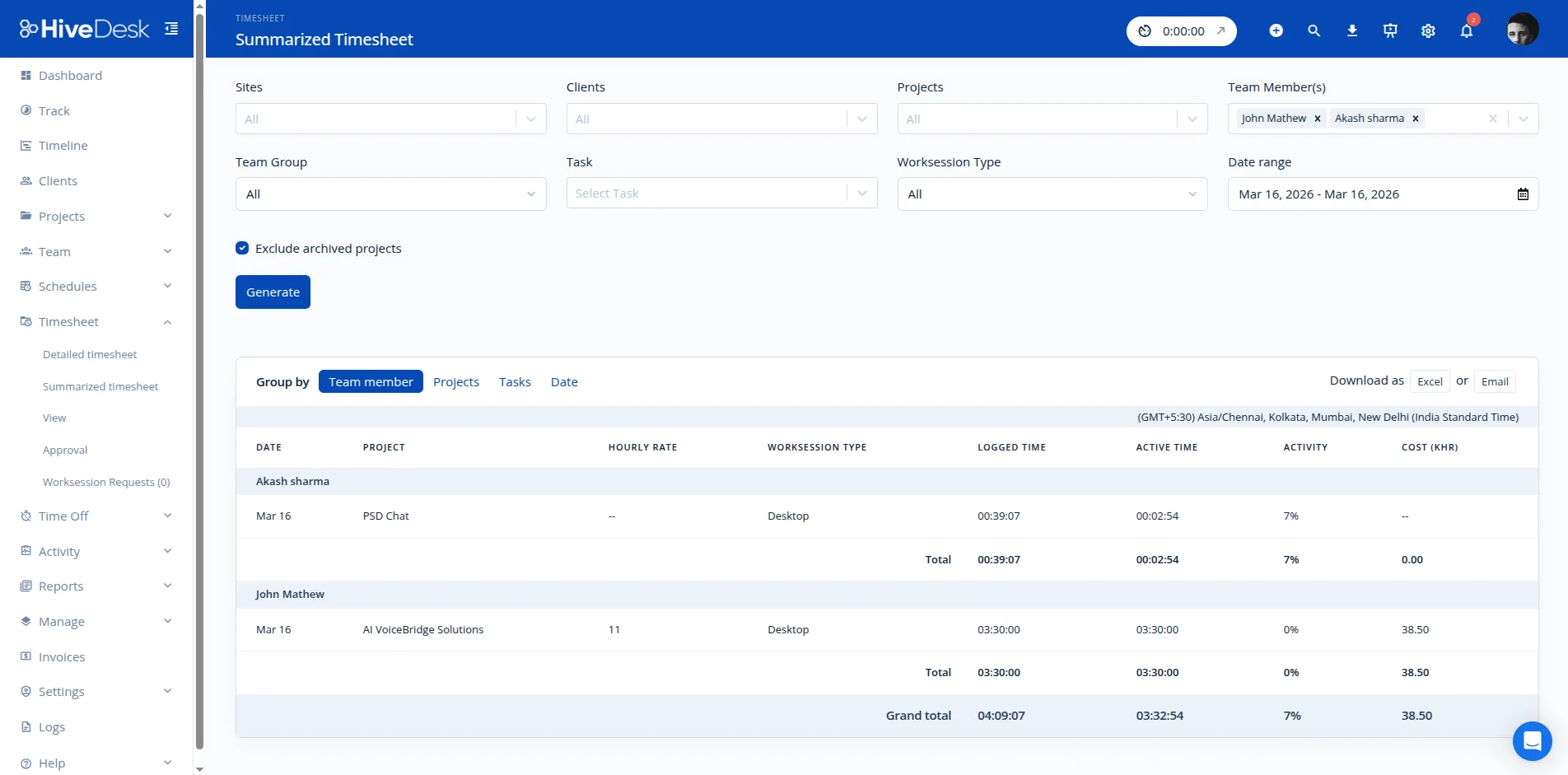
Timesheets generated from tracked hours with an approval workflow. Filter by client, project, or team member before export.
Screenshot Proof of Work
Periodic screenshots at configurable intervals serve as visual proof of work. Share with clients alongside timesheets.
Labor Cost Tracking
Add hourly rates to team members and projects. See the actual cost of each client project based on tracked hours.
Export Reports
Export time data as PDF or Excel for use with your invoicing or accounting tools. Filter by date range, client, or project.
Activity Monitoring
Keyboard and mouse activity levels during work sessions show whether billable hours are productive. Activity data backs up time reports.
Frequently Asked Questions
Common questions about using HiveDesk for client billing.
HiveDesk tracks time automatically by project, task, and client. This gives you accurate time data you can use to bill clients. Generate timesheets, export reports, and share screenshot reports as proof of work. HiveDesk does not generate invoices or process payments — it provides the accurate time tracking data your billing workflow needs.
Yes. Set up separate projects for billable and non-billable work. When team members switch between client work and internal work, they select the appropriate project. All time is tracked and organized for easy reporting.
Timesheets are generated automatically from tracked time. Managers review and approve timesheets before they are finalized. View timesheets by team member, project, or client, and export them as PDF or Excel for your invoicing or accounting tools.
HiveDesk takes periodic screenshots at configurable intervals during work sessions. These screenshots serve as visual proof of work that you can share with clients alongside timesheets. This transparency builds client trust and eliminates questions about billed hours.
Yes. Add hourly rates to team members and projects. HiveDesk calculates labor costs from tracked hours so you can see the actual cost of each client project and understand profitability.
Yes. Export time tracking data and reports as PDF or Excel. Filter by client, project, date range, or team member. Import the data into your preferred invoicing or accounting software.
HiveDesk integrates with Asana for project and task management. Track time against Asana tasks and projects to keep your project management and time tracking in sync. Timesheet data exports to Excel and PDF for use with any billing software.
HiveDesk is $5 per user per month with all features included in a single plan — time tracking, screenshots, scheduling, leave management, and reporting. Start with a 14-day free trial, no credit card required.
HiveDesk tracks time automatically when the app is running — there are no manual entries to forget. If someone does forget to start the timer, managers can see gaps in the timeline and address them. This is far more reliable than manual time entry.
Related Pages
Product Pages
Ready to Get Started?
Join teams worldwide who trust HiveDesk for workforce management, time tracking, and employee monitoring. $5/user/month, all features included.