

Time-Off Requests and Approvals — All in One Place
No more email chains for time-off requests. Employees submit requests, managers approve with one click, and leave data flows automatically into schedules, attendance, and payroll exports.
No credit card required · $5/user/month · All features included
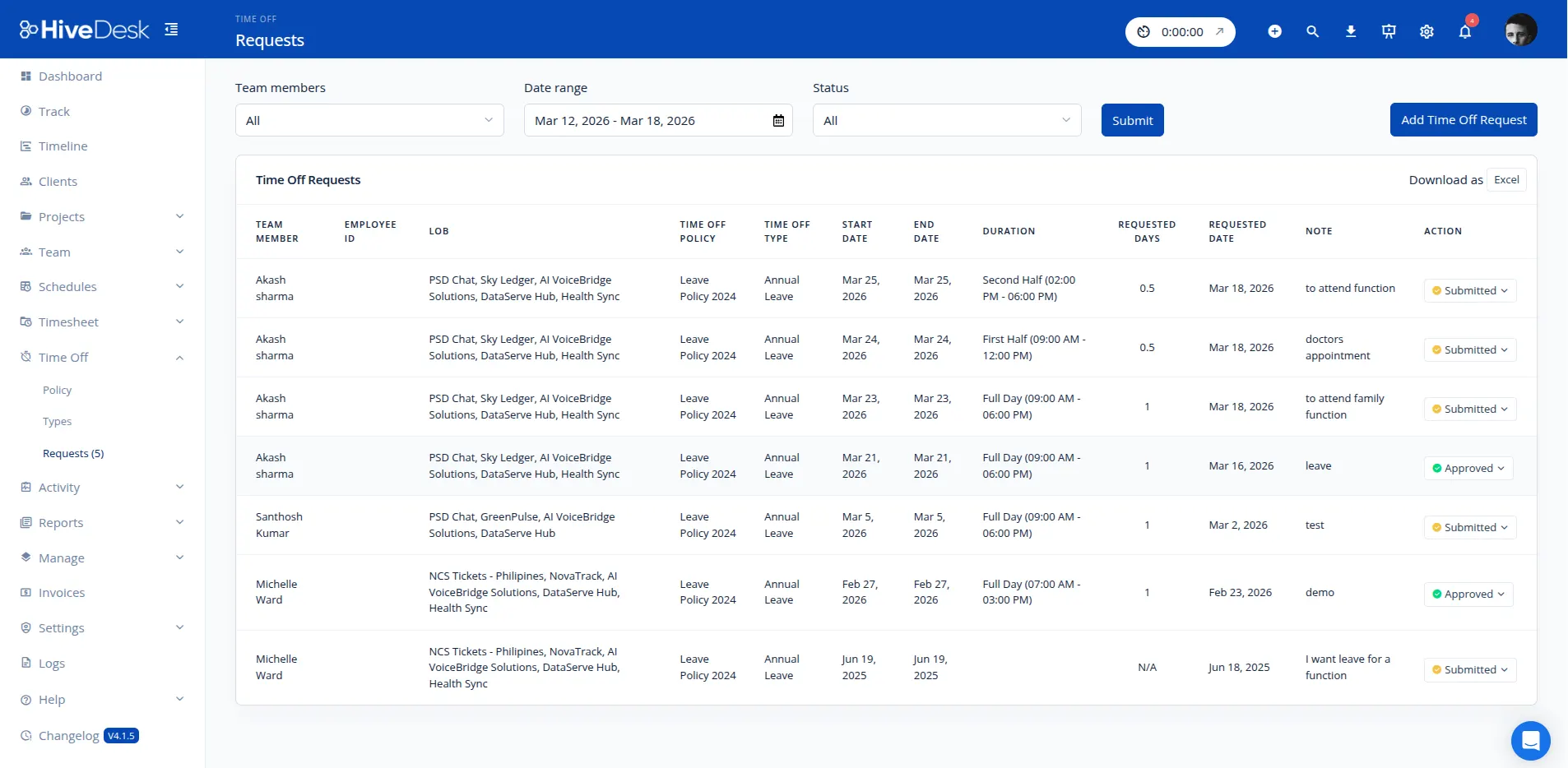
Disconnected Leave Tracking Creates Coverage Gaps and Payroll Errors
Leave management should connect to scheduling, attendance, and payroll — not live in a separate spreadsheet. If you are still writing the policy itself, start with what PTO is and how it works.
Without integrated leave management
- Time-off requests get lost in email threads or Slack messages
- Managers accidentally schedule people who have approved leave
- Nobody can see at a glance who is on leave for a given shift
- Payroll data does not match leave records, causing errors
With HiveDesk leave management
- Self-service requests with one-click approval — no emails needed
- Approved leave is reflected in schedules automatically
- Leave status shows per shift in Scheduled Activity
- Leave data exports alongside timesheets for accurate payroll
Leave Management That Connects to Everything
Requests, policies, schedules, attendance, and payroll — all in sync.
Self-Service Requests
Employees submit leave requests from the web dashboard. They see their request history and approval status — no need to email or message their manager.
Approval Workflow
Managers review requests from the dashboard with visibility into team availability. Approve or deny with one click, and the decision shows in the request status.
Leave Policies
Each time-off policy has a limit in days, such as 15 vacation days per year. Set up vacation, sick, personal, and any custom time-off types you need.
Schedule Integration
Approved leave is reflected in shift schedules. Managers see who is available before creating shifts, preventing the coverage gaps that come from scheduling someone who is off.
Attendance-Aware
Leave data flows into attendance reports. Planned absences are not flagged as no-shows. You get a clean, accurate picture of who is working, who is on leave, and who is unaccounted for.
Payroll-Ready Export
Leave data is included in timesheet exports. Reports cover leave type and dates alongside time tracking and overtime data for payroll processing.
How It Works
Simple leave management that integrates with your scheduling and time tracking.
Request Time Off
Employees submit leave requests from the web dashboard and view their request history in the same place.
Approve & Schedule
Managers review requests with team availability context. Approve with one click. Leave is reflected in shift schedules automatically.
Track & Export
Leave status shows per shift in Scheduled Activity. Leave data exports alongside timesheets for payroll. Attendance reports reflect planned absences.
Frequently Asked Questions
Common questions about leave management with HiveDesk.
Employees submit time-off requests in the HiveDesk web app. Managers receive the request and can approve or deny it. Approved time off is reflected in schedules, Scheduled Activity, and attendance reports.
You can configure time-off policies based on your organization needs, each with a time-off limit in days. Create custom time-off types such as vacation, sick leave, or personal days. Employees request time off against those policies and managers approve or deny each request. HiveDesk does not calculate accruals, so set the day limit to match your policy.
Approved leave is reflected in your shift schedules automatically. When managers create or adjust shifts, they can see who is on leave and available. This prevents scheduling someone who has approved time off.
Yes. Employees can view their request history and the status of pending requests in the HiveDesk web app. HiveDesk does not calculate remaining leave balances, so share each policy's day limit with your team.
Approved leave is factored into attendance tracking. Planned absences are not counted as missed shifts. Attendance reports show the full picture — who is on leave, who is working, and who is absent without notice.
Yes. When reviewing leave requests, managers can see all pending and approved leave for their team. This visibility helps prevent approving too many overlapping requests that would create coverage gaps.
Yes. Leave data is included in timesheet exports. Reports include leave type and dates alongside time tracking and overtime data — everything your payroll team needs in one export.
You can create holiday calendars with company holidays and days off for different offices or regions. Holidays are reflected in scheduling and leave tracking automatically.
HiveDesk integrates with Asana for project management. Leave and timesheet data can be exported as PDF or Excel for use with your existing payroll and HR tools.
Leave management is included in the HiveDesk plan at $5/user/month. There are no add-ons or extra charges. You get leave management, time tracking, scheduling, attendance, activity monitoring, and reporting — all included. Start with a 14-day free trial.
Related Pages
Vacation Tracker
Full product page for vacation and PTO tracking with detailed features and use cases.
Workforce Scheduling
Create shifts and schedules with leave data built in — never schedule someone who is off.
Attendance Management
Automatic attendance tracking that accounts for approved leave and planned absences.
Ready to Get Started?
Join teams worldwide who trust HiveDesk for workforce management, time tracking, and employee monitoring. $5/user/month, all features included.