

HiveDesk vs Clockify — Which Is the Better Clockify Alternative?
Clockify's free tier is generous, but once you need screenshots, scheduling, or workforce management, the price climbs fast. See how HiveDesk delivers the same capabilities at half the cost — with every feature included for $5/user/month.
No credit card required · 14-day free trial · All features included
Quick Verdict: HiveDesk vs Clockify
Choose HiveDesk if
You manage a remote or distributed team and need automatic time tracking, periodic screenshots, shift scheduling, leave management, and invoicing — all included for $5/user/month with no feature gating.
Choose Clockify if
You need a free tier for solo use or basic time logging, a wide library of third-party integrations, or enterprise features like single sign-on and on-premise deployment.
Pricing: The Real Cost of a Clockify Alternative
Clockify's free plan covers basic time tracking, but the features most teams actually need — screenshots, scheduling, labor cost tracking — are locked behind higher tiers. Here is what a 20-person team actually pays.
| HiveDesk | Clockify Standard | Clockify Pro | |
|---|---|---|---|
| Per user/month | $5 | $6.99 | $9.99 |
| 20-person team/month | $100 | $139.80 | $199.80 |
| Annual cost (20 people) | $1,200 | $1,677.60 | $2,397.60 |
| Screenshots | Included | Not included | Included |
| Shift scheduling | Included | Not included | Included |
| Labor cost tracking | Included | Not included | Included |
For a 20-person team that needs screenshots and scheduling, HiveDesk costs $100/month. Clockify Pro costs $199.80/month for the same capabilities — nearly double. Over a year, that is $1,197.60 in savings with HiveDesk.
The difference comes down to packaging. HiveDesk offers a single plan with every feature included. Clockify spreads features across four tiers (Free, Standard at $6.99, Pro at $9.99, Enterprise at $14.99), so the price depends on which features your team actually needs.
Full Feature Comparison Table
| HiveDesk ($5/user/mo) | Clockify | |
|---|---|---|
| Time tracking | Yes | Yes (all plans) |
| Automatic timesheets | Yes | Yes (all plans) |
| Break time tracking | Yes | Yes (all plans) |
| Billable hours tracking | Yes | Yes (all plans) |
| Attendance tracking | Yes | Yes (Standard+) |
| Holiday calendar | Yes | Yes (Standard+) |
| Leave policies | Yes | Yes (Standard+) |
| Time off tracking | Yes | Yes (Standard+) |
| Overtime tracking | Yes | Yes (Standard+) |
| Timesheet approval | Yes | Yes (Standard+) |
| Desktop, web, and mobile apps | Yes | Yes |
| Windows, Mac, and Linux | Yes | Yes |
| Automatic screenshots | Yes | Pro ($9.99/user/mo) |
| Adjustable screenshot frequency | Yes | No |
| Keyboard and mouse tracking | Yes | Yes (Pro) |
| App usage tracking | No | Yes (Pro) |
| Asana integration | Yes | Yes |
| 80+ third-party integrations | No | Yes |
| Task tracking | Yes | Yes |
| Time tracking per task | Yes | Yes |
| Labor cost tracking | Yes | Pro ($9.99/user/mo) |
| Access level management | Yes | Yes |
| Team management | Yes | Yes |
| Invoicing from timesheets | Yes | Yes (Standard+) |
| Shift scheduling | Yes | Pro ($9.99/user/mo) |
| Reporting | Yes | Yes |
Time Tracking
HiveDesk
HiveDesk runs automatic time tracking in the background. When an employee starts work, the desktop app begins recording hours, taking periodic screenshots, and measuring activity levels. There is no manual entry to forget or fudge. HiveDesk tracks billable time and break time separately, and works across the desktop client, web app, Chrome extension, and mobile app.
Clockify
Clockify offers flexible time tracking with manual timers, one-click start/stop, and timesheet-style entry. Its free tier covers up to 5 users and basic tracking (it was unlimited until April 2026), which suits very small teams that just need a simple clock. Kiosk mode for shared devices is available on paid plans.
Verdict: If your team works remotely and you need verified hours with screenshots, HiveDesk's automatic tracking is purpose-built for that. If your team prefers manual entry and you want a free starting point, Clockify's flexibility is hard to beat at $0.


Timesheets
HiveDesk
HiveDesk automatically generates timesheets from tracked time — no manual data entry required. Managers can review, approve, or reject timesheets before using them for payroll or client billing. Timesheets can be exported as PDF or Excel files.
Clockify
Clockify also provides timesheets with an approval workflow. Since Clockify relies on user-entered time, timesheets reflect what employees report rather than what the system captures. Clockify timesheets are available on Standard plans and above.
Verdict: Both tools handle timesheet management well. HiveDesk has an edge for teams that want timesheets generated from verified, automatically tracked time rather than self-reported entries.
Activity Monitoring: Where the Best Clockify Alternative Pulls Ahead
This is the section where the pricing gap matters most.
HiveDesk
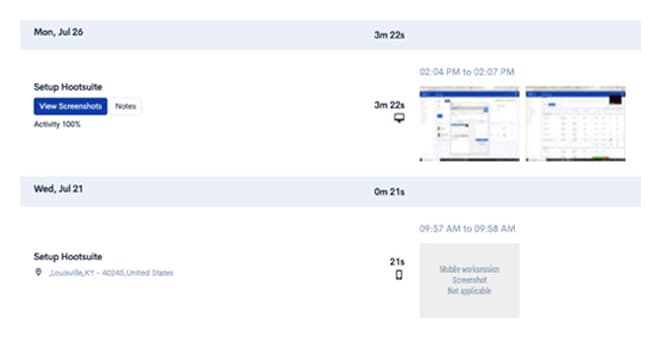
HiveDesk includes periodic screenshots, keyboard and mouse activity tracking, and activity level percentages — all in the $5/user/month plan. Managers can adjust screenshot frequency based on team needs. Screenshots are stored securely and accessible through the dashboard.
Clockify
Clockify offers screenshot capture and activity tracking, but only on the Pro plan at $9.99/user/month. The Standard plan ($6.99/user/month) does not include screenshots. Clockify also offers app usage tracking on the Pro plan, which HiveDesk does not provide.
Verdict: For teams that need activity monitoring with screenshots, HiveDesk delivers the same core capability at half the price. For a 20-person team, that is $100/month with HiveDesk versus $199.80/month with Clockify Pro. Clockify wins on app usage tracking if that is a priority for your team.
Project and Task Management
HiveDesk
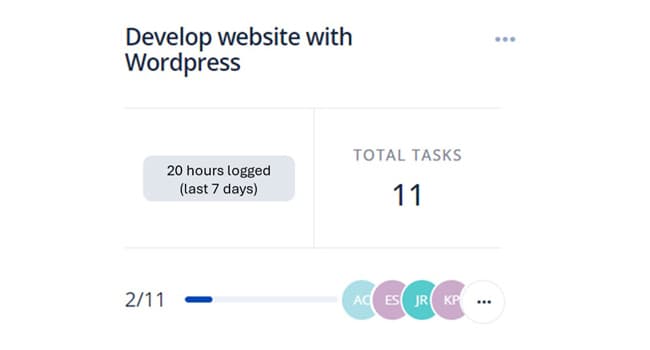
HiveDesk includes project and task management. Managers can create projects, add tasks, assign team members, and track time at the task level. HiveDesk integrates with Asana for teams that use it as their primary project management tool.
Clockify
Clockify organizes time entries by project and task with reporting on how time is distributed across activities. Clockify integrates with 80+ tools including Asana, Jira, Trello, and Monday.com, giving it a significant advantage for teams that rely on multiple platforms.
Verdict: For basic project and task tracking, both tools get the job done. Clockify has a clear advantage in integrations — if your team uses Jira, Trello, or other project tools, Clockify connects to far more platforms. HiveDesk integrates with Asana only.
Workforce Management
HiveDesk
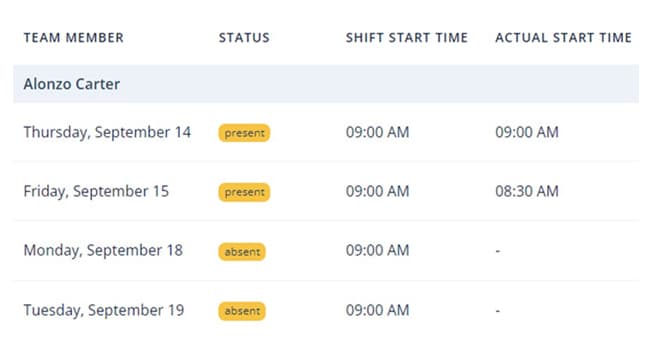
HiveDesk includes shift scheduling, attendance tracking, leave management, holiday calendars, and overtime tracking — all in the $5/user/month plan. This makes HiveDesk a workforce management platform, not just a time tracker. For contact centers and BPOs that need to manage schedules alongside time tracking, everything is in one place.
Clockify
Clockify offers attendance tracking and time off management in its Standard plan ($6.99/user/month). However, shift scheduling requires the Pro plan at $9.99/user/month. Workforce management features are spread across tiers rather than bundled together.
Verdict: HiveDesk is the stronger Clockify alternative for workforce management. Every scheduling and attendance feature is included at $5/user/month. Getting the same from Clockify requires the $9.99/user/month Pro plan, which costs nearly double.
Invoicing
HiveDesk
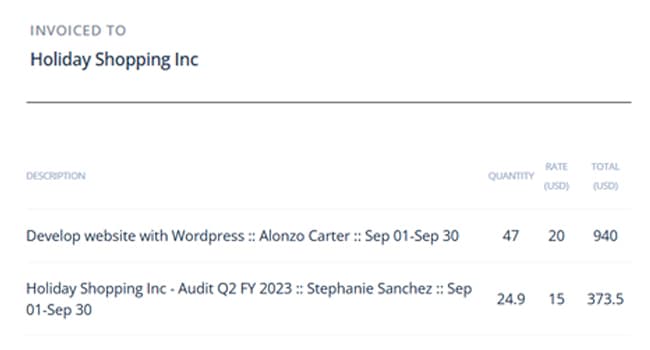
HiveDesk has built-in invoicing that generates invoices directly from timesheet data. Managers can create invoices for clients based on tracked billable hours, simplifying the billing workflow.
Clockify
Clockify also offers invoicing from tracked hours with support for multiple currencies and customizable invoice templates. Invoicing is available on the Standard plan and above.
Verdict: Both tools provide solid invoicing from tracked time. Clockify offers more customization options and multi-currency support. For straightforward time-to-invoice workflows, both get the job done.
Employee Shift Scheduling
HiveDesk
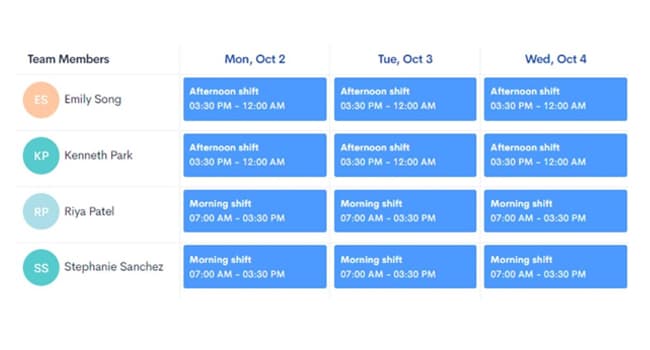
HiveDesk includes shift scheduling that allows managers to create, assign, and manage employee shifts. This is built for contact centers, BPOs, and any team with rotating or staggered schedules. Scheduling is included in the $5/user/month plan.
Clockify
Clockify offers shift scheduling in its Pro plan at $9.99/user/month. The feature is not available on the Free or Standard plans.
Verdict: If shift scheduling is a must-have, HiveDesk saves your team real money. For a 20-person team, you get scheduling for $100/month with HiveDesk versus $199.80/month with Clockify Pro.
When to Choose HiveDesk
HiveDesk is the better Clockify alternative for teams that need more than basic time tracking:
- You manage a remote or distributed team and need automatic time tracking with screenshots to verify work — included at $5/user/month, not $9.99.
- You run a contact center, BPO, or agency that needs shift scheduling, attendance tracking, and leave management bundled with time tracking.
- You want predictable pricing with every feature included in a single plan — no surprises when you need screenshots or scheduling down the road.
- You want to keep costs low — for a 20-person team, HiveDesk costs $100/month versus $199.80/month for comparable Clockify Pro features.
When to Choose Clockify
Clockify is the better choice in specific situations:
- You need a free tier for solo freelancers or a small team that only needs basic time tracking.
- You rely on many third-party tools and need integrations with Jira, Trello, Slack, Monday.com, and other platforms. Clockify connects to 80+ tools; HiveDesk integrates with Asana only.
- You need enterprise features like single sign-on (SSO), on-premise deployment, or audit logs — available on Clockify's Enterprise plan.
- You want app usage tracking to see which applications your team uses during work hours.
Conclusion
Clockify is a strong time tracking tool with a generous free tier and extensive integrations. For basic time logging, it is hard to argue with free.
But for teams that need automatic time tracking, activity monitoring with screenshots, shift scheduling, and workforce management, Clockify's price climbs to $9.99/user/month — nearly double what HiveDesk charges for the same features at $5/user/month.
If you manage a remote team, run a contact center, or need workforce management alongside time tracking, HiveDesk gives you everything in one plan at a price that stays predictable as your team grows. Try it free for 14 days — no credit card required.
Start Free 14-Day Trial →Frequently Asked Questions
Common questions about HiveDesk vs Clockify.
It depends on what your team needs. HiveDesk is better for teams that need automatic time tracking with screenshots, shift scheduling, attendance management, and leave tracking — all included for $5/user/month. Clockify is better for solo users who need a free tier, teams that rely on 80+ third-party integrations, or enterprises that need SSO and on-premise deployment.
Clockify has a free plan for basic time tracking. Paid plans start at $6.99/user/month (Standard) for attendance and timesheet approval, $9.99/user/month (Pro) for screenshots, scheduling, and labor cost tracking, and $14.99/user/month (Enterprise) for SSO and audit logs. For a 20-person team needing screenshots and scheduling, Clockify Pro costs $199.80/month.
HiveDesk is one of the most affordable Clockify alternatives at $5/user/month with every feature included — time tracking, screenshots, shift scheduling, attendance, leave management, and reporting. There are no tiers or feature gating. For a 20-person team, HiveDesk costs $100/month compared to $199.80/month for Clockify Pro with similar features.
HiveDesk does not have a permanent free plan, but it offers a 14-day free trial with full access to every feature — no credit card required. Unlike Clockify, which locks screenshots, scheduling, and labor cost tracking behind paid tiers, HiveDesk includes everything in its single $5/user/month plan.
Yes. HiveDesk is built specifically for remote and distributed teams. It includes automatic time tracking, periodic screenshots for activity verification, shift scheduling, attendance tracking, leave management, and real-time dashboards — all features that Clockify either lacks or charges extra for on higher-tier plans.
Yes. HiveDesk takes periodic screenshots to verify employee activity, and this feature is included in the $5/user/month plan. With Clockify, screenshot capture requires the Pro plan at $9.99/user/month. HiveDesk also lets managers adjust screenshot frequency, which Clockify does not offer.
HiveDesk integrates with Asana for project and task management — you can track time directly inside Asana tasks. Timesheet data exports to Excel and PDF for use with any payroll or accounting software. Clockify has an advantage here with 80+ integrations including Jira, Trello, Slack, and Monday.com.
For a 20-person team needing screenshots and scheduling: HiveDesk costs $100/month ($5/user). Clockify Pro costs $199.80/month ($9.99/user). That is $1,197.60 in annual savings with HiveDesk. Even Clockify Standard at $6.99/user costs $139.80/month but does not include screenshots or scheduling.
Yes. HiveDesk includes shift scheduling in the $5/user/month plan. Managers can create, assign, and manage employee shifts — ideal for contact centers, BPOs, and teams with rotating schedules. With Clockify, shift scheduling requires the Pro plan at $9.99/user/month.
Yes. HiveDesk offers a 14-day free trial with full access to every feature. No credit card required. You can run HiveDesk alongside Clockify to compare the experience before making a decision.
Want to explore more options? See our full list of 7 best Clockify alternatives for 2026.
Ready to Get Started?
Join teams worldwide who trust HiveDesk for workforce management, time tracking, and employee monitoring. $5/user/month, all features included.