

HiveDesk vs Connecteam — Detailed Feature and Pricing Comparison
Connecteam is built for deskless teams with communication tools, forms, and training modules. HiveDesk is built for remote and hybrid desk-based teams with screenshots, activity monitoring, and workforce management. Both track time and schedule shifts — but they serve different use cases. Here is how they compare.
No credit card required · 14-day free trial · All features included
Quick Verdict
HiveDesk is the better choice for remote monitoring
If your team works remotely from desktops or laptops and you need screenshots, activity monitoring, project time tracking, and invoicing. You get everything for $5/user/month — including features Connecteam does not offer at any price.
Connecteam is the better fit for deskless teams
If your workforce is in the field, on job sites, or in retail/hospitality and you need team chat, digital forms, training modules, and mobile-first scheduling. Connecteam excels at communication and operations for non-desk workers.
Pricing Breakdown: What Does a 25-Person Team Actually Cost?
Connecteam's per-user cost looks low because each paid plan covers the first 30 users in a flat fee. But it lacks screenshots, activity monitoring, and invoicing at every tier. HiveDesk charges $5/user/month and includes all features.
| Plan | Per User/Month | 25-Person Team/Month | 25-Person Team/Year |
|---|---|---|---|
| HiveDesk (all features) | $5 | $125 | $1,500 |
| Connecteam Free (up to 10 users only) | $0 | N/A (10-user limit) | N/A |
| Connecteam Basic (first 30 users) | $0.97* | $29 | $348 |
| Connecteam Advanced (first 30 users) | $1.63* | $49 | $588 |
| Connecteam Expert (first 30 users) | $3.30* | $99 | $1,188 |
*Connecteam per-user cost calculated by dividing the flat monthly fee by 25 users. Actual per-user cost varies by team size.
Connecteam can be cheaper per user for teams under 30 — but it does not include screenshots, activity monitoring, or invoicing at any price. HiveDesk includes all of those for $5/user/month.
Feature-by-Feature Comparison
HiveDesk and Connecteam serve different team types. This table shows where each tool leads and where it falls short.
| Feature | HiveDesk ($5/user) | Connecteam |
|---|---|---|
| Time tracking | Yes | Yes (time clock) |
| Automatic timesheets | Yes | Yes |
| Automatic screenshots | Yes | No |
| Activity monitoring | Yes | No |
| Keyboard & mouse activity tracking | Yes | No |
| Shift scheduling | Yes | Yes |
| Attendance tracking | Yes | Yes |
| Leave management | Yes | Yes (Advanced plan+) |
| Break time tracking | Yes | Yes |
| Overtime tracking | Yes | Yes (Advanced plan+) |
| Timesheet approval | Yes | Yes |
| GPS location tracking | iOS mobile app only | Yes (iOS and Android) |
| Geofencing | No | Yes |
| Desktop apps (Windows, Mac, Linux) | Yes | No (mobile-first) |
| Mobile apps | Yes (iOS) | Yes (iOS, Android) |
| Chrome extension | Yes | No |
| Team chat and messaging | No | Yes |
| Company news feed / updates | No | Yes |
| Surveys and polls | No | Yes |
| Digital forms and checklists | No | Yes |
| Training and onboarding modules | No | Yes |
| Task management | Yes | Yes |
| Project time tracking | Yes | No |
| Built-in invoicing | Yes | No |
| Asana integration | Yes | No |
| Reporting and dashboards | Yes | Yes |
Time Tracking and Activity Monitoring
HiveDesk
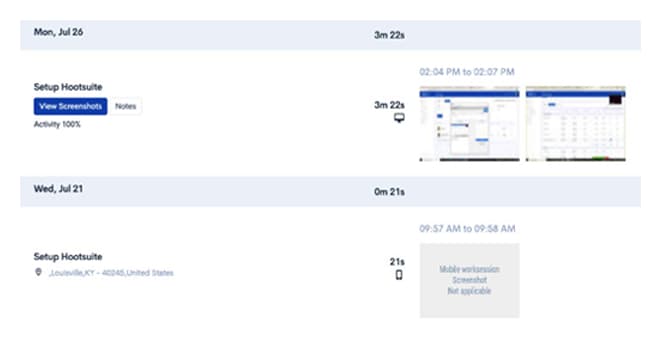
Automatic time tracking with periodic screenshots, keyboard/mouse activity tracking, and activity level percentages. Employees track time using desktop apps (Windows, Mac, Linux), web app, Chrome extension, or iOS mobile app. Break time tracking and manual time entry are included.
Connecteam
Time clock app with GPS tracking and geofencing for field workers. Employees clock in and out from their mobile devices. Connecteam does not capture screenshots, track activity levels, or monitor desktop activity in any way.
Verdict: HiveDesk wins on monitoring depth. If you need to verify that remote employees are productive during tracked time, HiveDesk provides screenshots and activity data. Connecteam simply records clock-in/clock-out times.

Employee Scheduling
HiveDesk
Shift scheduling that lets managers create, assign, and manage employee shifts. Useful for contact centers and remote teams with rotating schedules across time zones. Included at $5/user/month.
Connecteam
Scheduling is a core strength of Connecteam. It offers drag-and-drop shift scheduling, recurring shifts, open shifts employees can claim, shift swapping, and availability management. Scheduling is available on all paid plans.
Verdict: Connecteam has more advanced scheduling features, particularly for deskless teams. HiveDesk covers the scheduling basics that remote desk-based teams need, bundled with monitoring at a single price.
Team Communication
HiveDesk
HiveDesk does not include built-in communication tools. Teams using HiveDesk rely on separate tools like Slack, Microsoft Teams, or email for team communication.
Connecteam
Built-in team chat, company news feed, surveys, polls, and update channels. Connecteam is designed to be the single app for deskless workers, replacing multiple communication tools.
Verdict: Connecteam wins here. If your team needs built-in communication — especially for field workers without access to desktop tools — Connecteam has a clear advantage. HiveDesk does not compete in this category.
Project Tracking and Invoicing
HiveDesk
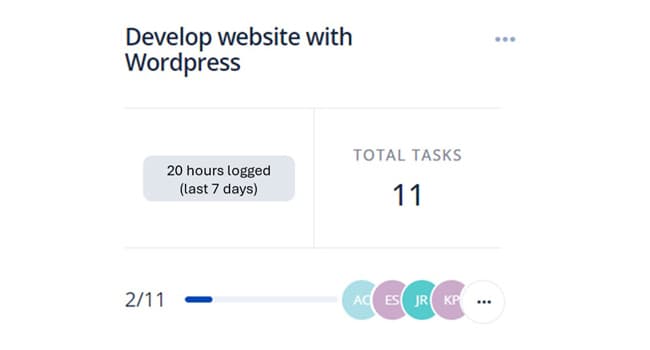
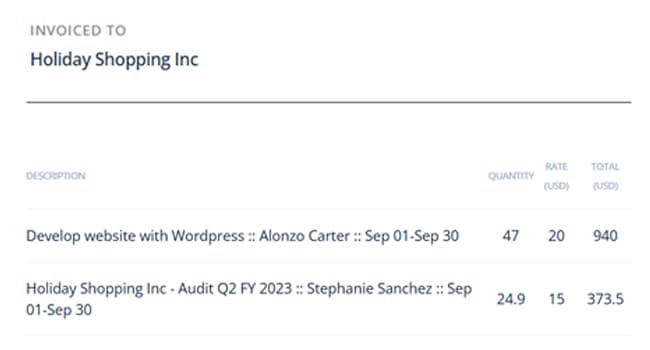
Includes project and task management with time tracking at the task level. Built-in invoicing generates invoices directly from timesheet data. HiveDesk integrates with Asana for teams that need a dedicated project management tool.
Connecteam
Offers task management with checklists and digital forms, but does not track time at the project level and does not include invoicing.
Verdict: HiveDesk wins for project-based teams. If you bill clients by the hour or need to track time per project, HiveDesk handles it end-to-end from time tracking to invoice. Connecteam is not designed for this workflow.
When to Choose Each Tool
When to Choose Connecteam
Connecteam is the stronger choice if your team needs:
- Deskless team management — Connecteam is purpose-built for field workers, retail staff, construction crews, and other non-desk employees who work primarily from mobile devices.
- Built-in communication — Team chat, news feeds, surveys, and updates replace the need for separate communication tools. HiveDesk does not offer any of these.
- Training and onboarding — Create training courses, quizzes, and onboarding workflows directly in the platform. HiveDesk does not have training features.
- Digital forms and checklists — Standardize processes with customizable forms and checklists for field operations. HiveDesk does not offer forms.
If your workforce is primarily mobile and non-desk-based, Connecteam is the better platform.
When to Choose HiveDesk
HiveDesk is the stronger choice if your team needs:
- Remote employee monitoring — Screenshots and activity tracking verify productivity during work hours. Connecteam does not offer monitoring at any price.
- Desktop time tracking — Apps for Windows, Mac, Linux, and Chrome extension. Connecteam is mobile-first with no desktop apps.
- Project time tracking and invoicing — Track time per project and generate invoices from timesheets. Connecteam does not support project-level tracking or invoicing.
- Simple, predictable pricing — One plan, one price, all features for $5/user/month. No evaluating multiple plan tiers or feature modules.
HiveDesk is built for contact centers, BPOs, agencies, and remote teams that need monitoring and workforce management at a straightforward price.
The Bottom Line
HiveDesk and Connecteam are designed for different types of teams. They overlap on time tracking and scheduling, but diverge on monitoring versus communication.
Connecteam excels at managing deskless workforces with built-in chat, forms, training, and mobile-first scheduling. But it has no screenshots, no activity monitoring, and no desktop apps.
HiveDesk delivers time tracking with screenshots, activity monitoring, shift scheduling, workforce management, and invoicing for $5/user/month. For remote desk-based teams that need accountability and workforce management, HiveDesk is the more focused choice.
Frequently Asked Questions
Common questions about HiveDesk vs Connecteam.
It depends on your team type. HiveDesk is better for remote and hybrid teams that need time tracking with screenshots, activity monitoring, and workforce management for $5/user/month. Connecteam is better for deskless and field teams that need communication tools, digital forms, training modules, and task management from a mobile-first platform.
Connecteam offers a free plan for up to 10 users. Paid Operations plans cover the first 30 users and, as of September 2026, cost $29 a month on annual billing or $35 monthly (Basic), $49 or $59 (Advanced), and $99 or $119 (Expert), with each additional user from $0.80 to $5.00 a month depending on the plan and billing term. HiveDesk charges a flat $5/user/month for all features with no user minimums or caps.
HiveDesk is one of the most affordable Connecteam alternatives at $5/user/month for all features. For small teams under 30 users, Connecteam's Basic plan at $29/month can be cheaper per user, but it lacks screenshots and activity monitoring. HiveDesk includes monitoring features that Connecteam does not advertise on any plan.
Connecteam does not advertise screenshots, activity monitoring, or screen recording on its pricing or feature pages. It is designed for deskless teams and focuses on communication, scheduling, and task management rather than monitoring. If you need activity monitoring for remote employees, HiveDesk includes screenshots and activity tracking at $5/user/month.
No. HiveDesk does not include built-in chat, news feeds, surveys, or team messaging. HiveDesk focuses on time tracking, activity monitoring, scheduling, and workforce management. If built-in team communication is essential, Connecteam has the advantage here.
Yes, and HiveDesk goes further on time tracking by adding automatic screenshots and activity monitoring — features Connecteam does not advertise. HiveDesk also includes timesheet approval, invoicing, and project time tracking. However, HiveDesk cannot replace Connecteam's communication tools, digital forms, or training features.
Connecteam is designed primarily for deskless and field teams — think retail, construction, cleaning, and logistics. While it has a time clock and scheduling, it does not advertise the monitoring and accountability features that remote desk-based teams typically need. HiveDesk is purpose-built for remote and hybrid teams with screenshots, activity tracking, and desktop apps.
Yes. HiveDesk has an iOS mobile app with GPS location tracking. HiveDesk also has desktop apps for Windows, Mac, and Linux, plus a Chrome extension and web app. Connecteam is mobile-first and supports both iOS and Android.
HiveDesk is the better fit for contact centers. It includes time tracking with screenshots, activity monitoring, shift scheduling, attendance tracking, and timesheet approval — all features contact centers need to manage remote agents. Connecteam lacks monitoring capabilities and is designed more for field-based deskless workers.
Want to explore more options? See our full list of 7 best Connecteam alternatives for 2026.
Ready to Get Started?
Join teams worldwide who trust HiveDesk for workforce management, time tracking, and employee monitoring. $5/user/month, all features included.