

HiveDesk vs Deputy — Detailed Feature and Pricing Comparison
Deputy is built for hourly and shift-based teams with auto-scheduling, demand forecasting, and POS integrations. HiveDesk is built for remote teams with screenshots, activity monitoring, and project tracking. Both handle scheduling and attendance — but they serve different workforces. Here is how they compare.
No credit card required · 14-day free trial · All features included
Quick Verdict
HiveDesk is the better choice for remote monitoring
If your team works remotely and you need screenshots, activity monitoring, project time tracking, and invoicing alongside scheduling. You get everything for $5/user/month — including monitoring features Deputy does not offer.
Deputy is the better fit for hourly shift teams
If your workforce is hourly and on-site — retail, hospitality, healthcare — and you need auto-scheduling, demand forecasting, POS integrations, and compliance alerts. Deputy is purpose-built for optimizing shift-based labor.
Pricing Breakdown: What Does a 25-Person Team Actually Cost?
Deputy Premium costs $6/user/month for scheduling plus time and attendance. HiveDesk costs $5/user/month and adds screenshots, activity monitoring, project tracking, and invoicing that Deputy does not include.
| Plan | Per User/Month | 25-Person Team/Month | 25-Person Team/Year |
|---|---|---|---|
| HiveDesk (all features) | $5 | $125 | $1,500 |
| Deputy Premium (scheduling + time & attendance) | $6 | $150 | $1,800 |
| Deputy Enterprise | Custom | Custom | Custom |
HiveDesk saves you $300/year compared to Deputy Premium for a 25-person team — and includes screenshots, activity monitoring, project tracking, and invoicing that Deputy does not offer.
Feature-by-Feature Comparison
HiveDesk ($5/user/month) compared to Deputy Premium ($6/user/month). Each tool leads in different areas depending on your team type.
| Feature | HiveDesk ($5/user) | Deputy |
|---|---|---|
| Time tracking | Yes | Yes |
| Automatic timesheets | Yes | Yes |
| Automatic screenshots | Yes | No |
| Activity monitoring | Yes | No |
| Keyboard & mouse activity tracking | Yes | No |
| Shift scheduling | Yes | Yes |
| Auto-scheduling (AI-powered) | No | Yes |
| Demand forecasting | No | Yes |
| Shift swapping | No | Yes |
| Attendance tracking | Yes | Yes |
| Leave management | Yes | Yes |
| Break time tracking | Yes | Yes |
| Break planning and compliance alerts | No | Yes |
| Overtime tracking | Yes | Yes |
| Fatigue management | No | Yes |
| Holiday calendar | Yes | Yes |
| Timesheet approval | Yes | Yes |
| Desktop apps (Windows, Mac, Linux) | Yes | No |
| Mobile apps | Yes (iOS) | Yes (iOS, Android) |
| Chrome extension | Yes | No |
| Web app | Yes | Yes |
| GPS location tracking | iOS mobile app only | Yes (iOS and Android) |
| Geofencing | No | Yes |
| POS integrations | No | Yes |
| Payroll integrations | No | Yes |
| Asana integration | Yes | No |
| Project time tracking | Yes | No |
| Task management | Yes | Yes (basic) |
| Built-in invoicing | Yes | No |
| Reporting | Yes | Yes |
Time Tracking and Activity Monitoring
HiveDesk
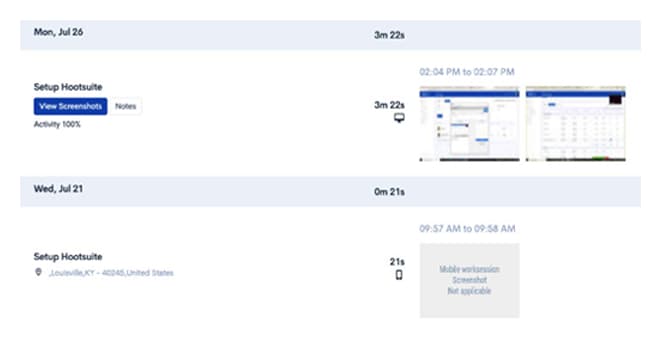
Automatic time tracking with periodic screenshots, keyboard/mouse activity tracking, and activity level percentages. Desktop apps for Windows, Mac, and Linux, plus a Chrome extension and iOS mobile app. Break time tracking and manual time entry included.
Deputy
Time clock with GPS tracking and geofencing for on-site workers. Employees clock in from mobile devices or kiosk mode. Deputy does not capture screenshots or track desktop activity — it is designed for shift-based clock-in/clock-out, not remote monitoring.
Verdict: HiveDesk wins for remote teams. If you need to verify what employees do during tracked hours, HiveDesk provides screenshots and activity data. Deputy records when people arrive and leave but does not monitor desktop activity.

Shift Scheduling
HiveDesk
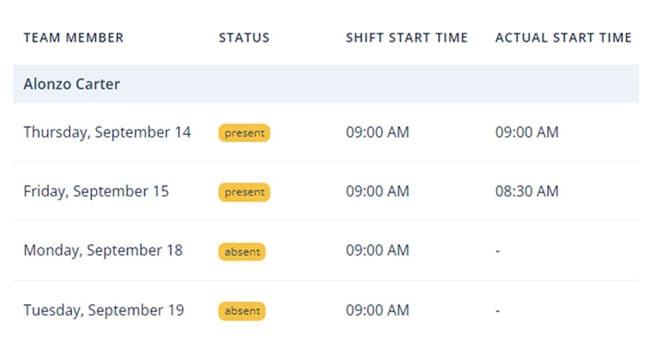
Shift scheduling that lets managers create, assign, and manage employee shifts. Suited for contact centers and remote teams with rotating schedules across time zones. Included at $5/user/month.
Deputy
Scheduling is Deputy's core strength. It offers AI-powered auto-scheduling that generates optimized schedules based on demand, employee availability, skills, and labor costs. Shift swapping, open shifts, break planning, and fatigue management are all included.
Verdict: Deputy wins decisively on scheduling. Its auto-scheduling, demand forecasting, and compliance features are significantly more advanced. If optimizing shift labor is your primary challenge, Deputy is the specialist tool.
Workforce Management and Compliance
HiveDesk
Shift scheduling, attendance tracking, leave management, holiday calendars, overtime tracking, and labor cost tracking — all included at $5/user/month. Built-in invoicing generates invoices from timesheet data.
Deputy
Scheduling, attendance, leave management, break planning, overtime alerts, and fatigue management. Deputy adds compliance-focused features like automated break reminders and labor law alerts. However, Deputy does not include invoicing or project time tracking.
Verdict: Both cover core workforce management well. Deputy leads on compliance automation. HiveDesk leads on invoicing and project tracking. Choose based on whether labor compliance or client billing is more important to your operations.
Project Tracking and Invoicing
HiveDesk
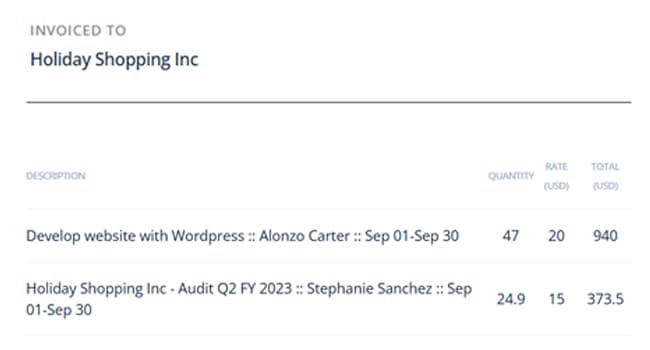
Includes project and task management with time tracking at the task level. Built-in invoicing generates invoices directly from timesheet data. HiveDesk integrates with Asana for teams that need a dedicated project management tool.
Deputy
Does not include project time tracking or invoicing. Deputy is focused on shift scheduling and attendance, not project-based work or client billing.
Verdict: HiveDesk wins for project-based teams. If you bill clients by the hour or track time across projects, HiveDesk handles the full workflow. Deputy is not designed for this use case.
When to Choose Each Tool
When to Choose Deputy
Deputy is the stronger choice if your team needs:
- AI-powered auto-scheduling — Deputy automatically generates optimized schedules based on demand, availability, skills, and labor costs. HiveDesk does not offer auto-scheduling.
- Demand forecasting — Predict staffing needs based on historical patterns and external data. HiveDesk does not include forecasting.
- POS and payroll integrations — Deputy connects with major POS systems, payroll providers, and HR platforms. HiveDesk integrates with Asana only.
- Compliance automation — Break planning alerts, overtime warnings, and fatigue management help maintain labor law compliance. HiveDesk tracks overtime but lacks automated compliance alerts.
If you manage hourly shift-based workers in retail, hospitality, or healthcare, Deputy is the more specialized platform.
When to Choose HiveDesk
HiveDesk is the stronger choice if your team needs:
- Remote employee monitoring — Screenshots and activity tracking verify productivity during work hours. Deputy does not offer monitoring at any price.
- Desktop-based time tracking — Apps for Windows, Mac, Linux, and Chrome extension for teams that work from computers. Deputy is focused on mobile time clocks.
- Project time tracking and invoicing — Track time per project and generate invoices from timesheets. Deputy does not support project-level tracking or invoicing.
- Lower cost with more features — $5/user/month includes monitoring, scheduling, workforce management, and invoicing. Deputy costs $6/user/month without monitoring or invoicing.
HiveDesk is built for contact centers, BPOs, agencies, and remote teams that need monitoring and workforce management at a straightforward price.
The Bottom Line
HiveDesk and Deputy are built for different types of workforces. Deputy is an advanced scheduling platform for hourly, on-site teams. HiveDesk is a workforce management tool for remote and hybrid desk-based teams.
Deputy excels at auto-scheduling, demand forecasting, compliance automation, and POS integrations. But it has no screenshots, no activity monitoring, no project tracking, and no invoicing.
HiveDesk delivers time tracking with screenshots, activity monitoring, shift scheduling, workforce management, and invoicing for $5/user/month. For remote teams that need accountability alongside scheduling, HiveDesk is the more complete and affordable choice.
Frequently Asked Questions
Common questions about HiveDesk vs Deputy.
It depends on your team type. HiveDesk is better for remote teams that need time tracking with screenshots, activity monitoring, and project tracking for $5/user/month. Deputy is better for shift-based hourly teams in retail, hospitality, or healthcare that need auto-scheduling, demand forecasting, POS integrations, and compliance alerts.
Deputy Premium costs $6/user/month and includes scheduling plus time and attendance. Enterprise pricing is custom. HiveDesk charges $5/user/month for all features including screenshots, activity monitoring, scheduling, attendance, leave management, and invoicing.
HiveDesk at $5/user/month is a cost-effective Deputy alternative that includes features Deputy does not offer — screenshots, activity monitoring, project time tracking, and invoicing. For a 25-person team, HiveDesk saves $300/year compared to Deputy Premium while providing monitoring capabilities.
No. Deputy does not offer screenshots, activity monitoring, or any form of screen monitoring. Deputy is designed for scheduling and time-and-attendance for hourly workers, not for monitoring remote desktop employees. If you need activity monitoring, HiveDesk includes it at $5/user/month.
No. HiveDesk does not offer AI-powered auto-scheduling or demand-based forecasting. Deputy has a significant advantage here — it can automatically generate optimized schedules based on demand, employee availability, skills, and labor costs. If auto-scheduling is critical, Deputy is the better choice.
For remote teams, yes. HiveDesk includes shift scheduling, attendance tracking, leave management, overtime tracking, and timesheet approval — plus screenshots, monitoring, and invoicing that Deputy lacks. However, for hourly teams needing auto-scheduling, demand forecasting, or POS integrations, Deputy is the more specialized tool.
Yes. Deputy integrates with major POS systems, payroll providers, and HR tools. HiveDesk integrates with Asana for project management. If your team needs POS or payroll integrations, Deputy has more options in those categories.
HiveDesk is the better fit for contact centers. It includes time tracking with screenshots, activity monitoring, shift scheduling, attendance tracking, and timesheet approval — all features contact centers need to manage remote agents. Deputy is designed for retail, hospitality, and healthcare shift workers, not remote desk-based teams.
Yes. Deputy includes compliance features like break planning alerts, overtime warnings, and fatigue management to help businesses comply with labor laws. HiveDesk tracks overtime and breaks but does not have automated compliance alerts or demand-based scheduling.
For a 25-person team, HiveDesk costs $125/month ($1,500/year) versus Deputy Premium at $150/month ($1,800/year). That is $300/year in savings, plus you gain screenshots, activity monitoring, project tracking, and invoicing — features Deputy does not include.
Want to explore more options? See our full list of 7 best Deputy alternatives for 2026.
Ready to Get Started?
Join teams worldwide who trust HiveDesk for workforce management, time tracking, and employee monitoring. $5/user/month, all features included.