

HiveDesk vs DeskTime: Feature and Pricing Comparison
DeskTime tracks time automatically and scores productivity by categorizing the apps and websites your team uses. HiveDesk bundles screenshots, scheduling, attendance, leave, timesheet approval, and invoicing into one $5/user/month plan. The deciding question is whether you are buying productivity analytics or workforce management.
No credit card required · 14-day free trial · All features included
Quick Verdict
HiveDesk is the better value for managing a team
Screenshots, shift scheduling, attendance, leave management, timesheet approval, and invoicing all arrive in one plan at $5/user/month. On DeskTime, screenshots and scheduling both sit behind Premium at $10/user/month, and timesheet approval and invoicing are not part of the product at all.
DeskTime is the better fit for productivity analytics
Tracking starts with the computer, with no timer for anyone to forget. Apps and websites are classified as productive or unproductive and rolled into a productivity score. HiveDesk does neither, and DeskTime connects to Jira, Trello, GitLab, and Zapier where HiveDesk offers only Asana.
Pricing Breakdown: What Does a 25-Person Team Actually Cost?
DeskTime splits its product across three tiers. Pro at $7/user/month covers automatic tracking and project time, but screenshots, app and URL tracking, shift scheduling, and the absence calendar all require Premium at $10/user/month. Most teams evaluating DeskTime against HiveDesk are really comparing Premium, because that is the tier that monitors and schedules.
| Plan | Per User/Month | 25-Person Team/Month | 25-Person Team/Year |
|---|---|---|---|
| HiveDesk (all features, one plan) | $5 | $125 | $1,500 |
| DeskTime Pro (annual billing) | $6.42 | $160.50 | $1,926 |
| DeskTime Pro (monthly billing) | $7 | $175 | $2,100 |
| DeskTime Premium (annual billing) | $9.17 | $229.25 | $2,751 |
| DeskTime Premium (monthly billing) | $10 | $250 | $3,000 |
| DeskTime Enterprise (200+ users) | Custom | Custom | Custom |
HiveDesk saves a 25-person team $1,500 a year against DeskTime Premium billed monthly, and still includes timesheet approval and invoicing that DeskTime does not advertise.
DeskTime pricing verified against desktime.com in September 2026. Prices exclude VAT and annual billing is discounted.
Feature-by-Feature Comparison
HiveDesk at $5/user/month compared against DeskTime, with the plan noted wherever a DeskTime feature requires an upgrade.
| Feature | HiveDesk ($5/user) | DeskTime |
|---|---|---|
| Time tracking | Yes | Yes |
| Fully automatic tracking (no timer to start) | No | Yes |
| Automatic timesheets | Yes | Yes |
| Timesheet approval workflow | Yes | Not advertised |
| Periodic screenshots | Yes (included) | Premium ($10/user) |
| Keyboard and mouse activity levels | Yes | Yes |
| App and URL tracking | No | Premium ($10/user) |
| Productivity categorization and scoring | No | Yes |
| Document title tracking | No | Yes (Pro) |
| Shift scheduling | Yes (included) | Premium ($10/user) |
| Attendance tracking | Yes | Yes |
| Leave and absence management | Yes (requests and approvals) | Premium (absence calendar) |
| Overtime tracking | Yes | Not advertised |
| Holiday calendar | Yes | Not advertised |
| Project time tracking | Yes | Yes (Pro) |
| Task management | Yes | Not advertised |
| Built-in invoicing | Yes | Not advertised |
| Real-time dashboards | Yes | Yes |
| Desktop apps | Windows, macOS, Linux | Windows, macOS, Linux |
| Mobile apps | Yes (iOS) | Yes |
| Browser tracking | Chrome extension | Web timer |
| Private time / pause tracking | Not advertised | Yes (Premium) |
| Integrations | Asana | Jira, Asana, Trello, GitLab, Outlook, Google Calendar, Zapier |
| Pricing structure | One plan at $5/user | Three tiers from $7 to custom |
| Free trial | 14 days | 14 days |
Monitoring: Evidence vs Productivity Scores
HiveDesk
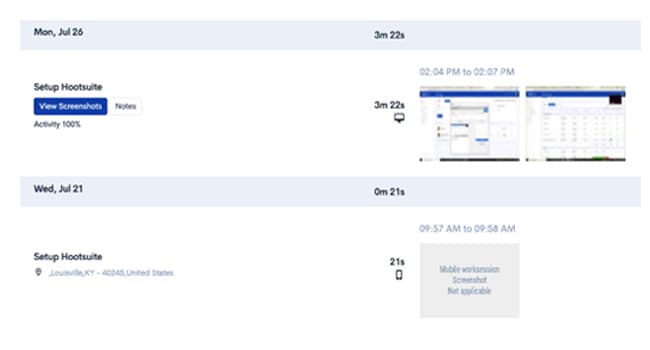
Periodic screenshots at configurable intervals plus keyboard and mouse activity levels, included at $5/user/month. A manager can open a work session and see what was on screen and how active the session was. HiveDesk does not classify apps or websites, so it tells you what happened rather than scoring it.
DeskTime
Tracking begins when the computer starts. DeskTime records which apps and websites are used, labels each as productive, unproductive, or neutral, and turns that into a productivity percentage. Screenshots and app and URL tracking both require the Premium plan at $10/user/month, so the Pro plan does not monitor in the way most buyers expect.
Verdict: DeskTime wins on analysis and HiveDesk wins on price and evidence. If you want a number that summarizes how productive the day was, DeskTime produces it. If you want to see the work itself without paying for an upgrade, HiveDesk includes screenshots at half the price of DeskTime Premium.

Scheduling, Attendance, and Leave
HiveDesk
Shift scheduling, attendance tracking, leave requests with approvals, holiday calendars, overtime tracking, and timesheet approval are all part of the $5/user/month plan. Nothing here is an upgrade, which matters for contact centers and BPOs where scheduling and supervision are the same daily job.
DeskTime
DeskTime does offer shift scheduling and an absence calendar, and this is a point worth correcting if you have read otherwise. Managers can assign shifts, use recurring shift templates, let team members request preferred times, and mark sickness and vacation on a shared calendar. Both features require Premium at $10/user/month. Timesheet approval is not advertised as part of the product.
Verdict: Both tools schedule shifts and track absence. The difference is the bill and the approval step. HiveDesk includes scheduling and leave at $5/user/month and adds timesheet approval on top, while DeskTime charges $10/user/month for the tier that unlocks them.
Time Tracking, Projects, and Invoicing
HiveDesk
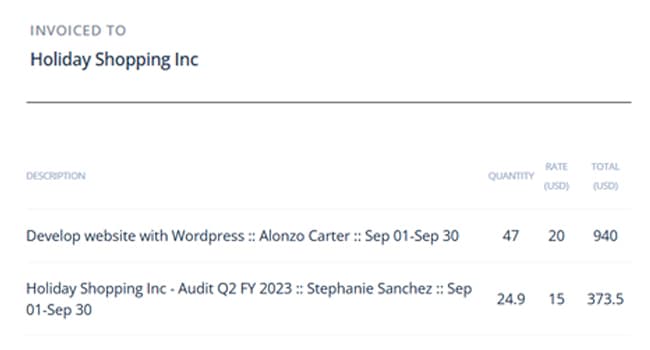
Time is tracked per project and task, timesheets are generated automatically, managers approve them, and built-in invoicing turns approved hours into client invoices without an export step. Asana is the only third-party integration.
DeskTime
Project time tracking is included from the Pro plan, and tracking runs automatically without anyone starting a timer, which produces more complete data than a manual timer does. DeskTime does not advertise invoicing, so billing runs through an export or a separate tool. Its integration list is considerably longer than HiveDesk's and covers Jira, Asana, Trello, GitLab, Outlook, Google Calendar, and Zapier.
Verdict: DeskTime captures time more completely and connects to more tools. HiveDesk takes the hours further, from approval through to an invoice, inside one product.

When to Choose Each Tool
When to Choose DeskTime
DeskTime is the stronger choice if your team needs:
- Productivity scoring — Apps and websites are classified as productive or unproductive and summarized as a score. HiveDesk does not categorize applications at all.
- Tracking with nothing to remember — Time is captured from the moment the computer starts, so nobody forgets to start a timer and no hours go unrecorded.
- A wide integration list — Jira, Trello, GitLab, Outlook, Google Calendar, and Zapier are supported. HiveDesk integrates with Asana only.
- App and URL visibility — A per-person list of which websites and applications were used during the day, available on the Premium plan.
If productivity analytics are the reason you are buying, DeskTime does that job better than HiveDesk does.
When to Choose HiveDesk
HiveDesk is the stronger choice if your team needs:
- One price for everything — Screenshots, scheduling, attendance, leave, approval, and invoicing at $5/user/month, with no tier that holds a feature back.
- Screenshots without an upgrade — DeskTime puts screenshots on Premium at $10/user/month. HiveDesk includes them at half that price.
- Timesheets that get approved and billed — Managers approve timesheets and generate invoices from the approved hours. DeskTime does not advertise either step.
- Contact center and BPO supervision — Shift coverage, attendance, activity levels, and screenshots belong to the same daily workflow, and HiveDesk keeps them in one plan.
HiveDesk has served contact centers, BPOs, agencies, and remote teams across six continents since 2011.
The Bottom Line
These tools overlap more than the marketing on either side suggests. Both track time, both track attendance, and both schedule shifts and record absence. The differences that matter are what each one does with the data and what it costs to unlock.
DeskTime turns activity into a productivity score and connects to a long list of project tools. That analysis is genuinely better than anything HiveDesk offers, and if it is what you are buying, DeskTime is the right choice. The catch is the tiering. Screenshots, app tracking, scheduling, and the absence calendar all sit on Premium at $10/user/month.
HiveDesk puts the same monitoring and scheduling capability in a single $5/user/month plan and carries the hours through approval into invoicing, which DeskTime does not do. For a 25-person team that is $1,500 a year saved against DeskTime Premium, with fewer tools to stitch together.
Frequently Asked Questions
Common questions about HiveDesk vs DeskTime.
DeskTime has three tiers. Pro is $7/user/month billed monthly, or $6.42/user/month billed annually. Premium is $10/user/month billed monthly, or $9.17/user/month billed annually. Enterprise is custom priced and requires 200 or more users. HiveDesk is $5/user/month with every feature included and no tiers.
Yes, at every tier. HiveDesk costs $5/user/month with all features included. DeskTime Pro costs $7/user/month and does not include screenshots or shift scheduling. DeskTime Premium, the plan most teams actually need, costs $10/user/month. For a 25-person team that is $125/month for HiveDesk versus $250/month for DeskTime Premium, a difference of $1,500 per year.
Yes. DeskTime includes shift scheduling and an absence calendar, but both require the Premium plan at $10/user/month. They are not available on the Pro plan at $7/user/month. HiveDesk includes shift scheduling, attendance, and leave management in its single $5/user/month plan.
Screenshots are a Premium feature on DeskTime, which costs $10/user/month. The Pro plan at $7/user/month does not include screenshots or app and URL tracking. HiveDesk includes periodic screenshots and activity level tracking at $5/user/month with no upgrade required.
DeskTime does not advertise invoicing among its features. HiveDesk includes built-in invoicing that generates invoices directly from timesheet data, so billable hours become client invoices without exporting to another tool.
Three things. DeskTime tracks time fully automatically from the moment the computer starts, with no timer to start. It categorizes apps and websites as productive or unproductive and calculates a productivity score, which HiveDesk does not do. And it integrates with Jira, Trello, GitLab, Outlook, Google Calendar, and Zapier, while Asana is the only third-party integration HiveDesk offers.
For most teams, yes. HiveDesk covers time tracking, screenshots, activity levels, scheduling, attendance, leave management, timesheet approval, and invoicing in one plan. What you give up is automatic app categorization and productivity scoring, plus the wider integration list. If productivity scoring is the reason you bought DeskTime, that gap matters. If you bought it for accountability and workforce management, HiveDesk covers the same ground for less.
No. HiveDesk tracks keyboard and mouse activity levels and takes periodic screenshots, but it does not maintain a productive versus unproductive classification for apps and websites. That automatic categorization is DeskTime’s core strength and the main reason to choose it.
HiveDesk is the closer fit for contact centers and BPOs. Agent supervision needs screenshots, shift scheduling, attendance, and timesheet approval together, and HiveDesk includes all of them at $5/user/month. Getting the same combination from DeskTime requires the Premium plan at $10/user/month, and timesheet approval and invoicing are still not part of it.
A 25-person team on DeskTime Premium pays $250/month, or $3,000/year. The same team on HiveDesk pays $125/month, or $1,500/year. That is $1,500 saved per year, and it adds timesheet approval and invoicing that DeskTime does not advertise.
Want to explore more options? See our full list of 7 best DeskTime alternatives for 2026, or compare every option in our guide to the best time tracking software.
Ready to Get Started?
Join teams worldwide who trust HiveDesk for workforce management, time tracking, and employee monitoring. $5/user/month, all features included.