

HiveDesk vs Hubstaff — Detailed Feature and Pricing Comparison
Both HiveDesk and Hubstaff track time and monitor employee activity. But Hubstaff locks workforce management features — shift scheduling, attendance tracking, leave management, and timesheet approval — behind its $10/user/month Team Premium plan. HiveDesk includes all of those features for $5/user/month.
No credit card required · 14-day free trial · All features included
Quick Verdict
HiveDesk is the better value
If you need time tracking, activity monitoring, shift scheduling, and workforce management in a single plan. You get everything for $5/user/month — features that Hubstaff charges $10/user/month or more to unlock.
Hubstaff is the better fit
If you need GPS tracking across all devices, app/URL usage monitoring, or integrations with tools like Jira and Trello. Those capabilities are genuine strengths, but they come at a higher price.
Pricing Breakdown: What Does a 25-Person Team Actually Cost?
Hubstaff's Starter plan ($4.99/user/month) covers basic time tracking and screenshots, but it excludes shift scheduling, attendance tracking, leave management, timesheet approval, and keyboard/mouse activity tracking. To get those features, you need Team Premium at $10/user/month.
| Plan | Per User/Month | 25-Person Team/Month | 25-Person Team/Year |
|---|---|---|---|
| HiveDesk (all features) | $5 | $125 | $1,500 |
| Hubstaff Starter (basic time tracking only) | $4.99 | $124.75 | $1,497 |
| Hubstaff Grow (adds integrations, some management) | $7.50 | $187.50 | $2,250 |
| Hubstaff Team Premium (scheduling, attendance, leave) | $10 | $250 | $3,000 |
| Hubstaff Enterprise | $25 | $625 | $7,500 |
At equivalent feature levels, HiveDesk saves you $1,500/year compared to Hubstaff Team Premium for a 25-person team. That gap widens as your team grows.
Feature-by-Feature Comparison
The table below compares HiveDesk ($5/user/month) against Hubstaff's plans. “Requires Team Premium” means the feature is only available at $10/user/month or higher.
| Feature | HiveDesk ($5/user) | Hubstaff |
|---|---|---|
| Time tracking | Yes | Yes (all plans) |
| Automatic timesheets | Yes | Yes (all plans) |
| Break time tracking | Yes | Requires Team Premium ($10+) |
| Billable hours tracking | Yes | Yes (all plans) |
| Attendance tracking | Yes | Requires Team Premium ($10+) |
| Holiday calendar | Yes | Requires Team Premium ($10+) |
| Leave policies & time-off tracking | Yes | Requires Team Premium ($10+) |
| Overtime tracking | Yes | Requires Team Premium ($10+) |
| Timesheet approval | Yes | Requires Team Premium ($10+) |
| Desktop apps (Windows, Mac, Linux) | Yes | Yes (all plans) |
| Mobile apps | Yes (iOS) | Yes (iOS, Android) |
| Web app | Yes | Yes (all plans) |
| Chrome extension | Yes | No |
| Automatic screenshots | Yes | Yes (all plans) |
| Configurable screenshot frequency | Yes | Yes (all plans) |
| Keyboard & mouse activity tracking | Yes | Requires Team Premium ($10+) |
| App & URL tracking | No | Requires Team Premium ($10+) |
| GPS tracking | iOS mobile app only | Yes (all plans, all devices) |
| Asana integration | Yes | Requires Grow ($7.50+) |
| Jira, Trello, Slack integrations | No | Requires Grow ($7.50+) |
| Task tracking | Yes | Yes (all plans) |
| Time tracking per task | Yes | Yes (all plans) |
| Labor cost tracking | Yes | Requires Team Premium ($10+) |
| Create user teams | Yes | Requires Team Premium ($10+) |
| Built-in invoicing | Yes | No |
| Shift scheduling | Yes | Requires Team Premium ($10+) |
| Reporting | Yes | Yes (all plans) |
Time Tracking
HiveDesk
Automatic time tracking with periodic screenshots and activity monitoring. Employees can track time using the desktop app (Windows, Mac, Linux), web app, Chrome extension, or iOS mobile app. Manual time entry is available, and managers can approve or reject manual entries. Break time tracking is included.
Hubstaff
Automatic time tracking with flexible options for manual edits and adjustments. Supports desktop and mobile apps across platforms. Break time tracking is available but requires the Team Premium plan ($10/user/month).
Verdict: Both offer reliable time tracking. HiveDesk includes break tracking in its base plan; Hubstaff charges double for it.


Timesheets
HiveDesk
Automatically generates timesheets from tracked time. Managers can review and approve timesheets before using them for payroll or client billing. Timesheets export as PDF or Excel.
Hubstaff
Provides detailed timesheets with customizable views. However, timesheet approval requires the Team Premium plan ($10/user/month).
Verdict: Both generate timesheets well. HiveDesk includes approval workflows at $5/user/month — Hubstaff requires Team Premium at $10/user/month for the same capability.
Activity Monitoring
HiveDesk
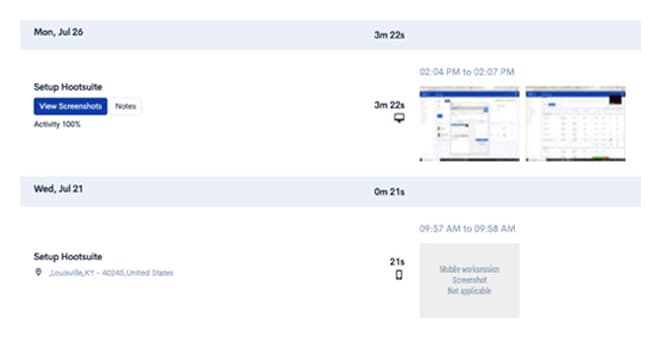
Activity monitoring includes periodic screenshots, keyboard/mouse activity tracking, and activity level percentages — all included in the $5/user/month plan. HiveDesk does not track app or URL usage.
Hubstaff
Offers advanced activity monitoring including app and URL tracking, showing which applications and websites employees use during work hours. Keyboard/mouse tracking and app/URL tracking both require the Team Premium plan ($10/user/month).
Verdict: Hubstaff wins on monitoring depth. App and URL tracking gives managers more granular visibility into how employees spend their time. But that capability costs $10/user/month. If screenshots and activity levels give you enough insight, HiveDesk covers the essentials at half the price.
Project and Task Management
HiveDesk
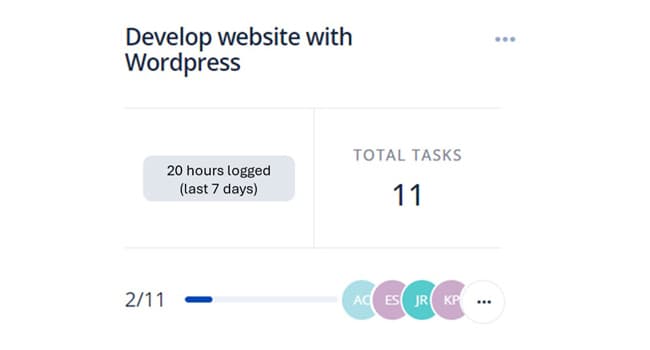
Includes project and task management with time tracking at the task level. Create projects, assign tasks to team members, and track progress. HiveDesk integrates with Asana for teams that need a dedicated project management tool.
Hubstaff
Offers task management with integrations to Asana, Trello, Jira, and other project management tools. However, integrations require the Grow plan ($7.50/user/month) or higher.
Verdict: Hubstaff has more integration options — if your team relies on Jira or Trello, that matters. HiveDesk includes its Asana integration in the base plan. If Asana is your tool or you manage tasks directly in your time tracker, HiveDesk covers it without an upgrade.
Workforce Management
HiveDesk
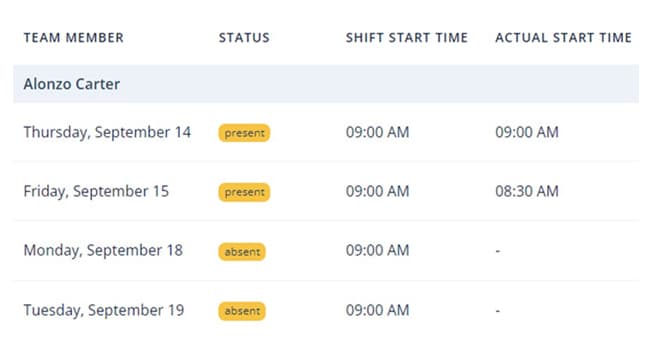
Shift scheduling, attendance tracking, leave management, holiday calendars, overtime tracking, and labor cost tracking — all included at $5/user/month. This is a core strength for contact centers, BPOs, and any team managing shifts.
Hubstaff
Offers comparable workforce management features, but they require the Team Premium plan at $10/user/month. The Starter and Grow plans do not include scheduling, attendance, or leave management.
Verdict: This is where the pricing gap matters most. HiveDesk includes the full workforce management suite at $5/user/month. Hubstaff charges $10/user/month for the same features — double the cost per user with no additional functionality in this category.
Invoicing
HiveDesk
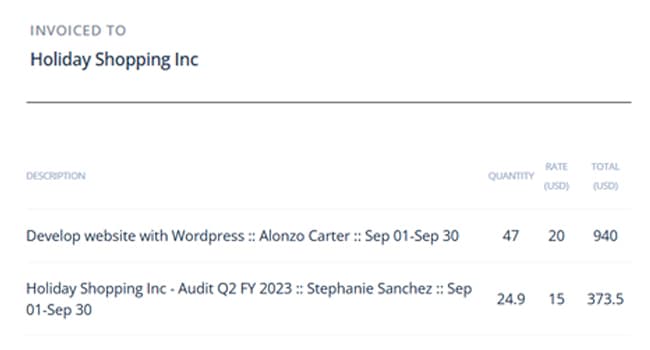
Built-in invoicing lets you generate invoices directly from timesheet data. Bill clients based on tracked hours without switching to a separate tool.
Hubstaff
Does not include built-in invoicing. You'll need a third-party tool like QuickBooks or FreshBooks for client billing.
Verdict: HiveDesk wins here. Built-in invoicing eliminates the need for a separate billing tool and reduces manual data entry between systems.
Shift Scheduling
HiveDesk
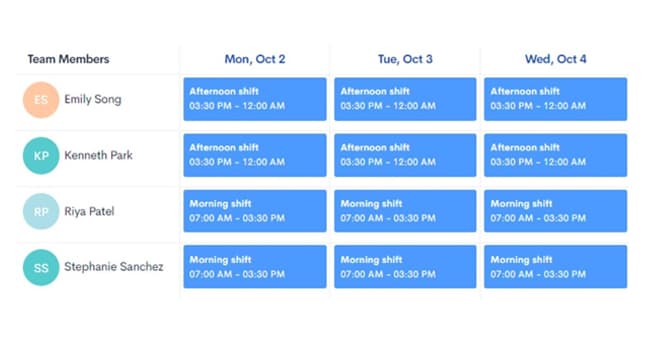
Includes shift scheduling that lets managers create, assign, and manage employee shifts. Particularly useful for contact centers and BPOs with rotating schedules or multiple shifts across time zones. Included at $5/user/month.
Hubstaff
Offers shift scheduling with attendance tracking, but only in the Team Premium plan at $10/user/month.
Verdict: Both handle shift scheduling, but HiveDesk includes it at $5/user/month — half the cost of Hubstaff's Team Premium plan.
When to Choose Each Tool
When to Choose Hubstaff
Hubstaff is the stronger choice if your team needs:
- GPS tracking across all devices — Hubstaff tracks location on Android, iOS, and desktop. HiveDesk offers GPS tracking only on its iOS mobile app.
- App and URL monitoring — If you need to know exactly which applications and websites employees use during work hours, Hubstaff provides this at the Team Premium tier. HiveDesk does not offer app/URL tracking.
- Multiple integrations — Hubstaff connects with Jira, Trello, Slack, Asana, and other tools. HiveDesk integrates with Asana only.
If these capabilities are essential for your team, Hubstaff justifies the higher price.
When to Choose HiveDesk
HiveDesk is the stronger choice if your team needs:
- Full workforce management at one price — Shift scheduling, attendance tracking, leave management, overtime tracking, and timesheet approval are all included for $5/user/month. No tier upgrades needed.
- Built-in invoicing — Generate client invoices directly from timesheets without a separate billing tool.
- Lower cost at scale — For a 25-person team, HiveDesk costs $125/month versus $250/month for Hubstaff Team Premium. That's $1,500/year in savings.
- Simple, predictable pricing — One plan, one price, all features. No evaluating tier comparisons or worrying about which plan unlocks the feature you need.
HiveDesk is built for contact centers, BPOs, agencies, and remote teams that need workforce management tools without enterprise pricing.
The Bottom Line
HiveDesk and Hubstaff overlap significantly on core features. The key differences come down to pricing structure and a few specific capabilities.
Hubstaff has genuine strengths in GPS tracking, app/URL monitoring, and third-party integrations. But those features require the Team Premium plan at $10/user/month — and many teams don't need them.
HiveDesk delivers time tracking, activity monitoring, shift scheduling, workforce management, and invoicing for $5/user/month. For teams that need these capabilities without paying for GPS tracking or app monitoring they won't use, HiveDesk is the more cost-effective choice.
Frequently Asked Questions
Common questions about HiveDesk vs Hubstaff.
It depends on what your team needs. HiveDesk is better value if you need time tracking, activity monitoring, shift scheduling, attendance, leave management, and timesheet approval — all included for $5/user/month. Hubstaff is better if you need GPS tracking across all devices, app/URL monitoring, or integrations with tools like Jira and Trello, though those features require the Team Premium plan at $10/user/month.
Hubstaff has four plans: Starter at $4.99/user/month (basic time tracking and screenshots), Grow at $7.50/user/month (adds integrations), Team Premium at $10/user/month (adds scheduling, attendance, leave management, keyboard/mouse tracking), and Enterprise at $25/user/month. Many workforce management features that HiveDesk includes at $5/user/month require Hubstaff's $10/user/month Team Premium plan.
HiveDesk is one of the most affordable Hubstaff alternatives at $5/user/month for all features. Unlike Hubstaff, which locks workforce management features behind its $10/user/month Team Premium plan, HiveDesk includes shift scheduling, attendance tracking, leave management, timesheet approval, and activity monitoring in a single plan with no tier upgrades.
Yes, HiveDesk offers GPS location tracking on its iOS mobile app. Hubstaff offers GPS tracking across all devices including Android, iOS, and desktop. If GPS tracking across all platforms is essential for your team, Hubstaff has the edge here.
Yes, but only on the Team Premium plan at $10/user/month. Hubstaff's Starter ($4.99) and Grow ($7.50) plans do not include shift scheduling. HiveDesk includes shift scheduling in its $5/user/month plan.
No. HiveDesk does not track which applications or websites employees use during work hours. HiveDesk focuses on time tracking, screenshots, and activity levels. If you need app and URL monitoring, Hubstaff offers this on the Team Premium plan ($10/user/month).
Yes. HiveDesk includes shift scheduling, attendance tracking, leave management, overtime tracking, holiday calendars, and timesheet approval — all the workforce management features that Hubstaff locks behind the Team Premium plan. For teams that don't need GPS tracking on every device or app/URL monitoring, HiveDesk delivers equivalent functionality at half the cost.
For a 25-person team comparing equivalent feature sets, HiveDesk costs $125/month ($1,500/year) versus Hubstaff Team Premium at $250/month ($3,000/year). That is $1,500/year in savings. The gap grows with team size.
Yes. HiveDesk includes built-in invoicing that generates invoices directly from timesheet data. You can bill clients based on tracked hours without switching to a separate billing tool. Hubstaff does not include built-in invoicing.
HiveDesk integrates with Asana for project and task management. Hubstaff connects with Jira, Trello, Slack, Asana, and other tools, but integrations require the Grow plan ($7.50/user/month) or higher. If your team relies on multiple third-party project management tools, Hubstaff has more integration options.
Want to explore more options? See our full list of 7 best Hubstaff alternatives for 2026, or read our head-to-head Time Doctor vs Hubstaff comparison.
Ready to Get Started?
Join teams worldwide who trust HiveDesk for workforce management, time tracking, and employee monitoring. $5/user/month, all features included.