

HiveDesk vs Time Doctor — Features, Pricing and Value Compared
Looking for a Time Doctor alternative that costs less and includes more workforce management features? This comparison breaks down exactly where each tool wins, where it falls short, and which one makes more sense for your team and budget.
No credit card required · 14-day free trial · $5/user/month — all features included
Quick Verdict
HiveDesk and Time Doctor both help businesses track remote employee time, but they take different approaches — and the pricing gap is significant.
Choose HiveDesk if...
You need workforce management alongside time tracking. You get shift scheduling, leave management, attendance tracking, invoicing, and Asana integration — all for $5/user/month.
Choose Time Doctor if...
App and website monitoring is your top priority. Its productivity alerts and detailed app usage reports go deeper than HiveDesk's screenshot-based monitoring — but you will pay $10-$20/user/month for the full feature set.
Pricing Comparison
This is where the difference hits hardest. HiveDesk has one plan at $5/user/month with every feature included. Time Doctor splits features across three tiers plus a custom Enterprise plan. Figures below are Time Doctor's published prices as of September 2026 on monthly billing; annual billing is about 17% lower.
| HiveDesk | Time Doctor Basic | Time Doctor Standard | Time Doctor Premium | |
|---|---|---|---|---|
| Price (monthly billing) | $5/user/mo | $8/user/mo | $14/user/mo | $20/user/mo |
| Price (annual billing) | $5/user/mo | $6.67/user/mo | $11.67/user/mo | $16.70/user/mo |
| Time tracking | Yes | Yes | Yes | Yes |
| Screenshots | Yes | Yes | Yes | Yes |
| Activity tracking | Yes | Yes | Yes | Yes |
| App/website tracking | No | No | Yes | Yes |
| Unusual activity reports | No | Add-on | Add-on | Yes |
| Shift scheduling | Yes | No | Yes | Yes |
| Attendance tracking | Yes | No | Yes | Yes |
| Leave management | Yes | No | Yes | Yes |
| Overtime tracking | Yes | No | Yes | Yes |
| Timesheet approval | Yes | No | Yes | Yes |
| Invoicing | Yes | No | No | No |
| Asana integration | Yes | No | Yes | Yes |
The 25-person team math
For a team of 25 employees who need time tracking, shift scheduling, and attendance management:
HiveDesk
$125/mo
25 x $5
Time Doctor Standard
$350/mo
25 x $14
Time Doctor Premium
$500/mo
25 x $20
That is $2,700 to $4,500 more per year with Time Doctor on monthly billing, depending on which tier you need. HiveDesk saves you 64-75% while including features Time Doctor does not advertise, like invoicing.
Feature-by-Feature Comparison
Time Tracking
HiveDesk
Automatic time tracking across desktop (Windows, macOS, Linux), mobile (iOS), web app, and Chrome extension. Employees start the timer, select a project and task, and HiveDesk records their hours with periodic screenshots.
Time Doctor
Automatic and manual time tracking with desktop and mobile apps. Includes idle time detection and alerts that remind employees to stay on task when inactivity is detected.
Verdict: Both handle core time tracking well. Time Doctor adds idle alerts; HiveDesk covers more platforms with its Chrome extension and includes all tracking features at the base price.

Activity Monitoring
HiveDesk
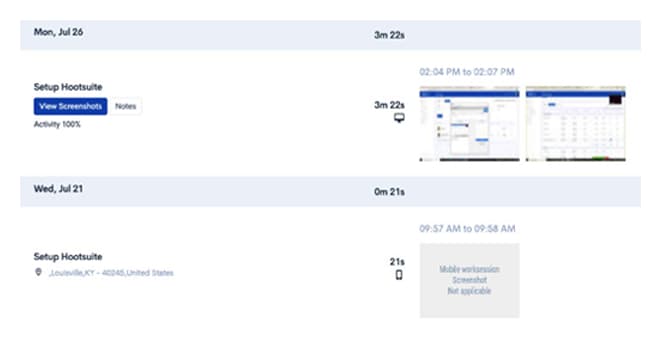
Tracks activity levels through keyboard and mouse usage and captures periodic screenshots at configurable intervals. Managers can review screenshots and activity percentages to understand how time is being spent.
Time Doctor
Offers activity monitoring with app and website tracking that logs which applications and websites employees use throughout the day. Productivity reports categorize activities as productive, unproductive, or neutral. However, app/website tracking requires the Standard plan ($10/user/month) and productivity alerts require Premium ($20/user/month).
Verdict: Time Doctor wins on monitoring depth. Its app and website tracking provides more granular visibility than HiveDesk's screenshot-based approach. If detailed application usage data and productivity scoring matter to your team, Time Doctor is the stronger tool here — though you will pay $14-$20/user/month on monthly billing for those capabilities.
Timesheets
HiveDesk
Automatically generates timesheets from tracked time. Managers can review, approve, and export timesheets as PDF or Excel. Overtime hours are tracked automatically against configurable thresholds.
Time Doctor
Provides detailed timesheets with task-level breakdowns. Data can be exported for payroll. However, timesheet approval and overtime tracking require the Standard plan at $10/user/month.
Verdict: Both generate solid timesheets. HiveDesk includes approval workflows and overtime tracking at $5/user/month — features that require Time Doctor's Standard plan at nearly three times the price.

Employee Shift Scheduling
HiveDesk
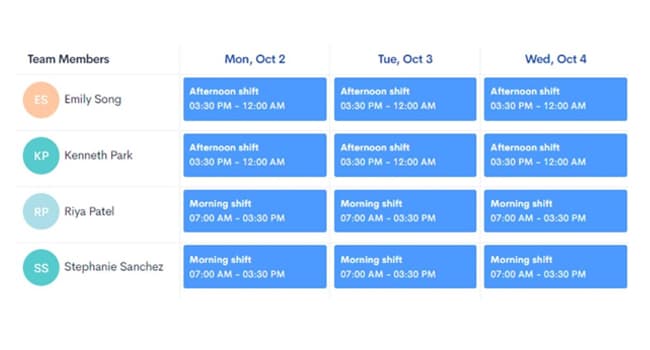
Built-in shift scheduling lets managers create, assign, and manage employee shifts. Especially useful for contact centers, BPOs, and any team running rotating or multi-shift operations. Included in the $5/user/month plan.
Time Doctor
Offers shift scheduling in the Standard ($10/user/month) and Premium ($20/user/month) plans. Not available in the Basic plan.
Verdict: Both offer scheduling, but HiveDesk includes it at half the cost. For contact centers and BPOs where scheduling is essential, this pricing difference adds up fast.
Workforce Management
HiveDesk
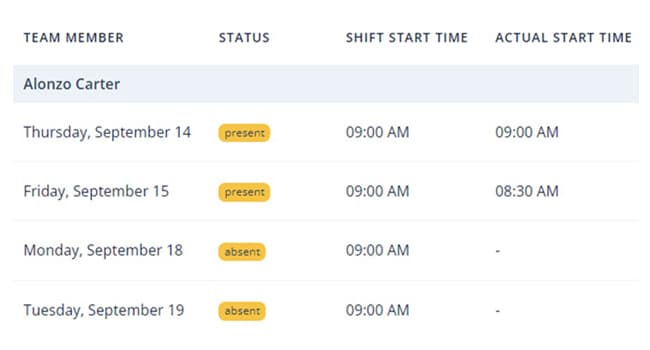
Includes attendance tracking, leave management with customizable policies, holiday calendars, overtime tracking, and team management — all in the base plan.
Time Doctor
Offers attendance tracking and workforce analytics, but these features are locked behind the Standard plan at $14/user/month on monthly billing. The Basic plan at $8/user/month is limited to time tracking, screenshots, and activity monitoring.
Verdict: HiveDesk delivers a more complete workforce management package at a lower price. If your team needs attendance, leave tracking, and scheduling alongside time tracking, HiveDesk covers it all without tier upgrades.
Project and Task Management
HiveDesk
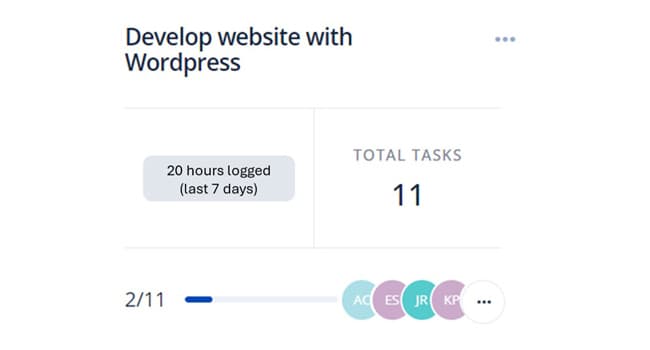
Create projects, add tasks, assign team members, and track time at the task level. Integrates with Asana for teams that manage work there. The Asana integration is included in the $5/user/month plan.
Time Doctor
Tracks time by project and task. Integrates with project management tools including Asana, Trello, and others — but integrations require the Standard plan at $14/user/month.
Verdict: Both handle project and task tracking. Time Doctor connects with more third-party tools; HiveDesk includes its Asana integration at the base price.
Invoicing
HiveDesk
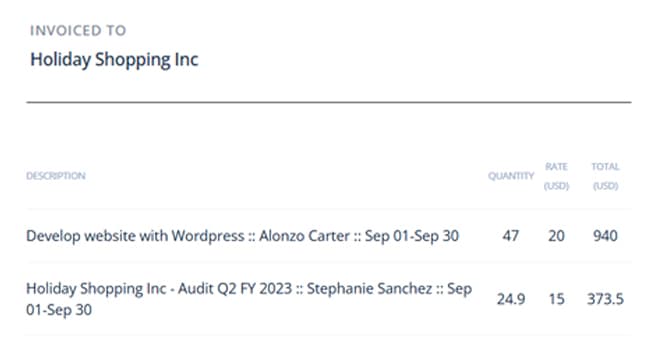
Built-in invoicing lets you generate invoices directly from timesheet data. Useful for agencies, consultants, and any business that bills clients based on tracked hours.
Time Doctor
Does not include invoicing at any plan tier.
Verdict: HiveDesk wins outright. If you bill clients for time worked, HiveDesk eliminates the need for a separate invoicing tool.
When to Choose HiveDesk
HiveDesk is the right fit if:
- Budget matters. You need a full-featured tool without paying $10-$20 per user per month. At $5/user/month, HiveDesk is the most affordable option with no feature gating.
- You run a contact center or BPO. Shift scheduling, attendance tracking, and overtime management are included — not locked behind premium tiers.
- You manage a remote or hybrid team. Time tracking, screenshots, leave management, and team organization in one tool.
- You bill clients for time. Built-in invoicing from timesheets saves you from juggling a separate billing tool.
- You use Asana. The integration is included at no extra cost.
When to Choose Time Doctor
Time Doctor is the right fit if:
- App and website monitoring is critical. Time Doctor tracks exactly which apps and websites employees use, with productivity scoring. HiveDesk does not offer this.
- You need productivity alerts. Time Doctor can notify employees when it detects extended idle time or time on unproductive websites. HiveDesk does not have this feature.
- You need integrations beyond Asana. Time Doctor connects with a wider range of project management and communication tools (on the Standard plan and above).
- You prioritize monitoring depth over cost. If granular app usage data justifies the higher per-user price, Time Doctor delivers it.
Conclusion
HiveDesk and Time Doctor solve overlapping but different problems. Time Doctor goes deeper on monitoring — app tracking, website tracking, and productivity alerts give managers granular visibility into how employees spend their time. HiveDesk goes wider on workforce management — shift scheduling, leave management, attendance, invoicing, and Asana integration are all included in a single affordable plan.
For most teams that need time tracking plus workforce management, HiveDesk delivers more value at $5/user/month than Time Doctor does at $14-$20/user/month on monthly billing. You save 64-75% on per-user costs while getting features like invoicing and scheduling that Time Doctor either charges extra for or does not offer at all.
No credit card required · 14-day free trial · $5/user/month — all features included
Frequently Asked Questions
Common questions about HiveDesk vs Time Doctor.
It depends on your priorities. HiveDesk is the better value if you need workforce management alongside time tracking — shift scheduling, leave management, attendance, invoicing, and Asana integration are all included for $5/user/month. Time Doctor is the better choice if detailed app and website monitoring is your top priority, though you will pay $14-$20/user/month on monthly billing for those capabilities.
As of September 2026, Time Doctor has three published tiers plus a custom Enterprise plan: Basic at $8/user/month (time tracking, screenshots, projects and tasks), Standard at $14/user/month (adds web and app usage reporting, schedules, attendance, leave tracking, payroll and 60+ integrations), and Premium at $20/user/month (adds video screen recording, unusual activity reports, executive dashboards and SSO). Annual billing lowers those to $6.67, $11.67 and $16.70 per user per month. HiveDesk includes all features in a single $5/user/month plan.
HiveDesk is the best Time Doctor alternative for teams that need workforce management features at an affordable price. You get time tracking, screenshots, shift scheduling, attendance management, leave tracking, invoicing, and Asana integration — all for $5/user/month, compared to $14-$20/user/month on monthly billing for equivalent Time Doctor features.
Yes, Time Doctor captures screenshots on all plans including the Basic tier at $8/user/month ($6.67 on annual billing). HiveDesk also captures periodic screenshots at configurable intervals, included in the $5/user/month plan. Both tools let managers review screenshots to verify how time is being spent.
No. HiveDesk monitors activity through keyboard and mouse usage levels and periodic screenshots, but does not track which specific apps or websites employees use. Time Doctor offers detailed app and website tracking with productivity scoring on its Standard ($14/user/month) and Premium ($20/user/month) plans.
Yes. You can sign up for a free 14-day HiveDesk trial, set up your projects and team, and run both tools in parallel before fully switching. HiveDesk is straightforward to set up — most teams are tracking time within minutes of creating an account.
HiveDesk is built specifically for contact centers and BPOs. Shift scheduling, attendance tracking, and overtime management are included at $5/user/month. Time Doctor requires the Standard plan at $14/user/month to access scheduling and attendance features, nearly three times the per-user cost.
HiveDesk includes built-in invoicing that lets you generate invoices directly from timesheet data — useful for agencies, consultants, and businesses that bill clients for tracked hours. Time Doctor does not include invoicing at any plan tier.
For a 25-person team, HiveDesk costs $125/month ($5/user). Time Doctor Standard costs $350/month ($14/user) and Premium costs $500/month ($20/user) on monthly billing. That is $2,700 to $4,500 in annual savings with HiveDesk, a 64-75% reduction in per-user costs. On annual billing the Time Doctor totals drop to about $292 and $418 a month, which still leaves HiveDesk 57-70% lower.
HiveDesk integrates with Asana for project and task management, included at $5/user/month. Time Doctor connects with a wider range of tools including Asana, Trello, and others — but integrations require the Standard plan at $14/user/month.
Want to explore more options? See our full list of 7 best Time Doctor alternatives for 2026, or read our head-to-head Time Doctor vs Hubstaff comparison.
Ready to Get Started?
Join teams worldwide who trust HiveDesk for workforce management, time tracking, and employee monitoring. $5/user/month, all features included.