

Data-Driven Insights Into Team Performance and Productivity
Stop guessing how your team spends their time. HiveDesk gives you timesheets, activity reports, attendance data, and project time breakdowns — all generated automatically from tracked work. Export any report as PDF or Excel.
No credit card required · $5/user/month · Works on Windows, macOS, Linux, iOS, Chrome
You Cannot Improve What You Cannot Measure
Without reliable data, performance reviews become subjective, workload imbalances go unnoticed, and overtime costs accumulate silently.
Without performance data
- Manual timesheets are unreliable — especially for remote teams
- No visibility into how hours are distributed across projects
- Overtime costs surface at payroll, not when they happen
- Performance conversations lack objective data to back them up
With HiveDesk
- Timesheets generated from actual tracked hours with activity data
- Project time reports show exactly where hours go
- Real-time dashboards make overtime and attendance visible now
- Activity reports and screenshots provide objective performance data
Start Tracking in Minutes
No complex setup. Reports populate automatically as your team works.
Set up projects & teams
Create projects and tasks. Add team members, set up shift schedules, and configure activity monitoring preferences.
Track time & activity
Team members track time against projects using desktop, mobile, or browser apps. Activity and screenshots are captured automatically.
Review reports
Review timesheets, activity, attendance, and project reports from the dashboard. Export as PDF or Excel for payroll and reviews.
Analytics & Reporting Tools
Reports and dashboards to understand your team's productivity.
Timesheets
Auto-generated timesheets from tracked hours. Approval workflow for managers. Export as PDF or Excel for payroll processing.
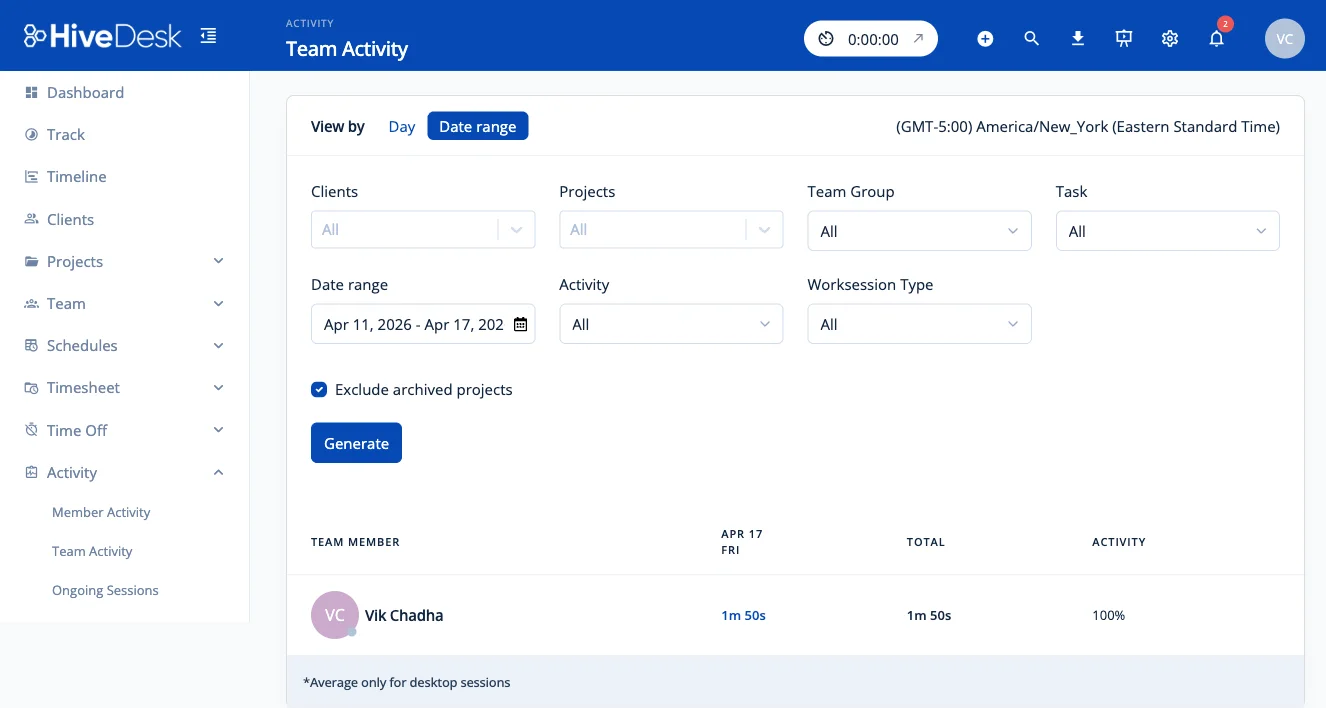
Activity Reports
Keyboard and mouse activity levels during work sessions. Periodic screenshots show what team members are working on.
Project & Task Time
Track time against projects and tasks. Add hourly rates to calculate labor costs per project or client.
Attendance Tracking
Compare actual clock-in/out times against scheduled shifts. Identify late arrivals, early departures, and missed shifts.
Overtime Reports
Track daily and weekly hours to see overtime before payroll. Filter by team or individual to manage overtime costs.
Role-Based Access
Managers see their teams. Administrators see everything. Team members see their own data. Access is configurable per role.
Frequently Asked Questions
Common questions about HiveDesk performance analytics and reporting.
HiveDesk provides timesheets, activity reports with screenshot timelines, attendance reports comparing clock-in times against scheduled shifts, project and task time reports, overtime reports, and leave balance reports. Filter any report by date range, team, or individual. Export as PDF or Excel.
HiveDesk tracks hours worked per day and week, keyboard and mouse activity levels during work sessions, time spent per project and task, attendance and punctuality against scheduled shifts, overtime hours, and break times.
Timesheets are generated automatically from tracked hours. Team members track time using the desktop, mobile, or browser app, and HiveDesk compiles this into timesheets. Managers review and approve timesheets through a built-in approval workflow before export.
Yes. HiveDesk tracks time against projects and tasks, so you can see exactly how hours are distributed. Add hourly rates to team members to calculate labor costs per project or client.
HiveDesk takes periodic screenshots and tracks keyboard and mouse activity levels during work sessions. Screenshot frequency is configurable. Team members always know when monitoring is active and can view their own tracking data.
Yes. Filter reports by date range to compare productivity across different periods. See trends in hours worked, attendance patterns, and project time distribution week over week or month over month.
Managers see reports for the teams and projects they are responsible for. Administrators have organization-wide visibility. Team members can view their own time and activity data. Access levels are configurable per role.
HiveDesk integrates with Asana for project and task management. Track time against Asana tasks. Timesheet and report data exports to PDF and Excel for use with any payroll or analytics tool.
HiveDesk is $5 per user per month — a single plan that includes all features: time tracking, activity monitoring, screenshots, scheduling, leave management, and reporting. 14-day free trial, no credit card required.
Yes. HiveDesk uses AES-256 encryption at rest and TLS 1.2+ in transit. It is GDPR compliant with role-based access controls. Only authorized personnel can view reports and activity data.
Ready to Get Started?
Join teams worldwide who trust HiveDesk for workforce management, time tracking, and employee monitoring. $5/user/month, all features included.