

Free Task Management Template in Excel
Manage tasks online with our free tool, or download the Excel template. Add tasks, assign owners, set dates, and track progress from start to finish.
Online Task Manager
Add tasks, assign team members, set dates and priorities, and track status. Print or save as PDF.
Total
5
Not Started
5
In Progress
0
Completed
0
Progress
0%
What This Template Covers
| Feature | Details |
|---|---|
| Task list | Create and organize all project tasks grouped by section or milestone |
| Task assignments | Assign each task to a team member |
| Start and end dates | Set timelines for every task |
| Task dependencies | Define which tasks must finish before others can begin |
| Status tracking | Track whether tasks are not started, in progress, or complete |
| Priority levels | Mark tasks as high, medium, or low priority |
| Resource allocation | See who is working on what and identify availability |
| Project options | Customize team member list, status labels, and priority labels |
How to Use This Template
Download the template and open it in Microsoft Excel. If you do not use Excel, upload it to Google Drive and open it with Google Sheets.
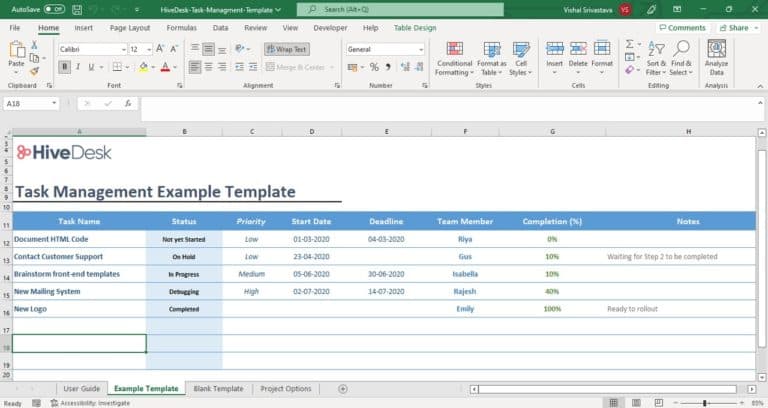
The first worksheet contains instructions. The second worksheet includes sample data so you can see how the template works. The third worksheet is blank and ready for your project.
Update the Project Options sheet first — list your team members, task status options, and priority levels so the dropdowns in your task list reflect your actual team and workflow.
What Is Task Management?
Task management is the process of planning, assigning, tracking, and completing the individual tasks that make up a project. It starts with creating a work breakdown structure (WBS) that lists all the tasks in your project.
From there, you assign each task to a team member, set start and end dates, define dependencies between tasks, and track progress. The result is a clear view of what needs to happen, who is responsible, and whether the project is on schedule.
Why Use an Excel Template for Task Management?
No software cost
This template is free and works with Excel or Google Sheets.
Easy to customize
Add columns, change labels, and adjust the layout to fit your project.
Built-in date functions
Calculate task duration and identify scheduling conflicts automatically.
Collaboration
Share via Office 365 or Google Sheets for real-time updates across your team.
Resource visibility
See who is assigned to what and avoid overloading team members.
This template is a practical starting point for small to mid-size projects where dedicated project management software would be unnecessary overhead.
Frequently Asked Questions
Common questions about task management templates.
A task management template is a pre-built spreadsheet that gives you the structure to list tasks, assign owners, set deadlines, track status, and monitor progress for a project. It functions like a simplified version of project management software without the cost or complexity.
Yes. Create a copy of the blank worksheet for each new project. If your projects have similar tasks, you can use a completed project as a starting template and modify it for the new project.
This Excel template handles the core functions of task tracking — assignments, dates, status, and dependencies — without the learning curve or subscription cost. It works well for teams managing a small number of projects. For larger operations that need time tracking, activity monitoring, and automated timesheets alongside task management, workforce management software like HiveDesk provides those features in one platform.
Yes. The template is fully editable. You can add columns for budget, notes, attachments, or any other information your project requires.
Yes. Download the Excel file, upload it to Google Drive, and open it with Google Sheets. All formulas and formatting will carry over, and your team can collaborate in real time.
Start Optimizing Your Workforce Today
Track employee time, manage schedules, and monitor attendance with HiveDesk — workforce management software for remote and hybrid teams. $5/user/month, all features included.