

Know Exactly How Many Hours Every Project Is Consuming
HiveDesk tracks time by project and task, calculates labor costs from hourly rates, and shows you real-time budget data — so you can manage scope, timelines, and client billing with actual numbers instead of estimates. All for $5/user/month.
No credit card required · Set up in under 10 minutes · Integrates with Asana

Projects Go Over Budget When You Can't See the Hours
Without real-time time tracking, project managers discover budget overruns after the damage is done. HiveDesk gives you the numbers while you can still act on them.
Managing projects without time tracking
- Budget overruns discovered only at the end of a project
- Estimates based on gut feel instead of historical data
- No visibility into which tasks are consuming the most hours
- Team allocation decisions made without utilization data
- Client billing based on estimates rather than verified hours
- Scope creep is invisible until the project is over budget
With HiveDesk
- Real-time labor cost tracking at the task and project level
- Historical time data makes future estimates accurate
- Hours by task reveal exactly where time is being spent
- Team utilization visible across all projects simultaneously
- Verified billable hours with screenshot proof for clients
- Budget warnings let you catch scope creep early
From Setup to Project Data in Under 10 Minutes
No complex onboarding. Add your projects, invite your team, and start tracking.
Create projects and tasks
Set up your projects, break them into tasks with deadlines, and assign hourly rates to team members.
Team tracks time
Employees start the timer from desktop, mobile, browser, or directly inside Asana. Hours are logged by task.
Monitor budgets in real time
See hours and costs by project and task as they accumulate. Compare actuals against your budget.
Bill and report
Generate client reports, approve timesheets, and export data for invoicing and payroll.
Task-Level Time Data
See which tasks are time sinks before they blow your budget
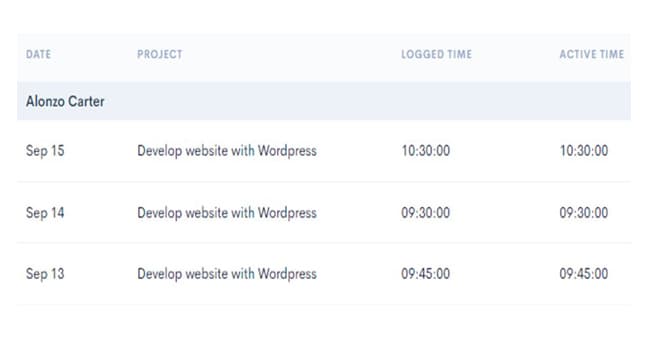
When your team tracks time against specific tasks, you see exactly where hours are going. Identify tasks that are taking longer than estimated, spot bottlenecks early, and make data-driven decisions about scope and resource allocation.
- Hours tracked by task, project, and team member
- Actual time vs. estimated time at the task level
- Identify bottlenecks before they delay the project
- Historical data for more accurate future estimates
Budget & Cost Tracking
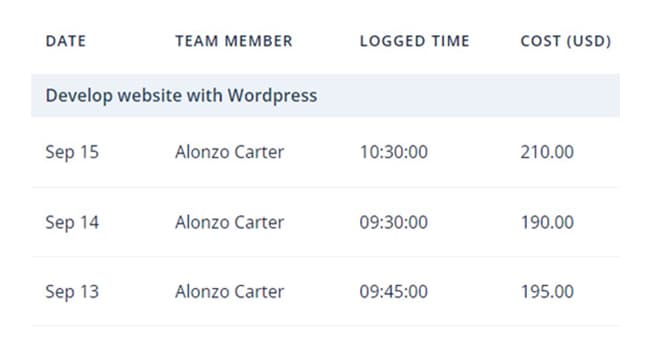
Track labor costs in real time, not after the project is done
Assign hourly rates to each team member. As they track time, HiveDesk calculates labor costs automatically at the task, project, and client level. Compare actual costs to your budget in real time. Catch overruns while you can still do something about them.
- Hourly rate assignment per team member
- Automatic labor cost calculation from tracked hours
- Real-time cost data at task, project, and client level
- Budget comparison to prevent overruns
Timeline & Resource Management
Keep timelines on track with real-time resource visibility
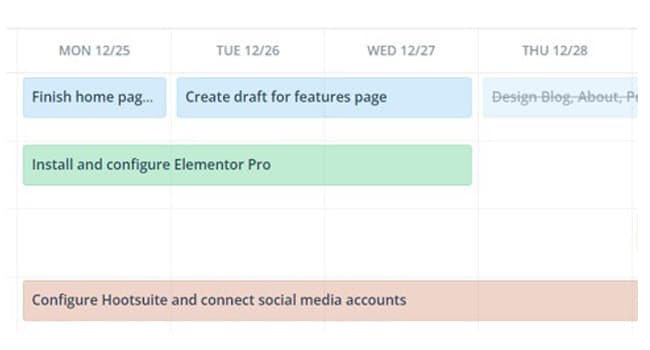
Manage tasks with deadlines using Kanban, calendar, and list views. See team allocation across projects. Identify who has capacity and who is overloaded. When you can see the full picture, you can make smarter decisions about timelines and staffing.
- Multiple views: Kanban, calendar, and list
- Task deadlines with progress tracking
- Team allocation visible across all projects
- Resource balancing to prevent bottlenecks
Everything a PM Needs. Nothing Extra.
One plan. $5/user/month. Every feature included.
Project Time Tracking
See exactly how many hours each project is consuming. Track time by task, phase, and team member.
Labor Cost Tracking
Assign hourly rates and see real-time labor costs at the task, project, and client level.
Task Management
Create tasks with deadlines and assignees. Track progress with Kanban, calendar, and list views.
Timesheets & Approval
Auto-generated timesheets with approval workflow. Export for payroll and client billing.
Activity Monitoring
Periodic screenshots and activity levels give you confidence that project hours are real.
Real-Time Dashboards
Live project dashboards showing hours, costs, team allocation, and task progress.
Trusted by Teams Worldwide Since 2011
We have used every time tracking software under the sun, and they all fall short in some area that we need, but overall HiveDesk has met our needs. Their PDF screenshot reports are clean, easy to use and understand. Our clients prefer them over the complicated reports of other systems.
HiveDesk has been instrumental in helping us manage our remote team effectively. The automatic time tracking and screenshot features give us the visibility we need without micromanaging. Setup was straightforward and our team adopted it within a day.
Frequently Asked Questions
Common questions about time tracking for project managers.
Project managers need to know how many hours are going into each project, task, and deliverable. Without time tracking, you are estimating budgets based on guesses, discovering overruns after they happen, and unable to accurately bill clients for work performed. Time tracking gives PMs the data to manage scope, budget, and timelines proactively.
HiveDesk tracks time by project and task automatically, calculates labor costs from employee hourly rates, and provides real-time project dashboards. You can see which tasks are consuming the most hours, whether you are over or under budget, and how your team allocation looks — all without asking anyone for a status update.
Yes. Assign hourly rates to team members and HiveDesk calculates labor costs automatically as they track time. You can see real-time cost data at the task, project, and client level. Compare actual costs against your budget to catch overruns early and take corrective action before they become problems.
When you have accurate data on how many hours similar tasks took in the past, your future estimates become significantly more reliable. HiveDesk gives you historical time data by task type, project, and team member — so you can quote new projects based on evidence instead of optimistic guessing.
Yes. The HiveDesk dashboard shows which team members are working on which projects and tasks in real time. You can see total hours by person and project, identify who is overloaded, and reallocate resources before deadlines are at risk.
HiveDesk tracks billable hours by client and project. You can generate reports showing exactly how many hours were spent on each engagement, attach screenshot reports as proof of work, and export data in PDF or Excel for invoicing. This eliminates billing disputes and recovers revenue from untracked hours.
HiveDesk costs $5 per user per month — one plan that includes every feature. No tiers, no hidden fees. You get time tracking, project tracking, cost tracking, screenshots, scheduling, timesheets, and reporting. There is a free 14-day trial with no credit card required.
HiveDesk integrates with Asana for project and task management. You can track time directly inside Asana tasks, and the data flows into HiveDesk for reporting, timesheets, and cost tracking. Timesheet data exports to Excel and PDF for use with any invoicing or accounting software.
Related Resources
Guides
Ready to Get Started?
Join teams worldwide who trust HiveDesk for workforce management, time tracking, and employee monitoring. $5/user/month, all features included.