

One Click. Accurate Timesheets. Zero Manual Entry.
HiveDesk runs in the background while your team works. It captures hours by task and project, logs activity, takes screenshots, and generates timesheets — all without a single manual entry. Your employees click start. Everything else is automatic.
No credit card required · Works on Windows, macOS, Linux, iOS, Chrome · $5/user/month
Set Up in 5 Minutes. Tracking Starts Immediately.
No implementation project. No training sessions. No IT department.
Create your account
Sign up free. Add projects, tasks, and team members in minutes.
Your team installs the app
Desktop, mobile, Chrome, or Asana — employees pick their preferred device.
Click start. That is it.
One click begins tracking. Hours, screenshots, and activity are captured automatically.
Review and export
Timesheets are generated. Managers approve. Export for payroll or billing.
Manual Timesheets Are Costing You More Than You Think
Every hour your team spends filling out timesheets is an hour they are not doing actual work. And the data they enter is almost certainly wrong.
Manual time tracking
- Employees forget to log hours and fill in timesheets from memory
- Time entries are rounded, estimated, or simply made up
- Managers chase people every pay period for missing data
- Payroll errors from inaccurate timesheets cost real money
- No way to verify if reported hours match actual work
- Compliance risk from incomplete or inaccurate records
Automatic time tracking with HiveDesk
- Hours captured in real time — no memory required
- Precise to-the-minute records, not rounded estimates
- Timesheets generated automatically for every pay period
- Payroll data is accurate and exportable in one click
- Screenshots and activity logs verify actual work done
- Audit-ready records maintained continuously
Labor Law Compliance
Automatic records that keep you compliant
The FLSA and most state labor laws require employers to maintain accurate records of hours worked. With automatic time tracking, you are always compliant — HiveDesk captures hours, overtime, breaks, and attendance continuously without anyone remembering to log anything.
- Daily and weekly hours recorded automatically for every employee
- Overtime flagged when employees exceed daily or weekly thresholds
- Break time and attendance data captured from clock-in/out events
- Time-off balances and leave history always up to date
- Data exports for any labor law audit or compliance review

Client Billing
Every billable minute captured. Every invoice accurate.
When your team tracks time automatically, no billable hours slip through the cracks. HiveDesk records time by client and project, so you can generate accurate invoices backed by screenshot proof that clients can verify.
- Billable hours tracked by client, project, and task automatically
- Screenshot reports serve as verifiable proof of work
- No more revenue leakage from forgotten or unlogged hours
- Client-ready reports in PDF or Excel with one click

Payroll
From automatic time capture to payroll in minutes
HiveDesk automatically turns tracked hours into timesheets that managers review and approve. Approved timesheets combine regular hours, overtime, attendance, and leave data — then export to Excel for any payroll software. The entire process from time capture to payroll-ready data happens without a single manual calculation.
- Timesheets auto-generated from tracked hours — no manual entry
- Manager approval workflow ensures data accuracy before export
- Overtime, attendance, and time-off data included automatically
- Export to Excel or PDF for any payroll software

More Than Just a Timer
HiveDesk is a complete workforce management platform. One plan, $5/user/month, every feature included.
Employee Scheduling
Create shifts, assign employees, and track schedule adherence automatically.
Screenshot Monitoring
Periodic screenshots at configurable intervals. Transparent — employees always know.
Timesheets & Approval
Auto-generated timesheets with manager review and approval workflow.
Attendance & Leave
Automatic attendance logging. Time-off requests and approvals built in.
Task & Project Tracking
Assign tasks, track time by project, and monitor progress in real time.
Real-Time Dashboards
See who is working, on what, and for how long — right now.
Trusted by Teams Worldwide Since 2011
We have used every time tracking software under the sun, and they all fall short in some area that we need, but overall HiveDesk has met our needs. Their PDF screenshot reports are clean, easy to use and understand. Our clients prefer them over the complicated reports of other systems.
We tried a lot of the competitors and for many reasons HiveDesk won. Plus, the team loves their support. Fast and attentive. We love HiveDesk. It allows us to track people's use and find areas of weakness. Their price level is perfect for us, and we love their reporting.
Frequently Asked Questions
Everything you need to know about automatic time tracking.
An automatic time tracker records employee work hours without manual data entry. Employees click one button to start, and the software runs in the background — logging hours by task and project, capturing activity levels, and generating timesheets automatically. HiveDesk is an automatic time tracker that also includes scheduling, attendance, and activity monitoring.
Manual timesheets rely on employees remembering to log hours after the fact — leading to forgotten entries, rounded numbers, and inaccurate data. Automatic time tracking captures hours as they happen, giving you precise records. Studies show manual timesheets can be off by 15-40% compared to automatic tracking.
Employees install the HiveDesk app on their desktop (Windows, macOS, Linux), mobile (iOS), or use the Chrome extension. They click start when they begin work and stop when they finish. HiveDesk records hours by task and project, takes periodic screenshots, logs activity levels, and generates timesheets that managers review and approve.
HiveDesk has native apps for Windows, macOS, and Linux desktops, an iOS mobile app with GPS tracking, a Chrome browser extension, and a web dashboard accessible from any browser. You can also track time directly inside Asana tasks.
Yes. HiveDesk integrates with Asana — you can start and stop the timer directly inside Asana tasks. Time is recorded against the specific task and project, and flows into your HiveDesk timesheets automatically.
Yes. HiveDesk captures periodic screenshots at configurable intervals while the timer is running. This gives managers visibility into work activity without micromanaging. Screenshots are stored securely and can be reviewed in the dashboard or exported as PDF reports for clients.
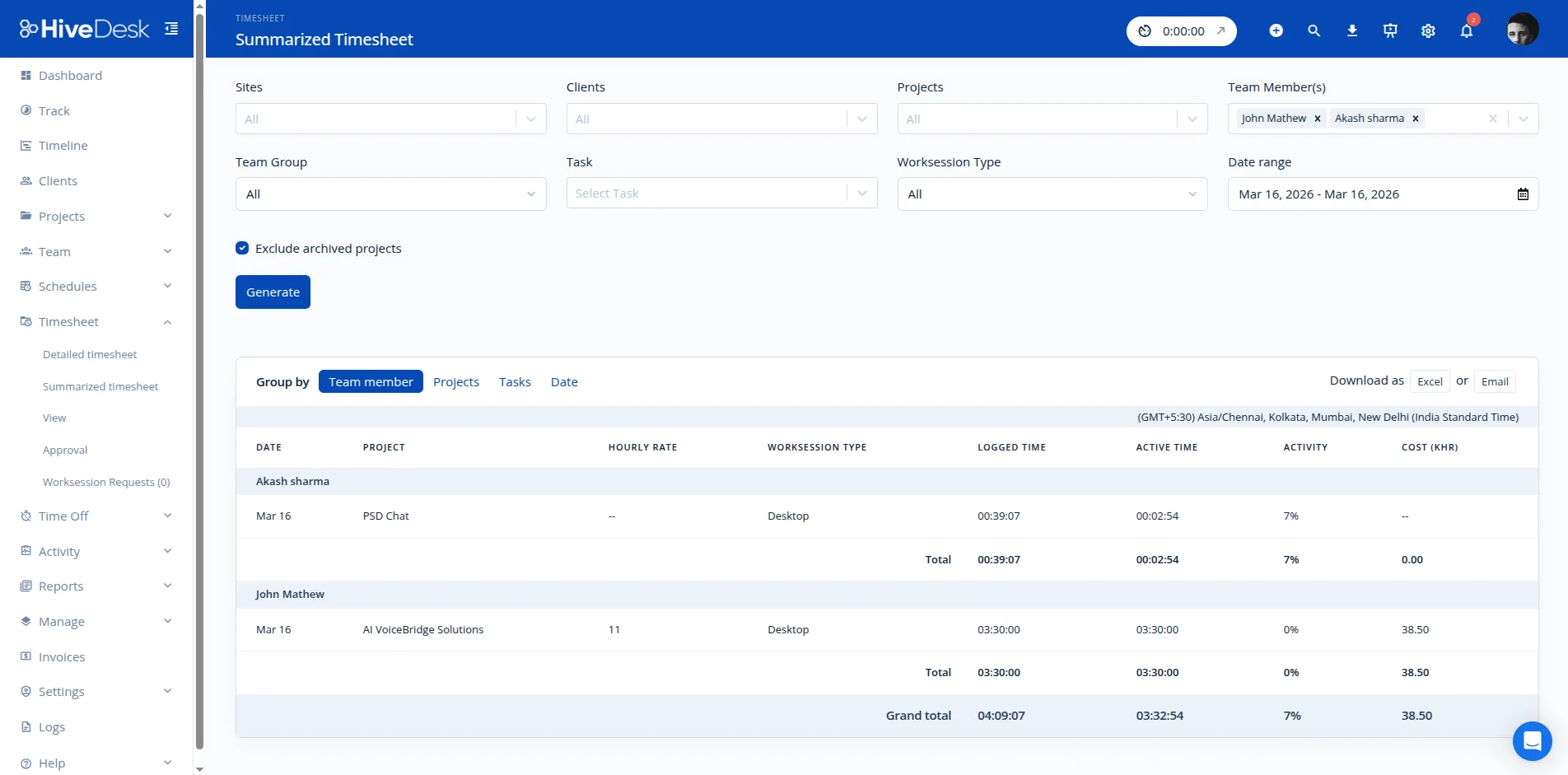
HiveDesk generates timesheets automatically from tracked time data. Timesheets show hours worked by employee, task, project, and date. Managers review and approve timesheets through a built-in workflow, then export approved timesheets as PDF or Excel for payroll processing or client billing.
HiveDesk offers a 14-day free trial with full access to every feature — automatic time tracking, screenshots, scheduling, attendance, timesheets, and reporting. No credit card required. After the trial, it costs $5/user/month with no feature restrictions.
The best automatic time tracker depends on your needs. For teams that need time tracking plus workforce management (scheduling, attendance, leave, activity monitoring), HiveDesk provides the most complete package at $5/user/month. For individual freelancers who just need a simple timer, tools like Toggl may suffice — but they lack workforce management features.
HiveDesk costs $5 per user per month — one plan with every feature included. Automatic time tracking, screenshot monitoring, employee scheduling, attendance management, leave tracking, timesheets, task management, and reporting. There is a 14-day free trial with no credit card required.
Related Resources
Guides
Templates
Ready to Get Started?
Join teams worldwide who trust HiveDesk for workforce management, time tracking, and employee monitoring. $5/user/month, all features included.