

Best Employee Monitoring Software for Remote Teams in 2026

Best Employee Monitoring Software — Quick Answer
The best employee monitoring software for remote teams in 2026 depends on your team size, budget, and monitoring approach. HiveDesk ($5/user/month) is the most affordable option with automatic screenshots, time tracking, and scheduling. Hubstaff ($5–$10/user/month) adds GPS tracking and invoicing. Time Doctor ($7–$20/user/month) offers distraction alerts and payroll integrations. ActivTrak has a free tier for up to 3 users. For enterprise teams, Teramind provides advanced insider threat detection. All platforms listed offer free trials, and pricing is per user per month.
The world of work has undergone a seismic shift, with remote teams becoming not just a contingency plan but a strategic advantage for countless organizations. Yet, with this newfound freedom comes a unique set of management challenges. How do you ensure employee productivity without micromanaging? How do you maintain team cohesion when everyone is geographically dispersed? This is where employee monitoring software, when used thoughtfully and ethically, enters the conversation.
This guide is for forward-thinking leaders navigating the complexities of remote work in 2026, seeking the best employee monitoring software tools that foster accountability, enhance efficiency, and ultimately, build stronger, more productive remote teams. We'll cut through the noise, offering clear, actionable insights into the top platforms available today, helping you make an informed decision that aligns with your company's values and goals.
Why Employee Monitoring for Remote Teams Matters More Than Ever
The pandemic didn't just introduce remote work; it accelerated its evolution. What began as a temporary measure has solidified into a permanent fixture for many, bringing with it both immense opportunities and unforeseen challenges. We've moved past the initial novelty and are now in a phase of optimization. Companies are looking for sustainable models, and that often involves understanding work habits, identifying bottlenecks, and ensuring equitable workloads across hybrid teams and distributed teams alike — all without the traditional in-office cues.
Beyond Surveillance: What Are We Really Looking For?
Let's be clear: the goal of modern employee monitoring isn't to play "Big Brother." That approach is outdated, counterproductive, and detrimental to team morale.
We're seeking insights. We want to understand productivity trends, identify training needs, prevent burnout by spotting overworked individuals, and safeguard sensitive data. It's about creating a fair and transparent environment where contributions are recognized, and resources are optimized. The right employee monitoring solution moves you from guesswork to informed leadership — helping you boost productivity, streamline workflows, and track employee performance across every work environment. For how to roll out monitoring without damaging trust, see our guide to the ethics of employee monitoring.
How We Chose the Best
With a plethora of options available, distinguishing the genuinely valuable employee monitoring tools from mere noise requires a clear framework. Our selection process focused on what truly matters for remote teams in 2026 and beyond.
Transparency and Ethics: Any software worth its salt must facilitate an open and honest relationship between employer and employee. We prioritized tools that offer clear reporting and make it easy for companies to be upfront about their practices.
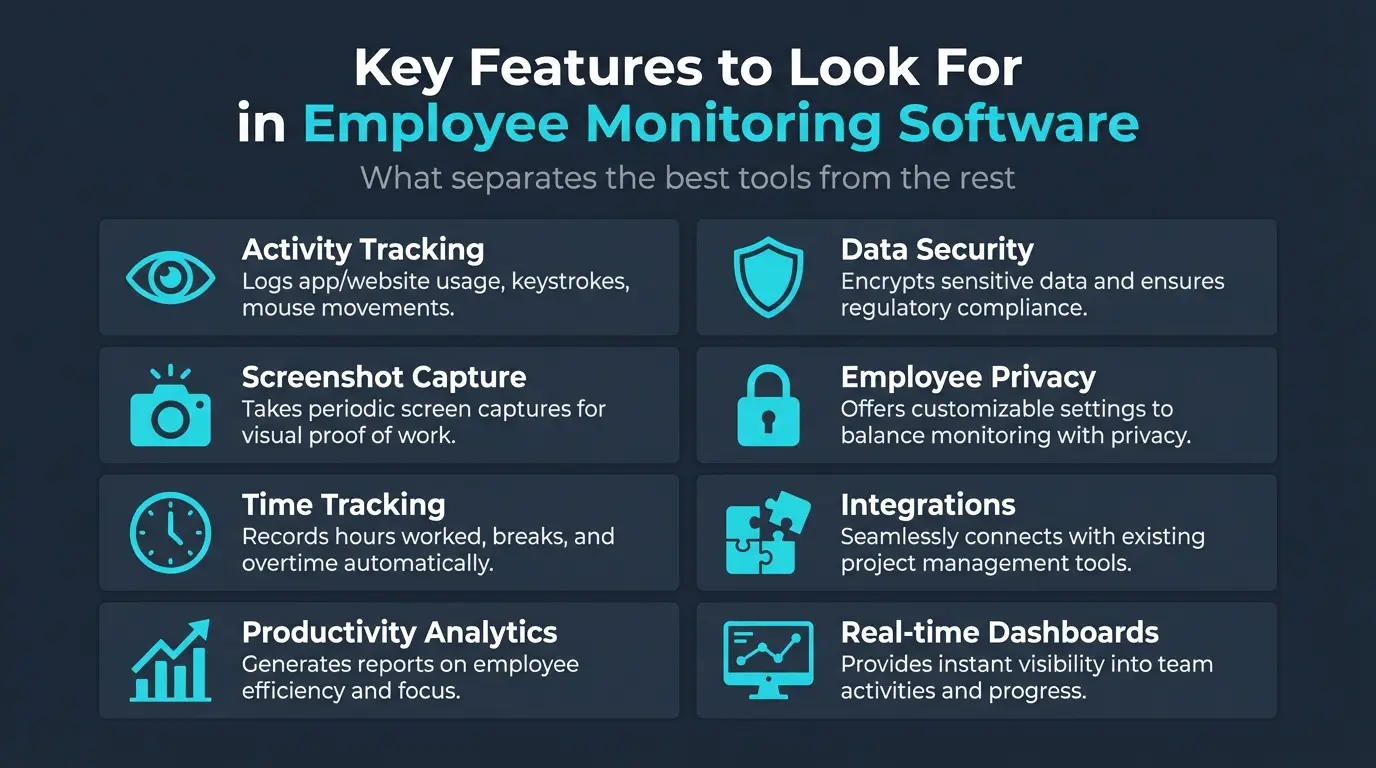
Key Features That Make a Difference:
- Activity Monitoring and Tracking: App usage, website visits, and idle time — providing a holistic view of digital engagement across Windows, macOS, and Linux.
- Productivity Analytics: Tools that translate raw data into actionable insights, identifying trends and distinguishing between productive and non-productive activities. For a full breakdown of tracking methods, see our guide to employee productivity tracking.
- Screenshot Capture (with ethical controls): For specific projects or compliance needs — but always with clear notification to the employee. See our guide on how screenshot-based time tracking works for a deeper look at ethical implementation.
- Time Tracking and Timesheets: Accurate, easy-to-use time logs, often integrated with project management tools.
- Data Security and Privacy: Robust measures to protect both company and employee data, including compliance with GDPR standards.
Ease of Use: We favored platforms with intuitive interfaces, straightforward setup processes, and minimal learning curves.
Scalability and Support: The best software grows with you, offering flexible pricing plans and responsive customer support.
Quick Comparison
| Feature | HiveDesk | Hubstaff | Time Doctor | ActivTrak | Teramind | DeskTime |
|---|---|---|---|---|---|---|
| Starting price | $5/user | $5/user | $7/user | $10/user | $15/user | $7/user |
| Screenshots | Yes | Yes | Yes | Optional | Yes | Optional |
| App/URL tracking | No | Yes | Yes | Yes | Yes | Yes |
| Video recording | No | No | Premium | No | Yes | No |
| Activity levels | Yes | Yes | Yes | Yes | Yes | Yes |
| Scheduling | Yes | Yes | Paid tier | No | No | No |
| GPS tracking | No | Yes | No | No | No | No |
| Integrations | Asana | 40+ | 60+ | 50+ | 15+ | 10+ |
The Top 10: Best Employee Monitoring Software for Remote Teams in 2026
1. HiveDesk
Overview: HiveDesk combines employee monitoring with full workforce management at a flat $5/user/month. It captures periodic screenshots at configurable intervals, tracks keyboard and mouse activity levels, and includes shift scheduling, attendance tracking, leave management, and invoicing in a single plan with no feature tiers.
Key Features: Periodic screenshots at configurable intervals, keyboard and mouse activity levels, automatic time tracking across desktop, mobile, and browser, shift scheduling, attendance tracking, leave management, and invoicing.
Pros:
- All features at $5/user/month — no tiers
- Screenshots, scheduling, attendance, leave, and invoicing in one plan
- Purpose-built for contact centers and BPOs
- Desktop apps for Windows, macOS, Linux, plus iOS mobile and Chrome extension
- 14-day free trial, no credit card required
Cons:
- Asana is the only third-party integration
- No app/website categorization
- No AI analytics or productivity scoring
Best For: Contact centers, BPOs, remote teams, and small businesses that need monitoring combined with workforce management at a predictable price.
2. Teramind
Overview: Teramind is a comprehensive insider threat prevention and productivity optimization platform. It offers an unparalleled level of visibility and control, designed for organizations that need an in-depth understanding of user activity and behavior.
Key Features: Live monitoring of employee screens, keystroke logging, application and website usage tracking, file transfer monitoring, intelligent behavior analytics, data loss prevention (DLP), and forensic analysis capabilities.
Pros:
- Unparalleled depth of monitoring for data security and compliance
- Excellent insider threat detection with behavior analytics and DLP
- Robust reporting and workforce analytics
- Highly customizable rules and alerts
- Comprehensive audit trails for regulatory requirements
Cons:
- Complex to set up and manage initially
- The depth of monitoring can lead to micromanagement perception if misused
- Premium pricing compared to simpler tools
- Can be resource-intensive on employee computers
Best For: Large enterprises, financial institutions, healthcare providers, and government contractors with high-security needs and strict compliance requirements (HIPAA, GDPR, PCI DSS).
3. ActivTrak
Overview: ActivTrak positions itself as a workforce analytics platform rather than just a monitoring tool. Its philosophy centers on providing insights into how work gets done, identifying productivity trends, and helping teams optimize their processes with a less intrusive approach.
Key Features: Passive productivity monitoring, automatic activity categorization (productive/unproductive/neutral), productivity reports, real-time dashboards, workload management insights, and event-driven screenshot capturing.
Pros:
- Focus on analytics and insights rather than raw activity logs
- User-friendly interface, easy to set up and navigate
- Less intrusive approach that fosters more trust
- Excellent workload balancing tools to prevent burnout
- Strong at identifying productivity bottlenecks
Cons:
- Less granular monitoring than competitors like Teramind
- Limited DLP or security features
- Screenshot frequency needs careful configuration
Best For: Remote teams and companies looking for a data-driven approach to optimize productivity without overly intrusive surveillance. Great for small to medium-sized businesses.
4. Hubstaff
Overview: Hubstaff started as a robust time tracking solution and has grown significantly, but time management remains at its core. It helps remote teams accurately track time, manage projects, and automate payroll.
Key Features: Desktop and mobile time tracking, optional screenshot capture at customizable intervals, keyboard and mouse activity percentages, task management, GPS tracking for mobile workforces, and automated payroll and invoicing.
Pros:
- Excellent and highly accurate time tracking
- Integrated project and task management
- Automated payroll and invoicing reduces admin overhead
- Flexible monitoring options (choose your level)
- Mobile app with GPS tracking for field workers
- Intuitive user experience
Cons:
- Screenshots can feel intrusive if set too frequently
- Less focus on deeper behavior analytics
- Relies heavily on employee managing their timers
- Pricing can add up for larger teams
Best For: Freelancers, agencies, small to medium-sized remote businesses, and project-based teams that need precise time tracking for billing, payroll, and project budgeting.
5. DeskTime
Overview: DeskTime is a straightforward yet powerful productivity tracking tool designed for simplicity. It gives companies a clear picture of how employee time is spent, automatically categorizing activities to identify productivity levels.
Key Features: Automatic time tracking from computer start, automatic app/website categorization, real-time monitoring dashboards, idle time detection, project tracking, and configurable screenshot captures.
Pros:
- Extremely easy to use with intuitive interface
- Automatic productivity calculation saves manual effort
- Clear, concise reports and dashboards
- Affordable pricing, attractive for smaller businesses
- Optional "private time" feature respects employee privacy
Cons:
- Less granular control than advanced solutions
- Basic security features (no DLP or insider threat detection)
- Productivity accuracy depends on categorization quality
Best For: Small to medium-sized businesses and startups looking for an affordable, no-frills solution to track time and monitor productivity without needing enterprise-level features.
6. Time Doctor
Overview: Time Doctor is a comprehensive time tracking and monitoring solution built to provide precision and proof of work for remote teams. It goes beyond logging hours, offering features designed to ensure accountability and transparent insights.
Key Features: Time tracking linked to projects/tasks, screenshot monitoring at customizable intervals, keyboard and mouse activity tracking, app/website usage categorization, productivity reports, payroll integration, and optional webcam shots.
Pros:
- Robust proof of work for client billing
- Detailed productivity analytics
- Integrated project management
- Automated payroll and invoicing
- Alerts for distracting activities
- Ethical options with customizable monitoring levels
Cons:
- Can feel invasive with frequent screenshots and activity tracking
- Configuration requires careful thought for ethical implementation
- Steeper learning curve for full utilization
Best For: Agencies, consulting firms, and remote teams that bill clients by the hour and require strong proof of work. Also good for organizations with strict time allocation requirements.
7. InterGuard
Overview: InterGuard blends employee monitoring with robust cybersecurity and data loss prevention capabilities. It's designed for organizations that need to track productivity and safeguard digital assets simultaneously.
Key Features: Comprehensive activity monitoring (keystroke logging, app usage, website visits, email tracking, file transfers), DLP, content filtering, forensic analysis, real-time alerts, and remote control capabilities.
Pros:
- Robust data loss prevention
- Strong insider threat detection
- Comprehensive activity tracking with detailed audit trails
- Advanced content filtering
- Cloud and on-premise deployment options
Cons:
- Potentially invasive (keystroke logging, stealth mode)
- Complex to configure and manage
- Higher price point
- Primary strength is security, not productivity analytics
Best For: Highly regulated industries (finance, healthcare, legal, government) handling sensitive data, where data security and compliance are paramount.
8. Insightful (formerly Workpuls)
Overview: Insightful, which rebranded from Workpuls, provides an in-depth understanding of employee behavior and productivity through sophisticated analytics and monitoring capabilities. It also includes a "burnout risk" feature that flags overworked team members.
Key Features: Automatic time tracking, app/website monitoring with customizable productivity classifications, smart screenshot capture (event-triggered), real-time dashboards, productivity reports, bandwidth monitoring, and attendance tracking.
Pros:
- Detailed behavioral insights for workflow optimization
- Smart screenshot technology captures crucial moments
- Robust and customizable reporting
- Workforce management features (attendance, scheduling)
- User-friendly interface
Cons:
- Level of monitoring can feel invasive without transparent communication
- Configuration demands for accurate metrics
- Lacks advanced DLP features
Best For: Medium to large remote teams, BPOs, contact centers, and organizations where understanding employee behavior and optimizing workflows is critical.
9. Controlio
Overview: Controlio is a modern, real-time monitoring solution that balances robust oversight with a user-friendly approach, providing managers with immediate insights into remote team activity.
Key Features: Real-time screen monitoring, continuous screen recording, app/website usage tracking, keystroke logging (configurable), detailed activity logs, productivity reports, and alert system.
Pros:
- Excellent real-time monitoring for quick checks and support
- Continuous screen recording for comprehensive records
- User-friendly interface
- Detailed activity logs
- Affordable for its feature set
Cons:
- High potential for intrusiveness if not managed transparently
- Continuous recording generates significant storage needs
- Less focus on deep analytics
- Limited DLP/security features
Best For: Customer support, virtual assistants, data entry, or specialized project teams requiring close supervision or training, particularly small to medium-sized businesses.
10. Kickidler
Overview: Kickidler emphasizes visual monitoring, offering unique features for observing and analyzing employee activity through screen recordings and real-time viewing.
Key Features: Online screen broadcast (mosaic view of multiple screens simultaneously), continuous video recording, app/website usage tracking, keyboard/mouse activity analytics, time tracking, and productivity reports.
Pros:
- Unique mosaic view for simultaneous team monitoring
- Continuous video recording for irrefutable visual evidence
- Deep visual insights for identifying workflow issues
- Excellent for training and quality assurance
- Detailed activity statistics
Cons:
- Highly intrusive — requires extreme transparency and explicit consent
- Data storage intensive with continuous video
- Focuses on visuals over deep analytics
- Resource demanding on both employee and server side
Best For: Roles where visual verification of work processes is paramount — virtual assistants, customer support agents, data entry specialists, or positions where quality assurance and training require seeing how work is done.
The Monitoring Spectrum
Employee monitoring tools range from light oversight to deep surveillance. Choose the level that matches your actual needs — more invasive is not always better.
Light monitoring — periodic screenshots, activity levels, and time tracking. Employees know when they are being monitored. HiveDesk and Hubstaff sit here.
Medium monitoring — app and website categorization, productivity scoring, and distraction alerts, sometimes with continuous tracking. ActivTrak, DeskTime, Insightful, and Time Doctor fall in this range.
Deep surveillance — keystroke logging, email monitoring, continuous video recording, and data loss prevention. Teramind, InterGuard, Controlio, and Kickidler operate here. This level raises significant trust and legal concerns and is best reserved for regulated industries.
Beyond the Software: Implementing Employee Monitoring Ethically
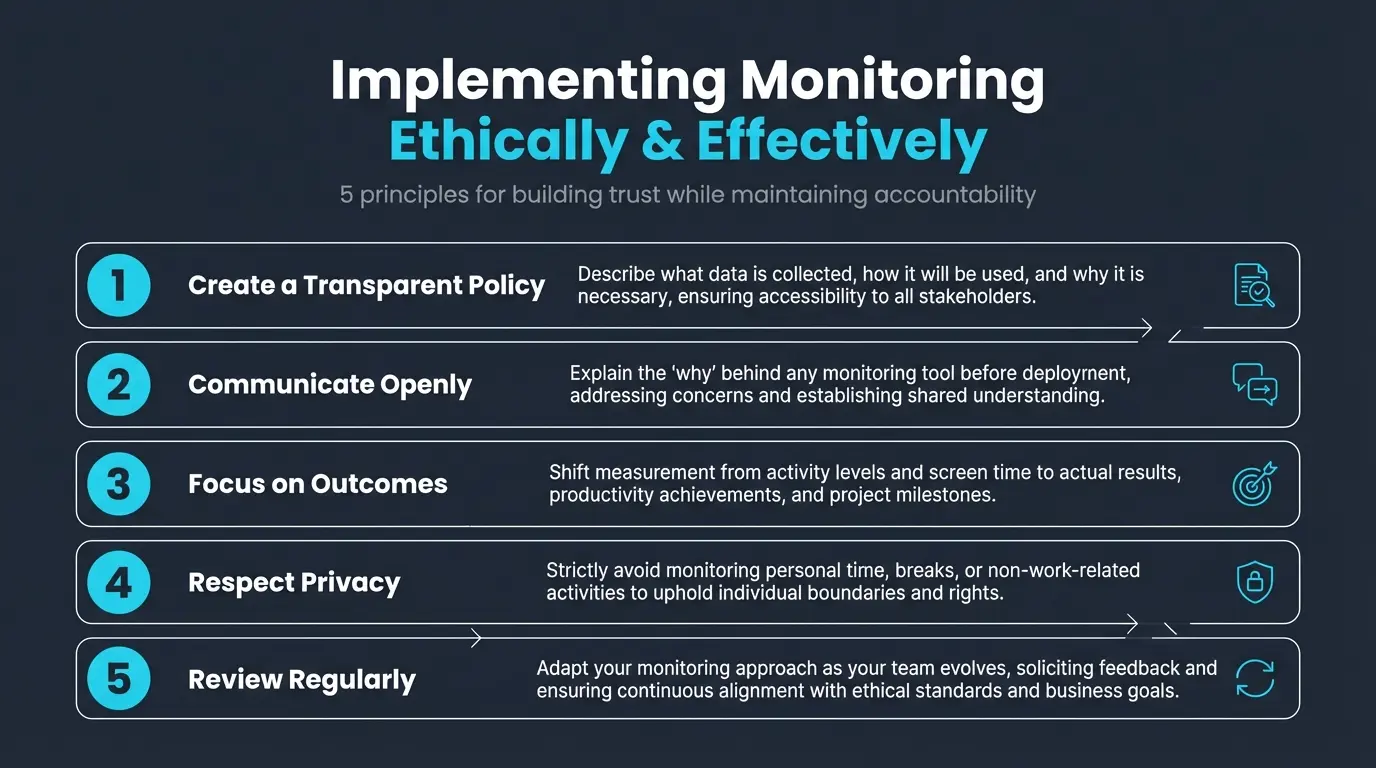
Choosing the right software is only half the battle. The success of any monitoring initiative hinges on ethical implementation and how it integrates into your company culture.
Craft a Clear and Transparent Policy
Before installing any software, create a comprehensive policy that explicitly states:
- What data is being collected (app usage, websites, screenshots, keystrokes)
- Why it's being collected (productivity, data security, compliance, payroll)
- How the data will be used (performance reviews, training needs, security investigations)
- Who has access to the data
- When monitoring occurs (only during work hours, not personal time)
- Employee rights — how team members can view their own data or dispute findings
Share this policy with every employee and obtain their acknowledgment. Ambiguity breeds mistrust.
Train and Communicate
Don't just hand down a policy — engage your team in a dialogue. Explain the "why" behind the monitoring. Frame it as a tool to support them, ensure fair workloads, identify training opportunities, and protect the company from security threats.
When employees feel they are part of the process, resistance diminishes. For practical strategies on leading distributed teams beyond monitoring alone, see our guide on how to manage your virtual team.
Focus on Outcomes, Not Just Activity
The biggest trap in employee monitoring is focusing solely on activity metrics. This can lead to employees faking activity, burnout, and a toxic culture. Instead, shift the focus to outcomes. Is the project delivered on time? Is the customer satisfied?
Use monitoring data to understand how outcomes are achieved, or why they aren't. If someone has low activity but high output, that's a positive. Monitoring should provide context, not just a raw score. Pairing monitoring with genuine efforts at motivating remote workers produces far better results than surveillance alone.
Maintain Trust
- Lead by example — managers should be subject to the same policies
- Provide regular feedback — use data for constructive conversations, not punishment
- Respect privacy — ensure personal time is not monitored
- Review and adapt — regularly update your practices as your team evolves
How HiveDesk Approaches Employee Monitoring
HiveDesk takes a transparency-first approach to employee monitoring. Rather than covert surveillance, HiveDesk gives managers visibility into employee time, activity, and productivity through:
- Automatic time tracking across desktop, mobile, and browser
- Periodic screenshots with clear employee notification — agents always know when screenshots are being taken
- Real-time dashboards showing who's working, on what, and when
- Attendance management to track clock-ins, breaks, and clock-outs
- Project and task tracking to connect time to deliverables
All of this at $5/user/month with a 14-day free trial — no credit card required.
The philosophy is simple: give managers the data they need to manage effectively, while keeping everything transparent so employees know exactly what's being tracked and why.
Making Your Choice
Start with your "why." Why do you need employee monitoring? Is it for productivity insights, data security, compliance, or accountability? Your core need will dictate which features are paramount.
Then consider your company culture. Are you a high-trust, autonomous environment, or do you operate in a highly regulated industry requiring strict oversight?
Finally, don't rush. Trial a few options, involve key stakeholders, and be prepared to iterate. The right employee monitoring solution, applied with integrity and transparency, won't just track employee work — it will transform how your remote team operates.
Frequently Asked Questions
Is employee monitoring software legal?
In most jurisdictions, employee monitoring is legal when employees are informed and consent to monitoring. In the US, employers generally have the right to monitor company-owned devices and work activities. The EU (GDPR) requires transparency and proportionality. Best practice is to have a clear monitoring policy, inform employees before monitoring begins, and use proportionate monitoring — periodic screenshots rather than keystroke logging.
What is the best employee monitoring software for small businesses?
HiveDesk at $5/user/month is the best value for small businesses. It includes screenshots, activity monitoring, scheduling, attendance, leave management, and invoicing in a single plan with no tiers. DeskTime is another affordable option if automatic app categorization matters more than screenshots.
What is the least invasive employee monitoring software?
HiveDesk and Hubstaff take periodic screenshots at configurable intervals — the least invasive approach that still provides meaningful visibility. DeskTime automatically tracks app usage without screenshots by default. On the invasive end, Teramind and InterGuard log keystrokes, and Kickidler and Controlio record screens continuously.
How much does employee monitoring software cost?
Prices range from about $5/user/month (HiveDesk, all features included) to $31/user/month (Teramind's DLP tiers). Most tools charge $5–$15/user/month, with enterprise analytics and security features driving prices higher. Watch for tiered pricing where useful features are locked behind more expensive plans.
Can employees detect monitoring software?
Most reputable monitoring tools run visibly — employees know the app is active and can see when tracking is on. Some tools offer "stealth mode" (hidden monitoring), but this is ethically questionable and can violate privacy laws in many jurisdictions. Best practice is transparent monitoring where employees are aware and have consented.
Try HiveDesk Free for 14 Days
Automatic time tracking, periodic screenshots, real-time dashboards, and attendance management — all with full transparency. $5/user/month, all features included.
