

Choosing Shift Scheduling Software for Call Centers

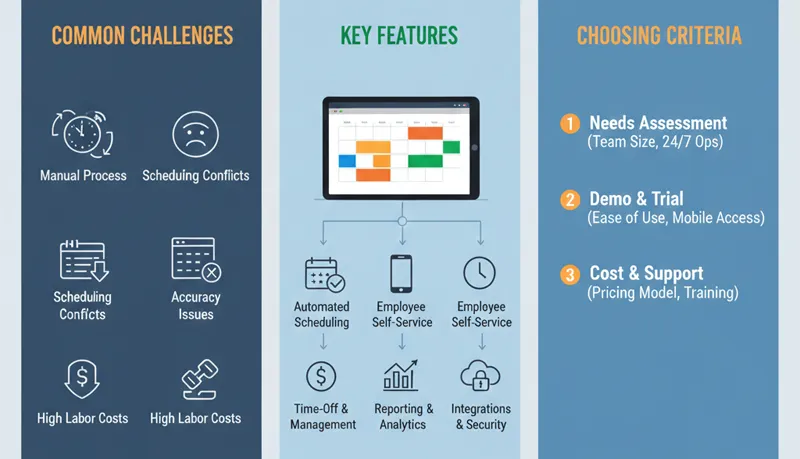
Most call centers and BPOs outgrow spreadsheet-based scheduling when they hit 30–50 agents. At that point, the manual effort of building weekly schedules, tracking shift swaps, managing time-off requests, and staggering breaks across shifts becomes a significant time sink for supervisors — and the errors in manual scheduling start costing real money in overtime, service level misses, and agent frustration.
The challenge is not finding scheduling software — there are dozens of options. The challenge is finding software that actually fits how call centers and BPOs operate, without paying for features you do not need or discovering critical gaps after you have already committed.
What call center scheduling actually requires
Before evaluating software, be specific about what your operation needs. Call center scheduling has requirements that generic employee scheduling tools often do not address:
| Requirement | Why it matters | What to check |
|---|---|---|
| Interval-level scheduling | Call volume varies by half-hour; flat shifts miss peaks | Can you assign different agent counts by interval, or only by shift? |
| Break scheduling with stagger rules | Unstaggered breaks collapse service level during peak hours | Can you set break windows and stagger rules, or only fixed break times? |
| Shift pattern templates | You run the same patterns weekly with minor adjustments | Can you save and reuse shift templates, or rebuild from scratch each week? |
| Days-off management | Fair distribution across a 6- or 7-day operation | Can you set days-off rotation rules, or is it purely manual? |
| Time-off request workflow | Agents request PTO; supervisors approve based on coverage | Does it show coverage impact before approving, or just approve/deny? |
| Shift swap workflow | Agents trade shifts; supervisor verifies coverage is maintained | Does it validate that the swap does not create a coverage gap? |
| Overtime visibility | You need to see when scheduled hours push an agent into overtime | Does it flag overtime before the schedule is published? |
| Multi-skill / multi-account | BPOs need agents scheduled by account, not just by time | Can you schedule by skill group or account, not just department? |
| Adherence tracking | Knowing whether agents follow the schedule | Does it compare scheduled vs. actual states, or only track clock-in/out? |
| Integration with time tracking | Schedule is only half the equation — you need actual hours worked | Does it integrate with your time tracking system or have built-in tracking? |
A tool that handles generic shift scheduling (assign Agent A to "morning shift" on Monday) but cannot stagger breaks, show overtime impact, or schedule by account will create almost as many problems as it solves in a call center environment.
Features that matter vs. features that do not
Features that matter
Schedule-to-coverage comparison. The most useful feature in any scheduling tool is the ability to see, before you publish the schedule, how many agents are available (net of breaks and time off) during each interval — compared to how many you need. This is the single view that tells you whether the schedule will work.
Automated conflict detection. The software should prevent scheduling errors before they happen: an agent scheduled for two shifts on the same day, an agent scheduled during approved time off, or a shift that pushes an agent past overtime thresholds. If you have to manually check for these, you will miss them.
Time-off and swap approval with coverage context. When a supervisor approves a time-off request or shift swap, they need to see the coverage impact instantly. "Approving this request drops Tuesday 2:00–4:00 PM from 12 agents to 9, below the 11-agent minimum" — that context prevents coverage gaps created by well-intentioned approvals.
Schedule publication and notification. The schedule must be easily accessible to agents — not emailed as a PDF attachment or posted on a breakroom wall. Agents should be able to see their upcoming schedule on their phone at any time. The system should notify agents when the schedule is published and when changes are made.
Reporting on schedule effectiveness. After the week runs, you need to compare what was scheduled to what actually happened: adherence, unplanned absences, overtime incurred, service level by interval. This feedback loop is how scheduling improves over time.
Features that rarely matter for call centers
GPS tracking. Useful for field service or delivery teams that need a GPS time clock, unnecessary for desk-based call center agents. Paying for GPS capability you will not use increases cost without adding value.
AI-generated schedules. Marketed heavily, but the value depends on the quality of the underlying algorithm and whether it understands call center constraints. A tool that auto-generates schedules but does not account for break staggering, skill-based assignment, or contractual SLA requirements may produce schedules that look optimized but miss critical operational constraints. Test this thoroughly with your actual data before relying on it.
Social features and gamification. Some tools include team feeds, badges, or gamified elements. These are unlikely to influence whether your schedule works or whether agents are satisfied with it. Schedule quality — predictability, fairness, advance notice — drives satisfaction, not software features layered on top of a bad schedule.
How to evaluate the real cost
The per-user monthly price is the most visible cost, but it is often not the largest one. The real cost of scheduling software includes:
| Cost component | What to calculate |
|---|---|
| Subscription | Per-user price × number of users × 12 months |
| Feature tier | Which plan includes the features you actually need? Many tools gate critical features (overtime alerts, advanced reporting, multi-department) behind higher-priced tiers |
| Implementation | Time to set up shift patterns, import employee data, configure rules. For larger operations, this can take days of admin time |
| Training | Time for supervisors and agents to learn the system. Simpler tools save money here |
| Ongoing admin | Hours per week a scheduler or supervisor spends building and maintaining schedules in the tool. A clunky interface costs you labor hours every week |
| Missed savings | If the tool does not flag overtime, does not show coverage gaps, or does not support break staggering, you continue paying for those scheduling inefficiencies |
Example comparison for a 100-agent call center:
| Factor | Tool A ($3/user/month) | Tool B ($5/user/month) | Tool C ($9/user/month) |
|---|---|---|---|
| Annual subscription | $3,600 | $6,000 | $10,800 |
| Feature gaps | No break staggering, no overtime flags, no coverage view | Full scheduling + time tracking + leave management | Full WFM with interval planning, adherence |
| Estimated overtime cost from scheduling gaps | $25,000–$40,000/year | Minimal — gaps visible before publishing | Minimal — gaps visible before publishing |
| Admin time building schedules | 6 hrs/week (manual workarounds) | 3 hrs/week | 2 hrs/week |
| Effective annual cost | $28,600–$43,600+ | $6,000 + admin time | $10,800 + admin time |
The cheapest tool is rarely the cheapest option. A tool that costs $2/user less but does not catch overtime conflicts or coverage gaps can cost 5–10x the subscription savings in preventable overtime and service level misses.
Evaluation process
Step 1: Document your requirements
Before looking at any software, list your non-negotiable requirements based on your operation:
- Number of agents and supervisors who will use the system
- Operating hours and days (do you run 24/7, 6 days, 5 days?)
- Number of shift patterns you use
- Whether you need multi-account scheduling (BPOs)
- Whether you need integrated time tracking, attendance tracking, and attendance monitoring
- Whether you need leave management in the same tool
- Overtime rules and thresholds you need enforced
- Break scheduling requirements (fixed times, staggered windows, paid vs. unpaid)
- Integration requirements (payroll system, ACD, existing HR system)
Step 2: Shortlist based on fit, not popularity
Narrow to 2–3 options that meet your non-negotiable requirements. The most popular or most-reviewed tool is not necessarily the best fit for call center operations. A tool designed for retail shift scheduling may be excellent for a restaurant chain and terrible for a BPO.
Step 3: Test with real data
Use the trial period (most tools offer 14–30 days) to build an actual schedule for your operation — not a test schedule with 5 fake employees. Import your real agent list, set up your actual shift patterns, and build next week's schedule in the tool.
During the trial, answer these questions:
- Can you see net available agents per interval after accounting for breaks and time off?
- How long does it take to build a week's schedule compared to your current process?
- Can supervisors approve a swap and immediately see the coverage impact?
- Does it flag when an agent will hit overtime before you publish?
- Can agents view their schedule on their phone?
- Is the reporting useful for identifying adherence problems and schedule gaps after the week runs?
Step 4: Get supervisor feedback
The people who build and manage the schedule daily — supervisors and WFM staff — should evaluate the tool, not just the operations manager who signs the contract. A tool that looks good in a demo but is slow or confusing for the people who use it 5 hours per week will not be adopted.
Step 5: Check the total cost
Calculate the all-in cost including the feature tier you actually need, not the advertised starting price. If break staggering requires the $12/user plan but the marketing says "starting at $5/user," your actual cost is $12/user.
What to do after implementation
Buying the software does not fix scheduling. The tool is only as good as the process and data behind it.
Validate your inputs. The schedule is built on assumptions about call volume patterns, AHT, and shrinkage. If those assumptions are wrong, the schedule will be wrong regardless of how good the tool is. Compare scheduled coverage to actual service level weekly and adjust assumptions when they diverge.
Build the review cadence. Every week, compare what was scheduled to what actually happened — adherence, absences, overtime, service level by interval. Feed this back into next week's schedule. Scheduling improves iteratively, not in a single setup.
Train supervisors on scheduling principles, not just software buttons. A supervisor who understands why break staggering matters and how occupancy affects agent burnout will build better schedules than one who knows every feature of the tool but does not understand workforce management fundamentals.
Measure impact. Track overtime hours, service level consistency, schedule adherence, and unplanned absence rates before and after implementation. If the tool is working, overtime should decrease, service level consistency should improve, and adherence should increase. If these metrics do not move within 60–90 days, the problem may be the process, not the tool — or the tool may not fit your operation.
