

Know Where Your Crews Are and What They're Working On
Construction time tracking software with GPS location tracking, automatic timesheets, and labor cost management. Your crews tap one button on their phone. HiveDesk tracks their hours, logs their location, and generates timesheets for payroll. All for $5/user/month.
No credit card required · Works on iOS, Windows, macOS, Linux · $5/user/month

Paper Timesheets Are Costing Your Construction Business Money
When you manage construction crews across multiple job sites, you need to know where your workers are, what they are working on, and how many hours they are logging. Paper timesheets and phone calls do not cut it.
Without construction time tracking
- Workers at the wrong site and you do not know until end of day
- Paper timesheets with rounded hours and guesswork
- No visibility into how long each task or phase actually takes
- Labor costs per job site are unknown until the project is over
- Payroll disputes from inaccurate or missing time records
- Hours spent calling crews to check if they showed up
With HiveDesk
- GPS location tracking shows where each worker clocked in
- Automatic timesheets — no paper, no manual entries
- Time tracked by project and task so you know where hours go
- Labor costs calculated in real time for every job site
- Accurate payroll data exported in one click
- Real-time visibility into who is working and where
How Construction Time Tracking Works with HiveDesk
Set up your job sites, have your crew install the app, and start tracking. It takes less than 10 minutes.
Set up job sites as projects
Create a project for each construction site. Add tasks for phases like foundation, framing, electrical, and finishing. Assign crew members to their projects.
Crews install the mobile app
Workers download the HiveDesk app on their phone. They log in, select their assigned project, and they are ready to start tracking.
GPS tracks location and hours
When workers tap start, the app records their hours and logs their GPS location. Every work session shows exactly where the worker was.
Timesheets generated automatically
HiveDesk generates timesheets with hours, GPS data, and tasks completed. Review, approve, and export for payroll in one click.
GPS Location Tracking
See where your crews are working — not where they say they are
Construction workers are spread across multiple job sites. You need to know who is where. The HiveDesk iOS mobile app logs GPS coordinates with every time tracking session. One look at the timesheet and you know if a worker was at the assigned site or not.
- GPS location recorded with every clock-in and work session
- Location data visible on timesheets for verification
- Verify workers are at assigned job sites — not somewhere else
- Works through the iOS mobile app with GPS enabled
- Location data helps resolve disputes about hours and attendance
Automatic Timesheets
Eliminate paper timesheets and manual data entry
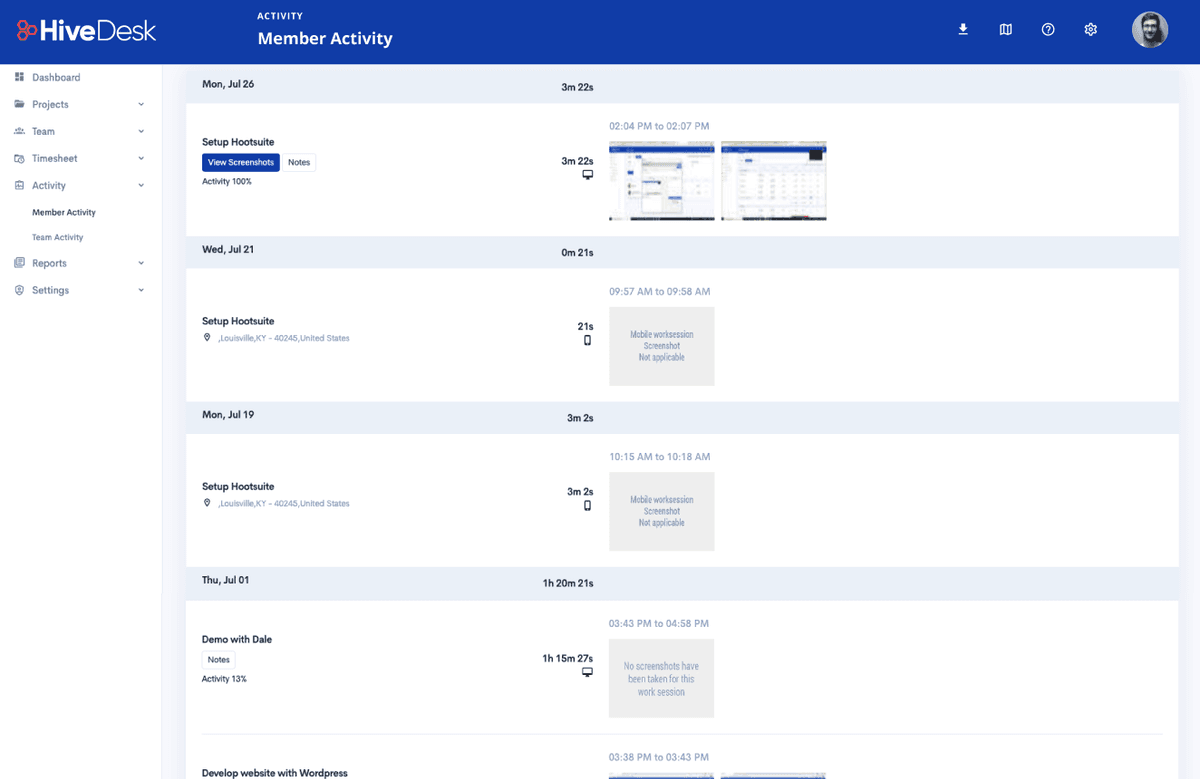
Paper timesheets get lost, damaged, or filled out with rounded numbers. HiveDesk generates accurate timesheets automatically from tracked hours. Every timesheet includes hours worked, break time, GPS location, and tasks completed — ready for manager approval and payroll export.
- Timesheets generated automatically from tracked time data
- View by worker, by project (job site), or by date range
- Break time and overtime tracked and included
- Manager review and approval workflow built in
- Export approved timesheets as PDF or Excel for payroll

Project & Task Tracking
Track every job site, every phase, every task
Create a project for each construction site. Break it down into tasks — foundation, framing, electrical, plumbing, finishing. Assign crew members and track how much time each task actually takes. Stay on schedule by comparing estimated vs. actual hours.
- Create unlimited projects — one per job site or contract
- Break projects into tasks for each construction phase
- Assign workers to projects and tasks
- Track actual time spent vs. estimates per task
- Add due dates to tasks and monitor schedule adherence

Labor Cost Tracking
Know your labor costs before they eat your profit
Labor is the biggest expense on any construction project. HiveDesk lets you set hourly rates for each worker and automatically calculates labor costs based on tracked hours. You get real-time visibility into what each job site is costing you — not an end-of-project surprise.
- Set hourly cost rates for each crew member
- Labor costs calculated automatically from tracked hours
- View costs by project, by worker, or by date range
- Compare actual labor costs against project budgets
- Export cost reports for accounting and billing

Built for Every Type of Construction Business
Whether you manage 5 workers or 50, HiveDesk gives you the visibility and control you need to run your construction business efficiently.
General Contractors
Track hours across multiple job sites. See labor costs per project and generate timesheets for your entire crew from one dashboard.
Subcontractors
Provide verified timesheets with GPS location data to general contractors. Prove your crew was on site and worked the hours billed.
Electrical & Plumbing
Track time by service call or job site. Know where your technicians are and how long each job takes for accurate bidding and billing.
Landscaping
Manage crews working at different properties throughout the day. Track drive time vs. on-site time with GPS location data.
Road & Infrastructure
Track large crews on long-running projects. Monitor labor costs against budgets and ensure workers are logging accurate hours.
Renovation & Remodeling
Track time by project phase — demo, framing, electrical, plumbing, finish work. Bill homeowners accurately based on real hours worked.
Everything Your Construction Business Needs
One plan. $5/user/month. Every feature included.
GPS Location Tracking
Track crew location on job sites with the iOS mobile app. GPS data is logged with every work session for verification.
Automatic Timesheets
Timesheets are generated from tracked hours — by worker, project, or date range. Review, approve, and export for payroll.
Project & Task Tracking
Create projects for each job site. Assign tasks to crew members. Track progress, deadlines, and time by task.
Labor Cost Tracking
Set hourly rates per worker. HiveDesk calculates labor costs by project so you know exactly what each job site costs.
Attendance Management
Track attendance automatically from clock-in data. Monitor who showed up, who was late, and who was absent.
Employee Scheduling
Create and assign shifts for your crews. Workers see their schedules. Track schedule adherence in real time.
Trusted by Businesses Since 2011
We have used every time tracking software under the sun, and they all fall short in some area that we need, but overall HiveDesk has met our needs. Their PDF screenshot reports are clean, easy to use and understand. Our clients prefer them over the complicated reports of other systems.
HiveDesk has been instrumental in helping us manage our remote team effectively. The automatic time tracking and screenshot features give us the visibility we need without micromanaging. Setup was straightforward and our team adopted it within a day.
Construction Time Tracking FAQ
Common questions about time tracking for construction businesses.
Construction time tracking software records work hours for field crews, tracks their GPS location on job sites, and generates timesheets for payroll and labor cost reporting. Unlike paper timesheets or punch clocks, modern construction time tracking software like HiveDesk runs on mobile phones — workers tap one button to start and stop, and the software handles the rest.
Construction workers download the HiveDesk mobile app on their phone (iOS). When they arrive at a job site, they tap the start button. The app records their hours by project and task, logs their GPS location for each work session, and generates timesheets that supervisors can review. Workers tap stop when they finish. No paperwork, no manual entries.
Yes. The HiveDesk iOS mobile app includes GPS location tracking. Every time a worker clocks in and tracks time, their GPS location is recorded and attached to the work session. You can view the location data in the timesheet to verify that workers were at the correct job site during their shift.
When a construction worker starts the HiveDesk timer on the iOS mobile app, the app captures their GPS coordinates. This location data is logged with each work session and appears on the timesheet. Supervisors and project managers can review the location data to confirm workers were on the assigned job site. GPS tracking requires the worker to have the mobile app running while tracking time.
The best construction time tracking app depends on your needs, but HiveDesk stands out for small to mid-size construction firms. It combines GPS location tracking, automatic timesheets, project and task tracking, and labor cost tracking in one platform for $5/user/month — significantly less than competitors like Busybusy or ClockShark that charge $8-$20+ per user.
HiveDesk costs $5 per user per month — one plan that includes every feature. No tiers, no hidden fees, no per-feature upsells. You get GPS time tracking, automatic timesheets, project tracking, task management, labor cost tracking, and reporting. There is a free 14-day trial with no credit card required.
Yes. Create a project in HiveDesk for each job site and assign your crew members to it. Set hourly rates for each worker. HiveDesk automatically calculates labor costs based on tracked hours and hourly rates, giving you real-time visibility into what each job site is costing you in labor.
Yes. HiveDesk has an iOS mobile app designed for field workers. Workers can track time, log GPS location, and select projects and tasks right from their phone. HiveDesk also has desktop apps for Windows, macOS, and Linux, plus a Chrome browser extension — but the mobile app is the primary tool for construction crews in the field.
HiveDesk automatically generates timesheets from tracked time data. You can view timesheets by worker, by project (job site), or by date range. Each timesheet includes hours worked, break time, GPS location data, and tasks completed. Managers can review and approve timesheets, then export them as PDF or Excel for payroll processing.
Yes. Create unlimited projects in HiveDesk — one for each job site or construction project. Assign workers to the projects they are working on. HiveDesk tracks time by project automatically, so you can see hours and labor costs for each job site separately. Workers can switch between projects throughout the day.
Related Resources
Time Tracking
Ready to Get Started?
Join teams worldwide who trust HiveDesk for workforce management, time tracking, and employee monitoring. $5/user/month, all features included.