

Scale Your E-commerce Support Without Losing Control
Black Friday surges, holiday rushes, multi-channel queues — e-commerce support never slows down. HiveDesk tracks every agent hour across chat, email, and phone, scales with seasonal staff, and gives you real-time visibility into your entire support operation.
No credit card required · $5/user/month · All features included

E-commerce Support Is Unpredictable. Your Workforce Management Shouldn't Be.
Ticket volumes spike without warning. Seasonal hires need to be productive from day one. And you need to know exactly where agent hours are going across every channel — without chasing timesheets.
Without e-commerce support tracking
- No visibility into how agent hours split across chat, email, and phone
- Seasonal hires work for weeks before you catch productivity issues
- Overtime piles up during Black Friday and holidays without warning
- Manual timesheets are unreliable — especially from temporary staff
- Scheduling is guesswork because you lack channel-level time data
- Staffing decisions for peak periods are based on last year's gut feel
With HiveDesk
- Track agent hours by channel, product line, or ticket type automatically
- Monitor seasonal hires from day one with activity data and screenshots
- Overtime hours are tracked and visible before payroll processing
- Timesheets are generated from actual tracked time — no manual entry
- Channel-level time reports inform staffing and scheduling decisions
- Historical data from past peaks helps you plan for the next one
Multi-Channel Time Tracking
Know exactly where agent hours go across every channel
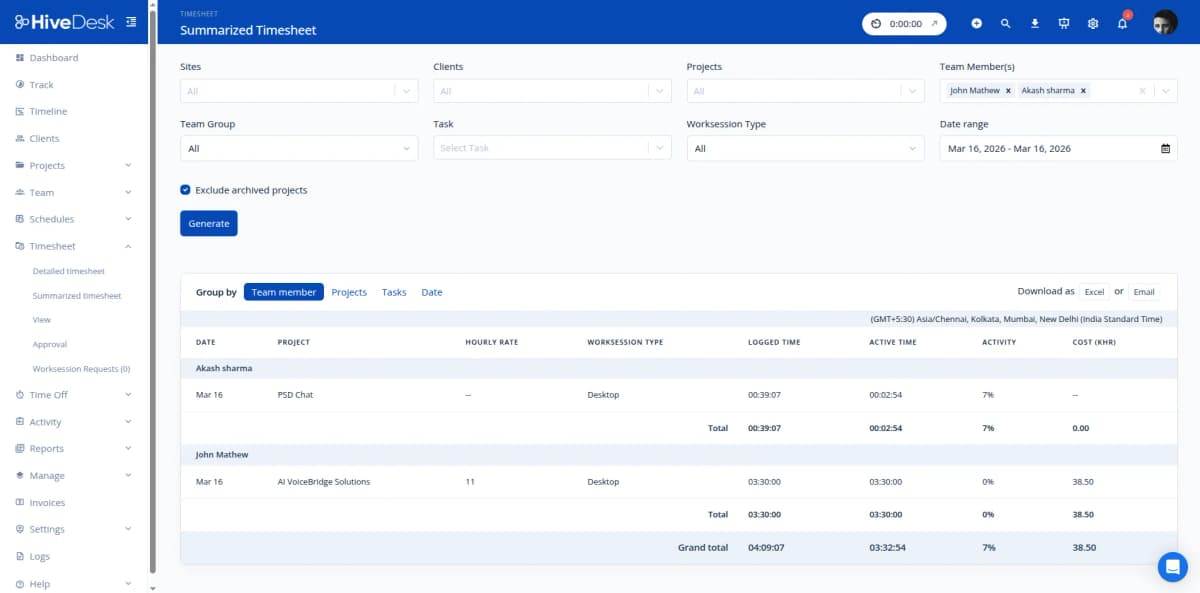
Your support team juggles live chat, email, phone calls, and social media throughout every shift. HiveDesk captures time automatically as agents work — organized by channel, product category, or ticket type. No end-of-shift guesswork, no forgotten entries during a rush.
- Create projects for each support channel — chat, email, phone, social
- Agents switch between channels with one click during their shift
- See how hours distribute across channels at the team and agent level
- Identify which channels consume the most resources during peaks
- Track time on desktop, mobile, or Chrome browser
Seasonal Staffing & Rapid Onboarding
Scale up for peak periods and back down without friction
Black Friday, Cyber Monday, holiday seasons, and flash sales demand rapid team scaling. HiveDesk lets you add temporary agents in minutes — no IT setup, no complex onboarding. Monitor new hires from their first shift with activity data, screenshots, and time reports.
- Add seasonal agents via email invite — they track time within minutes
- Monitor new hires from day one with real-time activity dashboards
- Screenshot reports verify seasonal staff are productive during shifts
- Generate timesheets for temporary staff payroll automatically
- Deactivate accounts after peak season without losing historical data

Scheduling & Coverage
Schedule shifts that match your ticket volume — not the other way around
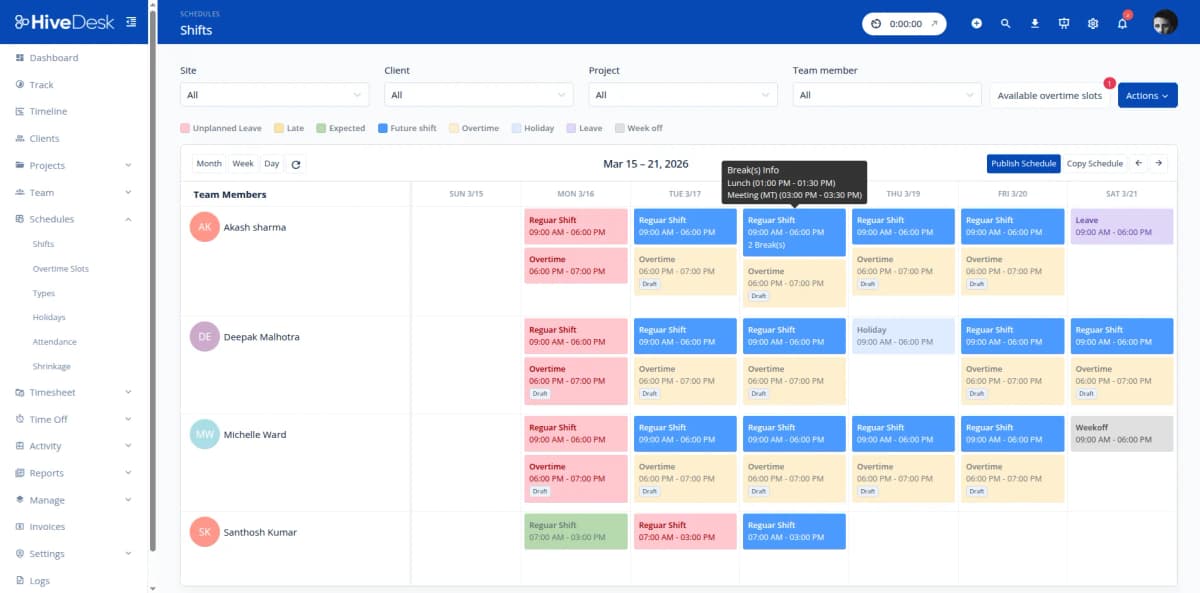
E-commerce support volume shifts with promotions, seasons, and time of day. HiveDesk lets you create and adjust shift schedules to match demand. Set up recurring schedules for regular operations and add extra coverage for anticipated spikes. Track attendance to ensure agents show up when they are needed most.
- Create shifts with specific start and end times for each team or channel
- Set up recurring schedules for regular rotations
- Add extra shifts for Black Friday, holidays, and promotional events
- Compare actual clock-in times against scheduled shifts
- Manage time-off requests so coverage gaps are visible in advance
Timesheets & Payroll
From tracked hours to payroll in minutes — even during peak season
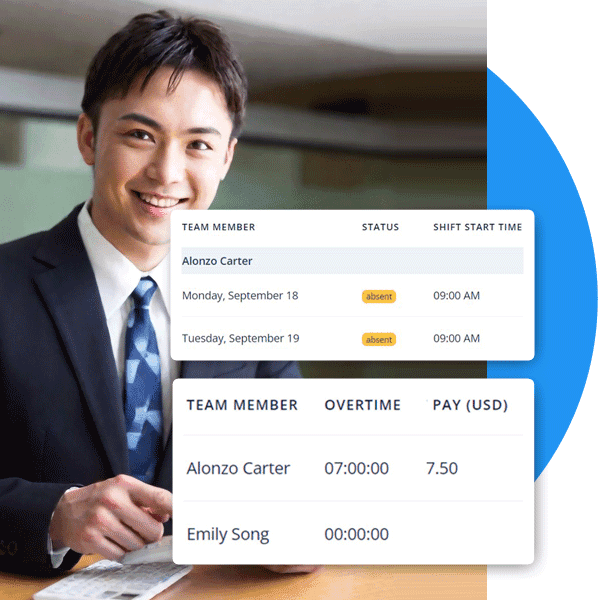
Processing payroll for a mix of full-time staff and seasonal hires is painful with manual timesheets. HiveDesk auto-generates timesheets from tracked time, runs them through a manager approval workflow, and exports clean data for your payroll software. Overtime hours are tracked and flagged automatically — critical during extended holiday shifts.
- Auto-generated timesheets for full-time and seasonal staff
- Manager review and approval before payroll processing
- Overtime hours tracked and flagged automatically
- Export approved timesheets as Excel for any payroll software
- Attendance and time-off records maintained continuously
How E-commerce Support Teams Use HiveDesk
From multi-channel agents to seasonal hires to team leads — every role benefits from automatic time tracking and workforce management.
Multi-Channel Support Teams
Agents handling chat, email, phone, and social media track time against each channel. Managers see how hours distribute across channels and staff accordingly for volume patterns.
- Track time by channel — chat, email, phone, social
- Identify which channels consume the most agent hours
- Staff channels based on actual time data, not guesswork
Seasonal & Peak Period Staffing
Black Friday, Cyber Monday, holiday seasons, and flash sales require rapid team scaling. Add temporary agents in minutes, monitor them from day one, and generate accurate timesheets for payroll.
- Onboard seasonal agents in minutes — no IT setup needed
- Monitor new hires immediately with activity data and screenshots
- Generate timesheets for temp staff payroll processing
Remote & Hybrid Support Teams
E-commerce support teams increasingly work from home or across multiple locations. HiveDesk provides the same visibility into remote agents as you would have in a physical contact center.
- Real-time dashboard shows who is online and working
- Activity monitoring verifies work without micromanaging
- Schedule agents across time zones to ensure coverage
Support Team Leads & Supervisors
Team leads need to track agent hours, review performance, approve timesheets, and manage schedules. HiveDesk centralizes all of this in one dashboard instead of juggling multiple tools.
- Review and approve timesheets before payroll
- Track overtime hours — especially during peak periods
- Manage leave requests to maintain adequate coverage
Everything Your Support Team Needs. $5/User/Month.
One plan with every feature included. No tiers, no hidden fees, no per-feature upsells. Scale up for peak season and back down after.
Automatic Time Tracking
One-click timer on desktop, mobile, and browser. Time is recorded by channel, project, and task — no manual entries at the end of a busy shift.
Activity Monitoring
Periodic screenshots and activity levels show what agents are working on during their shifts — especially useful for new seasonal hires.
Employee Scheduling
Create shifts for regular and seasonal staff. Adjust coverage for Black Friday, holiday rushes, and flash sale events with recurring or one-time schedules.
Timesheets & Approval
Auto-generated timesheets with manager approval workflow. Export as PDF or Excel for payroll — critical when processing seasonal staff payments.
Attendance & Leave
Track attendance automatically from clock-in data. Compare actual hours against scheduled shifts. Manage PTO requests and approvals.
Real-Time Dashboards
See who is online, which channel they are covering, and how many hours they have logged today. Drill into individual agents or team-level views.
Trusted by Teams Across 6 Continents Since 2011
We have used every time tracking software under the sun, and they all fall short in some area that we need, but overall HiveDesk has met our needs. Their PDF screenshot reports are clean, easy to use and understand. Our clients prefer them over the complicated reports of other systems.
HiveDesk has been instrumental in helping us manage our remote team effectively. The automatic time tracking and screenshot features give us the visibility we need without micromanaging. Setup was straightforward and our team adopted it within a day.
Simple Pricing That Scales with Your Team
One plan with all features included. Add agents for peak season, scale back after — you only pay for active users.
All features included
- Automatic time tracking across all devices
- Activity monitoring with screenshots
- Employee scheduling
- Attendance & leave management
- Project & task tracking by channel
- Timesheet generation & approval
- Reporting & analytics dashboards
- Asana integration
No credit card required
Frequently Asked Questions
Everything you need to know about time tracking for e-commerce support teams.
HiveDesk makes it easy to scale your support team for Black Friday, Cyber Monday, holiday rushes, and flash sales. Add seasonal agents in minutes — they download the desktop or mobile app and start tracking time immediately. Create shift schedules that match expected volume, monitor new agents from day one with activity data and screenshots, and generate timesheets for payroll at the end of the period. When the season ends, deactivate accounts without losing historical data.
Yes. Create separate projects for each support channel (live chat, email, phone, social media) or organize by product line and ticket type. Agents switch between projects with one click as they move between channels throughout their shift. At the end of the week, you can see exactly how many hours went to each channel — helping you staff appropriately and identify which channels consume the most resources.
HiveDesk tracks the total hours each agent spends working, broken down by project and task. Combined with your helpdesk ticket data, you can calculate average handle time and resolution rates per agent. Activity monitoring with periodic screenshots shows what agents are working on during their shifts, giving you objective data for coaching conversations and performance reviews.
Invite new agents to HiveDesk via email. They create an account, download the desktop or mobile app, and start tracking time against assigned projects within minutes. No IT department required, no complex onboarding. Managers can monitor new hires from day one with real-time dashboards, activity levels, and screenshot reports.
HiveDesk integrates with Asana for task and project management. Timesheet and activity report data can be exported as PDF or Excel for use alongside your helpdesk, e-commerce platform, and payroll tools. This lets you combine HiveDesk time data with ticket metrics from your existing systems.
Create shifts with specific start and end times for each support channel or team. Set up recurring schedules for regular rotations and create additional shifts for peak periods. Track attendance by comparing actual clock-in and clock-out times against scheduled shifts. Manage time-off requests through a built-in approval workflow so coverage gaps are visible before they happen.
HiveDesk has native apps for Windows, macOS, and Linux desktops, an iOS mobile app, a Chrome browser extension, and a web dashboard accessible from any browser. Your support agents can track time from whatever device they use — whether they work in a contact center, from home, or on the go.
HiveDesk costs $5 per user per month — one plan that includes every feature. No tiers, no per-feature upsells, no hidden fees. You get time tracking, screenshots, scheduling, attendance, leave management, task tracking, timesheets, and reporting. Scale up for seasonal peaks and back down after — you only pay for active users. There is a free 14-day trial with no credit card required.
Related Resources
Guides
Templates
Ready to Get Started?
Join teams worldwide who trust HiveDesk for workforce management, time tracking, and employee monitoring. $5/user/month, all features included.