

Staff Scheduling and Time Tracking for Healthcare Practices
Schedule every office, see who is in before the first appointment, approve time off and timesheets, and send payroll hours you trust. Used by dental groups, multi-location clinics and healthcare billing teams.
No credit card required · $5/user/month · All features included
Rolling out to 50 or more people? We'll help you set up
Built for the people who keep a practice running
HiveDesk manages staff time, not patient records. Healthcare customers use it for the front office, the back office and every location in between.
Multi-location practices
Dental groups, optical chains, physical therapy and specialty clinics that staff several offices and need one view of who is scheduled where.
Medical billing and revenue cycle teams
Billing, coding, insurance verification and credentialing staff, often remote, whose hours are billed to client practices or tracked against targets.
Care management and review teams
Utilization review, case management and claims review staff who work from desks and need accurate hours and approved timesheets.
Community health and research sites
Nonprofit health networks and clinical research sites that track staff time by program, project or sponsor.
Scheduling
One schedule for every location
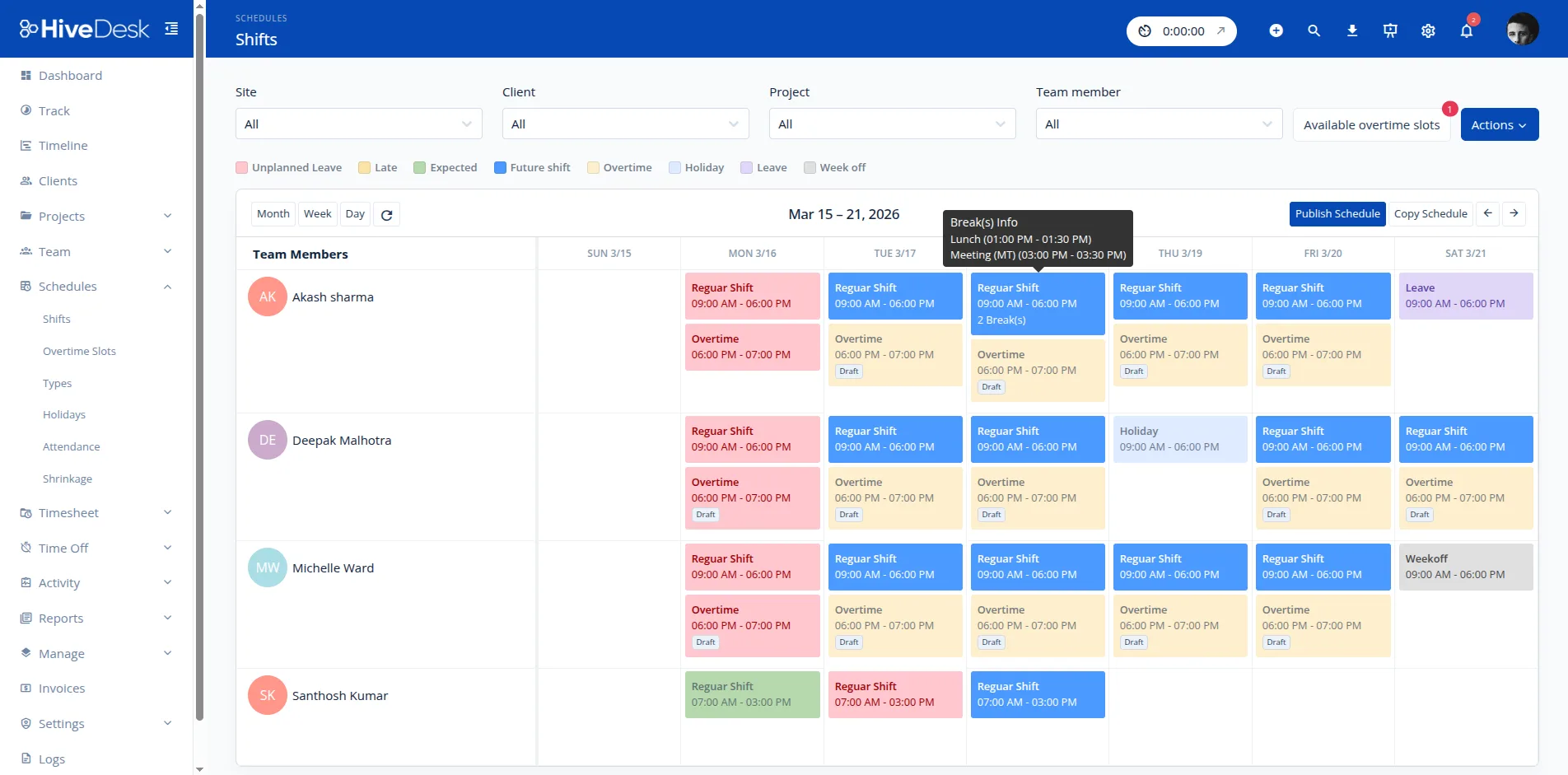
Front desks, hygienists, technicians and assistants work different shifts at different offices. HiveDesk keeps them in one schedule. Group staff by site, build each location’s shifts, and save a standard week or rotation as a schedule type so next month takes minutes, not an afternoon.
- Shifts by site, with scheduled breaks inside each shift
- Saved schedule types for standard weeks and rotations
- Holidays set once for the whole schedule
- Shift change requests that managers approve or decline
Attendance
Know who is in before the first appointment
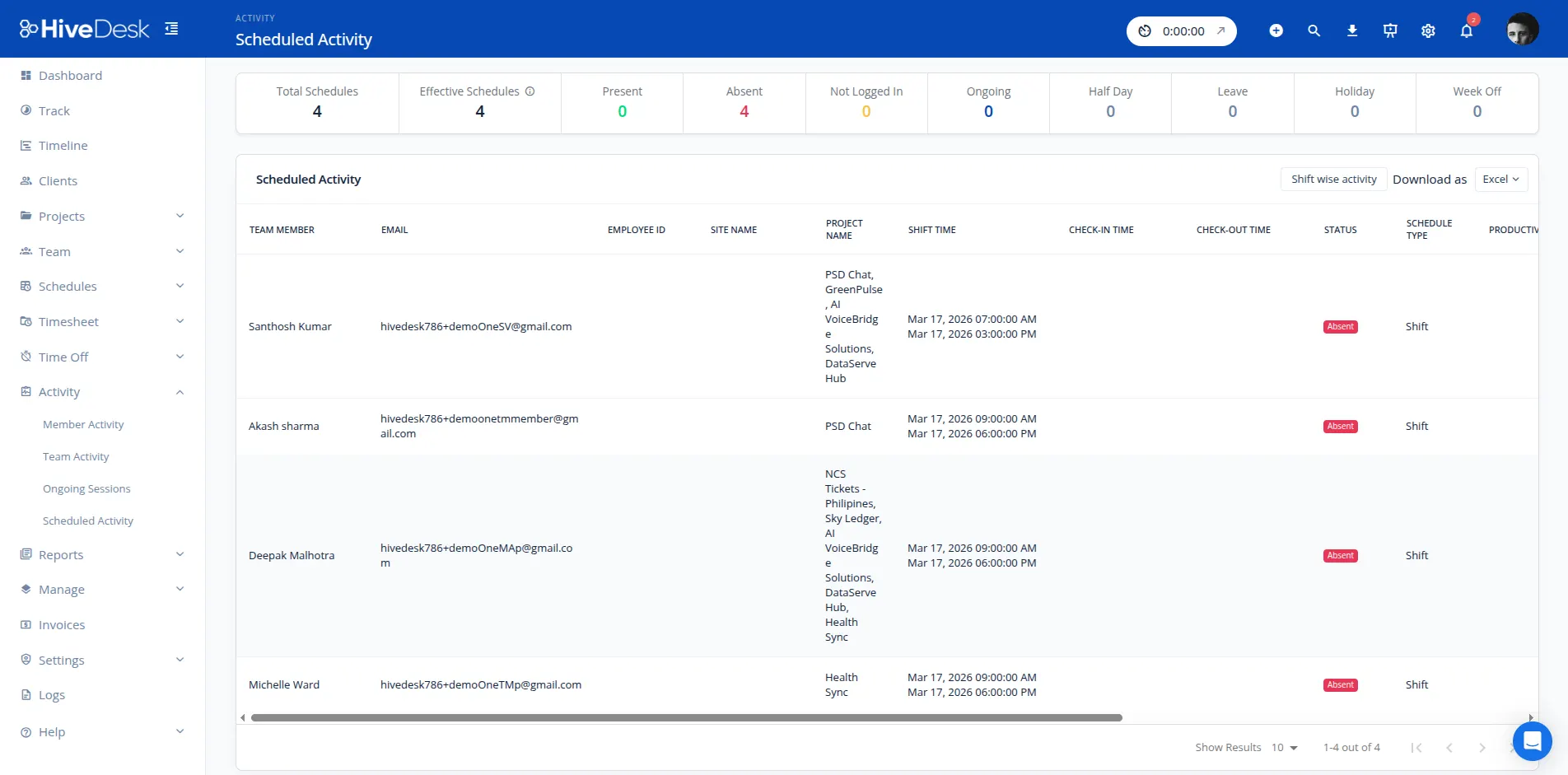
A missing medical assistant or receptionist backs up the whole day. HiveDesk compares every check-in with the schedule and shows each person’s status for today, so an office manager can call in cover before patients start waiting.
- Present, absent, not logged in, half day, leave and holiday status for every scheduled person
- Late threshold and shift tolerance set in minutes
- Check-in and check-out adherence by site
- Ongoing sessions show who is working right now
Timesheets and payroll
Approved hours and overtime, ready for payroll
Hourly healthcare staff are owed overtime, and errors cost money and trust. HiveDesk builds timesheets from recorded time, lets managers approve them, and calculates weekly overtime from each person’s hourly rate, so payroll starts from numbers a manager has already checked.
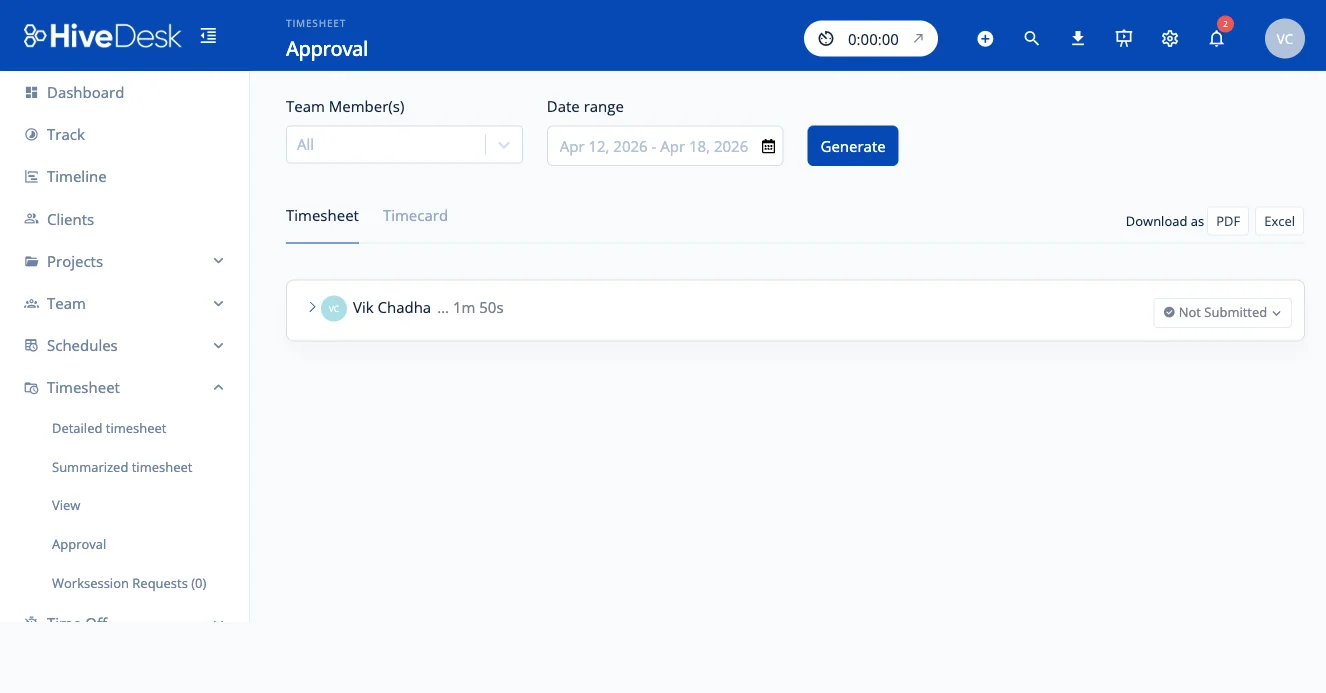
- Timesheet approval before hours are final
- A review step for edits to recorded time
- Weekly overtime from your threshold and pay multiplier
- PDF and Excel exports for your payroll provider
Time off
Time-off requests that show up on the schedule
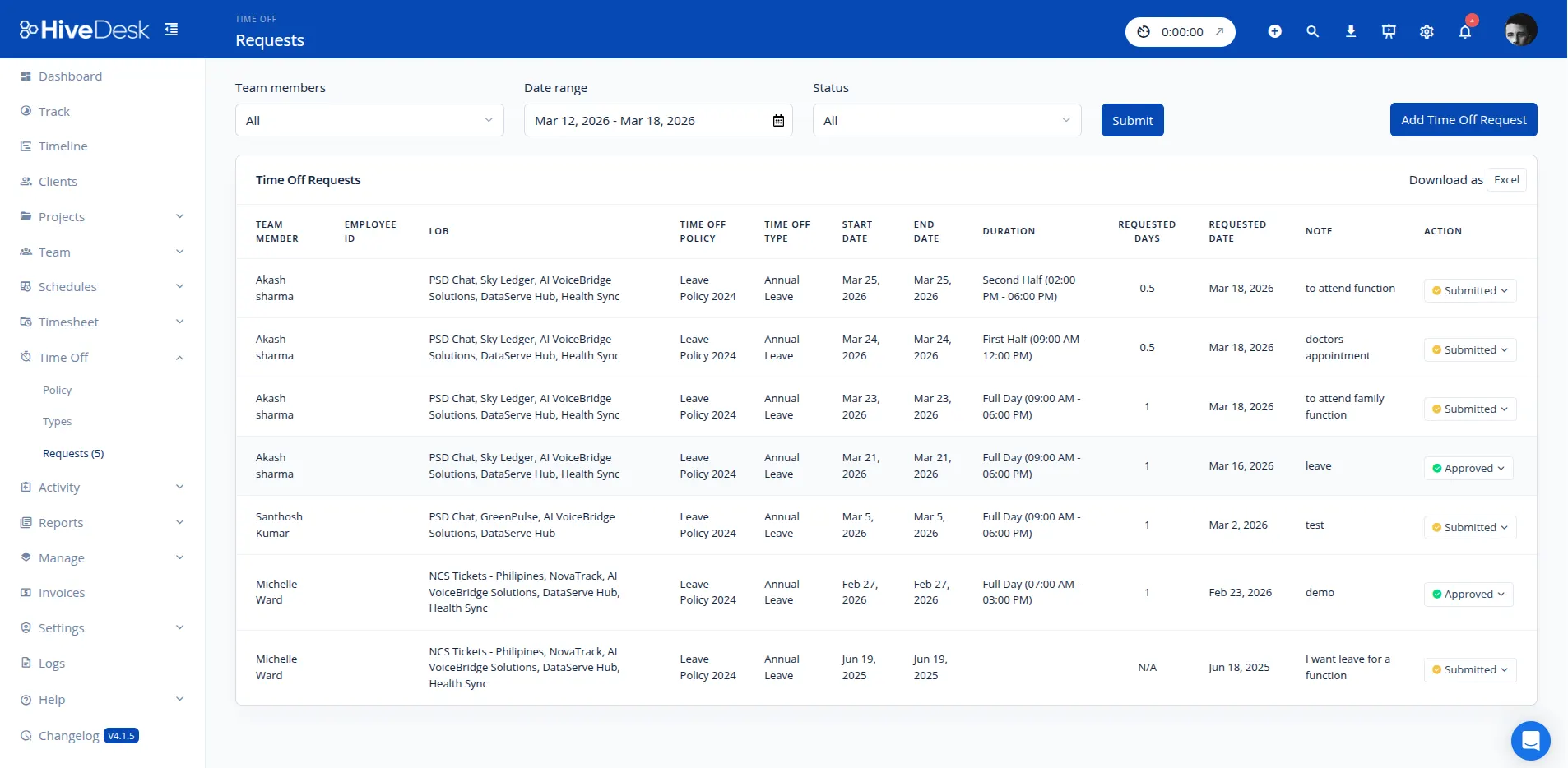
Staff request time off in HiveDesk instead of on a paper form or in a text message. Managers approve it, and approved leave appears on the schedule and in attendance, so nobody is marked absent on a day they were allowed off.
- Requests and approvals in the web app
- Time-off policies with a limit in days
- Approved leave shown in schedules and attendance reports
- Holidays set once for the whole team
Remote billing and admin teams
Visibility into desk work you can’t see
Medical billing companies and in-house revenue cycle teams often work remotely, and many bill their hours to client practices. The HiveDesk desktop app records time against each client or project, with keyboard and mouse activity levels, so supervisors can see where the day went and give each client an accurate account of hours.
Daily email summaries send each person’s hours to supervisors, or to client contacts who don’t use HiveDesk. Projects and clients keep work for different practices apart, and invoices can be generated from tracked time.
HiveDesk can also take periodic screenshots. Billing staff often have patient information on screen, so decide with your compliance officer whether screenshots are appropriate for those roles before you turn them on.
A note on patient data and HIPAA
HiveDesk is a workforce management tool. It stores staff names, schedules, hours, attendance, time off and, if you use them, screenshots and activity levels. It is not an EHR or practice management system, it does not hold HIPAA certification, and it should not be used to record patient information.
Keep task and project names free of patient details, and review screenshot settings with your compliance officer. Read more about how we protect your data on our security page.
How each role uses HiveDesk
Custom roles and permissions decide what each person can see and approve.
Practice and office managers
Build the week’s schedule, see who is late or absent each morning, and approve time off without a paper trail.
Regional and operations managers
Compare attendance, overtime and hours across every office from one account, filtered by site.
Billing and revenue cycle supervisors
Track remote billers’ hours by client practice or project, with activity levels and daily email summaries.
HR and payroll
Start each pay run from approved timesheets and calculated overtime instead of chasing paper time cards.
Getting a practice set up
- Add your locations. Create a site for each office so schedules and reports can be filtered by location.
- Invite staff. Add each person with their hourly rate and site. Staff clock in from the web app, the iOS app, the Chrome extension or the desktop app.
- Build the schedule. Create shifts, set your late threshold and shift tolerance, and save your standard week as a schedule type.
- Set your rules. Add holidays, time-off policies, the weekly overtime threshold and pay multiplier, and turn on timesheet approval.
- Run payroll from approved hours. Export approved timesheets and the overtime report to Excel for your payroll provider.
Frequently Asked Questions
HiveDesk does not hold HIPAA certification, and it is not built to store patient health information. Use it for staff time, schedules, attendance, time off and payroll hours, and keep patient records in your practice management or EHR system. Screenshots capture whatever is on an employee’s screen, so check with your compliance officer before you use screenshots for staff who work in patient records.
Yes. Group staff by site, build shifts for each location, and save a week or a rotation as a schedule type so you can reapply it instead of rebuilding it. Holidays are set once and apply to the schedule. Attendance, overtime and timesheet reports can be filtered by site and time zone, so a regional manager sees every office and an office manager sees only their own.
Staff can start and stop their timer from the web app on any shared front-desk computer, from the HiveDesk iOS app, which records GPS location at clock-in and clock-out, or from the Chrome extension. Staff who work at a desk all day, such as billing and scheduling teams, can use the desktop app for Windows, macOS or Linux.
Yes. HiveDesk compares each check-in with the scheduled shift, using a late threshold and shift tolerance you set in minutes. The scheduled activity view shows every scheduled person as present, absent, not logged in, half day, on leave, on a holiday or on a week off, so you can see coverage gaps before the first patient arrives.
Set a weekly overtime threshold and a pay multiplier, and HiveDesk calculates overtime from each person’s hourly rate. The overtime report shows who worked past the threshold and what it costs, and it exports to PDF or Excel for payroll.
Yes. Staff request time off in the web app, managers approve or decline it, and approved leave shows on the schedule and in attendance reports. Time-off policies set a limit in days per policy. HiveDesk does not calculate accruals automatically, so practices that accrue PTO per hour worked can use our free PTO accrual calculator alongside it.
Yes. Turn on timesheet approval and managers review each person’s hours before they are final. Edit requests for a work session can also go through a review step, so changes to recorded time are approved rather than made silently. Approved timesheets export to Excel for your payroll provider.
HiveDesk costs $5 per user per month with every feature included, with a minimum of 3 users. A 14-day free trial is available with no credit card required.
Related Resources
Features
Calculators
Ready to Get Started?
Join teams worldwide who trust HiveDesk for workforce management, time tracking, and employee monitoring. $5/user/month, all features included.