

Track Time Without Leaving Your Browser
No desktop app to install. No IT department required. HiveDesk's Chrome extension lets your team track time by task and project directly from the browser — then generates accurate timesheets for payroll and client billing. Works on any OS that runs Chrome. All for $5/user/month.
No credit card required · Set up in under 5 minutes · Works on Windows, macOS, Linux, ChromeOS
Why Track Time From Chrome?
Not every team member can install desktop software. Shared computers, locked-down machines, Chromebooks, and BYOD policies make desktop apps impractical. A Chrome extension solves all of these problems — your team tracks time from the tool they already use all day: their browser.
Desktop-only time tracking
- Requires IT to install software on every machine
- Does not work on Chromebooks or locked-down computers
- Employees on shared workstations cannot install personal apps
- BYOD teams resist installing employer software on personal devices
- New hires wait days for IT to provision their machine
- Different installers for Windows, macOS, and Linux
With HiveDesk Chrome extension
- Install from Chrome Web Store in one click — no IT needed
- Works on any device that runs Chrome, including Chromebooks
- Perfect for shared workstations and hot-desking environments
- No software on personal devices — just a browser extension
- New hires start tracking time within minutes of joining
- One extension works across Windows, macOS, Linux, and ChromeOS
Start Tracking Time in Under 5 Minutes
No downloads. No installations. No IT tickets.
Create your account
Sign up for a free trial. Add your projects, tasks, and team members.
Add the Chrome extension
Install from the Chrome Web Store with one click. Log in with your HiveDesk account.
Click to start tracking
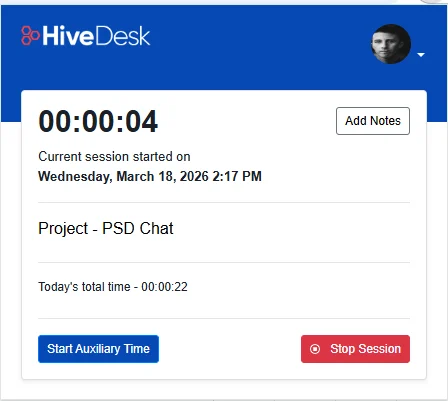
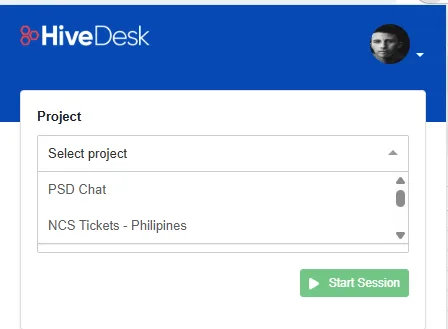
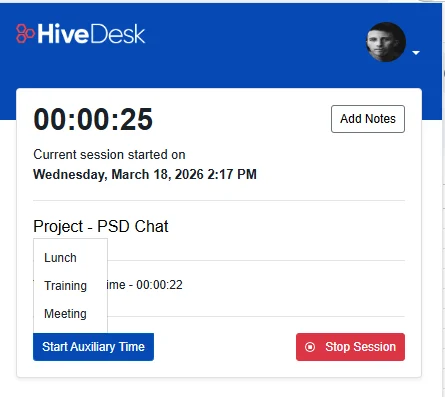
Select a project and task, then click Start. The extension records time in the background.
Review timesheets
Managers approve timesheets on the web dashboard. Export to PDF or Excel for payroll and billing.
Browser-Based Time Tracking
Full-featured time tracking from your browser
The HiveDesk Chrome extension is not a stripped-down timer. It is a complete time tracking app that runs in your browser. Track time by employee, task, project, and client. Generate accurate timesheets. Get insights into how your team spends their hours. All without installing desktop software.
- Track time by employee, task, project, and client
- Generate accurate timesheets automatically from tracked data
- Works on any OS that supports Chrome — Windows, macOS, Linux, ChromeOS
- Syncs with Asana for project and task management
- All data accessible from the HiveDesk web dashboard
Labor Law Compliance
Stay compliant with labor laws
The Chrome extension captures the same data you need for labor law compliance. The FLSA requires employers to keep accurate records of hours worked. State laws add overtime rules and record retention mandates. HiveDesk records it all — regular hours, overtime, attendance, and time-off — regardless of which app your employees use.
- Accurate daily and weekly hour records for every employee
- Overtime hours tracked and flagged automatically
- Attendance and time-off records maintained continuously
- Data exports for any audit or compliance review
- Same compliance data whether employees use Chrome, desktop, or mobile
Accurate Client Billing
Bill clients accurately from browser-tracked hours
When you bill by the hour, every untracked minute is lost revenue. The HiveDesk Chrome extension captures every billable hour as your team works, then generates timesheets that managers approve before invoicing. No more billing disputes from estimated hours. No more revenue leakage from forgotten time.
- Track billable and non-billable hours by client and project
- Eliminate billing disputes with verified, approved timesheets
- Recover revenue from hours that previously went untracked
- Export client-ready reports in PDF or Excel format
Payroll Processing
From browser-tracked hours to payroll in minutes
Time tracked through the Chrome extension flows into the same timesheets as desktop and mobile data. Managers review and approve timesheets through HiveDesk's built-in workflow, then export clean data for payroll processing. Attendance, overtime, and approved leave are all included.
- Auto-generated timesheets with manager approval workflow
- Overtime, attendance, and time-off data in one place
- Export approved timesheets as Excel for any payroll software
- Eliminate manual calculations and payroll errors
More Than Just a Chrome Time Tracker
The Chrome extension is one part of a complete workforce management platform. One plan. $5/user/month. Every feature included.
One-Click Browser Timer
Start and stop the timer from Chrome. Select your project and task, and time is recorded automatically.
Employee Scheduling
Create and assign shifts. Employees see their schedules and managers track adherence in real time.
Task & Project Tracking
Create tasks, assign them to team members, and track time spent on each. See hours by project and client.
Timesheets & Approval
Auto-generated timesheets with manager approval workflow. Export to PDF or Excel for payroll and billing.
Attendance & Leave
Track attendance from clock-in data. Manage time-off requests and approvals.
Real-Time Dashboards
See who is working, on what, and for how long. All data from Chrome, desktop, and mobile apps in one view.
Trusted by Teams Worldwide Since 2011
We have used every time tracking software under the sun, and they all fall short in some area that we need, but overall HiveDesk has met our needs. Their PDF screenshot reports are clean, easy to use and understand. Our clients prefer them over the complicated reports of other systems.
In today's world, remote work is a given. We use this software to handle those challenges. We tried a lot of the competitors and for many reasons HiveDesk won. Plus, team loves their support. Fast and attentive. We love HiveDesk. It allows us to track people's use and find areas of weakness. Their price level is perfect for us and we love their reporting.
Frequently Asked Questions
Everything you need to know about the HiveDesk time tracking Chrome extension.
A time tracking Chrome extension is a browser plugin that records how long you spend on tasks and projects without requiring a desktop application. HiveDesk's Chrome extension lets employees start a timer directly in the browser, select a project and task, and track time automatically. All data syncs to the HiveDesk web dashboard where managers can review timesheets, approve hours, and export data for payroll or billing.
The Chrome extension works entirely inside your browser — no software installation required. It tracks time by task and project just like the desktop app. The main difference is that the desktop app can also take periodic screenshots of your computer screen and track application usage, while the Chrome extension focuses on time tracking within the browser. Both feed data into the same HiveDesk dashboard and timesheets.
No. The Chrome extension installs directly from the Chrome Web Store with one click. It works on any operating system that runs Chrome — Windows, macOS, Linux, and ChromeOS. There is nothing to download, no installer to run, and no IT department required. Your team can be tracking time within minutes.
Yes. HiveDesk integrates with Asana, and the Chrome extension works seamlessly with it. Open your Asana project in a browser tab, start the HiveDesk extension, select the project or task you want to track time against, and start the timer. Time data flows into both HiveDesk and your Asana project.
The Chrome extension is designed for teams. Each team member installs the extension and tracks time against shared projects and tasks. All time data syncs to the central HiveDesk dashboard where managers see real-time activity, review timesheets, and approve hours. It works the same way as the desktop and mobile apps — just from the browser.
Yes. Team members can use whichever app suits their situation — desktop app on their work computer, Chrome extension on a shared machine, or mobile app when on the go. All data syncs to the same HiveDesk account. You can even switch between apps during the day and your time records stay consistent.
The Chrome extension records time with the same precision as the desktop and mobile apps. When an employee starts the timer, the extension tracks continuously until they stop it. There are no gaps, no rounding, and no manual entries. The extension also tracks which task and project the time is assigned to, so timesheets are accurate down to the minute.
HiveDesk costs $5 per user per month — one plan with every feature included. The Chrome extension, desktop apps, mobile app, scheduling, attendance, leave management, screenshots, timesheets, and reporting are all included. No tiers, no hidden fees. There is a free 14-day trial with no credit card required.
That works perfectly. HiveDesk supports mixed environments — some team members on the desktop app, some on Chrome, some on mobile. All data flows into the same dashboard, the same timesheets, and the same reports. Managers see a unified view regardless of which app each employee uses.
Yes. Sign up for a free 14-day trial with no credit card required. You get full access to the Chrome extension and every other HiveDesk feature. Add your team, track time, generate timesheets, and test everything before deciding.
Related Resources
Guides
Templates
Ready to Get Started?
Join teams worldwide who trust HiveDesk for workforce management, time tracking, and employee monitoring. $5/user/month, all features included.