

Track Every Billable Hour Across Every Client Contract
Your technicians click one button. HiveDesk tracks their hours by client, project, and task — generating verified timesheets for invoicing, monitoring activity for accountability, and giving you real-time visibility into where every hour goes. Built for MSPs and IT service companies billing by the hour. All for $5/user/month.
No credit card required · Set up in under 10 minutes · Works on Windows, macOS, Linux, iOS, Chrome

Untracked Hours Are Costing Your IT Firm Money
When technicians forget to log time, round their hours, or skip entries for small tasks, your firm loses billable revenue. Spreadsheets and manual timesheets make the problem worse — creating payroll errors, billing disputes, and zero visibility into where time actually goes.
Without IT time tracking software
- Technicians forget to log hours on client tickets and projects
- Billable hours leak through untracked small tasks and meetings
- No way to verify hours when clients question invoices
- Scheduling across multiple client contracts is a spreadsheet nightmare
- Remote technicians operate with zero visibility into their workday
- Payroll errors from manual timesheet calculations
With HiveDesk
- Every hour is captured automatically — no manual entries to forget
- Billable and non-billable time tracked separately by client and project
- Screenshot reports give clients verifiable proof of work performed
- Employee scheduling handles shift assignments across client contracts
- Real-time dashboards show who is working on which client right now
- Timesheets are generated automatically and ready for approval and export
Up and Running in Under 10 Minutes
No complex onboarding. No training sessions. No IT department required.
Create your account
Sign up for a free trial. Add your client projects, tasks, and team members.
Team installs the app
Desktop, mobile, or Chrome extension — technicians choose their preferred device and start the timer.
Time is tracked automatically
Hours are recorded by client and project. Screenshots capture activity. Attendance is logged.
Review and invoice
Approve timesheets, review dashboards, and export data for client invoicing or payroll.
Accurate Client Billing
Bill clients with proof, not promises
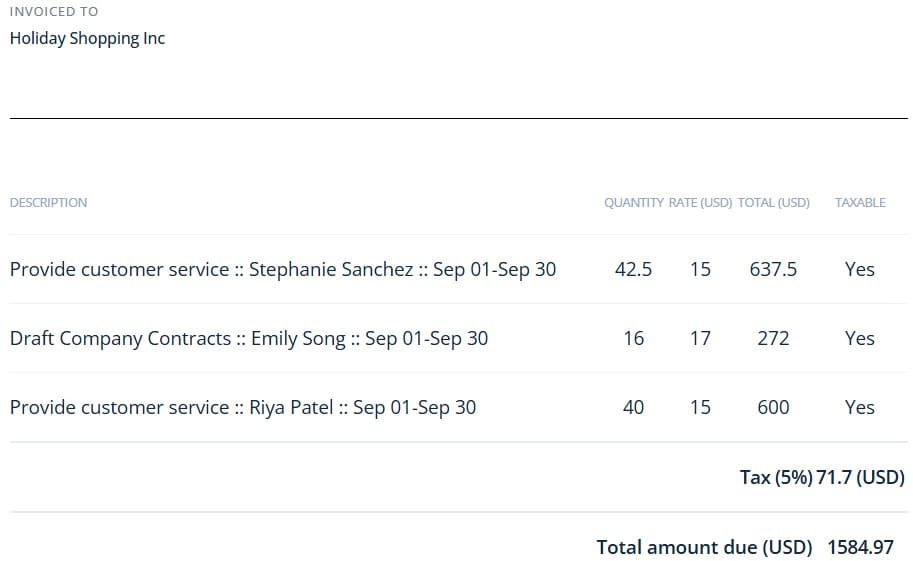
IT service contracts live and die by billable hours. When a client questions an invoice, you need more than a spreadsheet. HiveDesk gives you verified time records backed by screenshot reports that clients can review — eliminating disputes and recovering revenue from hours that would otherwise go untracked.
- Track billable and non-billable hours by client, project, and technician
- Share screenshot reports as verifiable proof of work completed
- Eliminate revenue leakage from forgotten or unlogged service hours
- Generate client-ready timesheets in PDF or Excel with one click
- Built-in timesheet approval workflow before invoicing
Workforce Management
Schedule, track, and manage your IT workforce
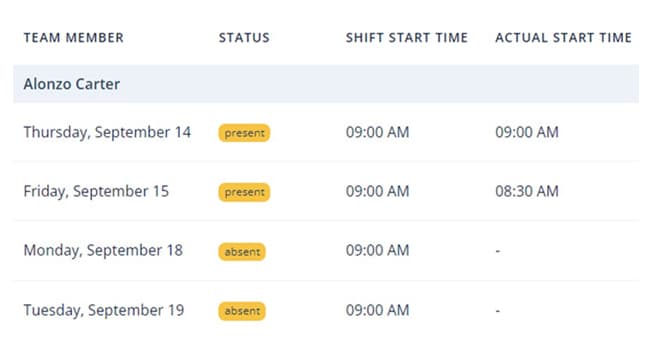
IT service firms need more than a timer. You need to schedule technicians across client sites, track attendance, manage time-off requests, and monitor overtime. HiveDesk handles all of this in a single platform — so you stop juggling spreadsheets and start managing your workforce properly.
- Create and assign shifts across client contracts and service windows
- Track attendance automatically from clock-in and clock-out data
- Manage PTO requests, approvals, and leave balances
- Monitor overtime hours to control labor costs and stay compliant
- Real-time dashboards show who is on the clock right now
MSP Time Tracking
Built for managed service providers
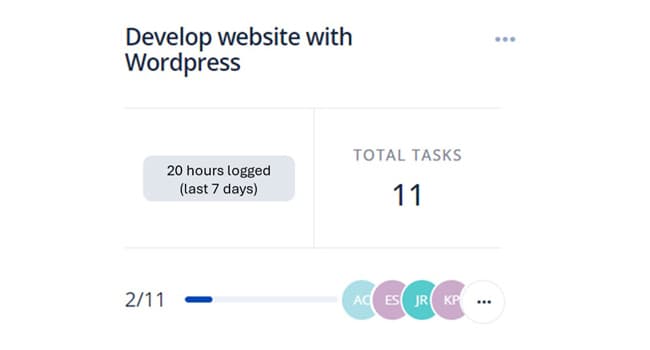
MSPs manage dozens of client contracts simultaneously — each with different billing terms, service windows, and staffing requirements. HiveDesk lets you track time by client and project, schedule staff across contracts, and generate timesheets that map directly to your invoicing process. No more guessing how many hours went to which client.
- Separate time tracking by client contract and project
- Assign technicians to specific client accounts and service windows
- Generate per-client timesheets for retainer and T&M billing
- Screenshot reports provide accountability for remote support work
- Track utilization rates to identify under-billed accounts

Payroll Processing
From tracked hours to payroll in minutes
Stop manually calculating hours, overtime, and time-off balances for your IT staff. HiveDesk combines time tracking data with attendance and leave records, generates timesheets, runs them through manager approval, and exports clean data for your payroll software.
- Auto-generated timesheets with built-in approval workflow
- Overtime, attendance, and time-off data in one place
- Export approved timesheets as Excel for any payroll software
- Eliminate manual calculations and payroll errors
HiveDesk vs. Other Time Tracking Software
Most time tracking tools are just timers. HiveDesk gives you workforce management — scheduling, attendance, leave, and activity monitoring — all included at $5/user/month.
| HiveDesk | Toggl | Clockify | Hubstaff | |
|---|---|---|---|---|
| Automatic time tracking | Yes — desktop, mobile, browser | Yes | Yes | Yes |
| Employee scheduling | Yes — shift creation & adherence | No | No | No |
| Screenshot monitoring | Yes — configurable frequency | No | No | Yes ($7+/user) |
| Attendance management | Yes — automatic from clock-in | No | No | Limited |
| Leave/time-off management | Yes — requests & approvals | No | No | No |
| Timesheet approval workflow | Yes — manager review & approve | No | Yes (paid) | Yes |
| Task & project tracking | Yes — with time by task | Yes | Yes | Yes |
| GPS location tracking | Yes — iOS mobile app | No | Yes (paid) | Yes |
| Asana integration | Yes — track time in Asana | Yes | Yes | Yes |
| Price (per user/month) | $5 — all features | $9–$18 | $3.99–$11.99 | $4.99–$10+ |
Built for IT Service Companies That Bill by the Hour
Teams across 6 continents use HiveDesk to track time, manage their workforce, and bill clients accurately.
Managed Service Providers
Track hours across multiple client contracts. Generate verified timesheets that map to SLAs and retainer agreements.
IT Staffing Agencies
Track contractor hours across client sites. Generate verified timesheets that clients can review and approve.
IT Consulting Firms
Track every billable minute across consulting engagements. Eliminate revenue leakage from unlogged hours.
Contact Centers & BPOs
Track agent hours across shifts, monitor schedule adherence, and generate accurate timesheets for client billing.
Software Development Teams
Track development hours by sprint, project, and client. Know where engineering time actually goes.
Remote IT Teams
Get the same visibility into remote technician work that you have with on-site staff — without surveillance.
Everything Your IT Firm Needs. Nothing It Doesn't.
One plan. $5/user/month. Every feature included.
Automatic Time Tracking
One-click timer on desktop, mobile, and browser. Time is recorded by client, project, and task automatically.
Employee Scheduling
Create shifts for technicians and support staff. Track schedule adherence across client contracts.
Activity Monitoring
Periodic screenshots and activity levels give you visibility into remote technician productivity without micromanaging.
Timesheets & Approval
Auto-generated timesheets with manager approval workflow. Export to PDF or Excel for client invoicing and payroll.
Attendance & Leave
Track attendance automatically from clock-in data. Manage PTO requests, approvals, and balances for your IT team.
Real-Time Dashboards
See who is working, on which client, and for how long. Drill into projects, tasks, and individual contributors.
Trusted by Teams Worldwide Since 2011
One of the first employee tracking software I ever used and I compare all the latest programs to HiveDesk. It is a definite contender in this space. Easy to use as the most important thing for time tracking is making sure that the program keeps track at a click of a button.
In today's world, remote work is a given. We use this software to handle those challenges. We tried a lot of the competitors and for many reasons HiveDesk won. Plus, team loves their support. Fast and attentive. We love HiveDesk. It allows us to track people's use and find areas of weakness. Their price level is perfect for us, and we love their reporting.
Frequently Asked Questions
Everything you need to know about IT services time tracking.
IT services time tracking software records the hours your technicians, engineers, and support staff spend on client projects, service tickets, and managed service contracts. It captures billable and non-billable time by client, project, and task — then generates timesheets for invoicing and payroll. HiveDesk automates this process so your team clicks one button to start and the software handles the rest.
MSPs juggle multiple client contracts with different billing terms. HiveDesk tracks time by client and project, so you know exactly how many hours each contract consumes. Periodic screenshots provide verifiable proof of work. Timesheets are generated automatically and can be exported for client invoicing. This eliminates revenue leakage from untracked hours and reduces billing disputes.
Yes. HiveDesk works for remote, hybrid, and on-site teams. Remote technicians track time via the desktop app (Windows, macOS, Linux) or Chrome extension. Field technicians use the iOS mobile app with GPS location tracking. All data flows into the same dashboard regardless of where your staff works.
You set up projects for each client contract and internal activities. When team members track time against a client project, those hours are billable. Time tracked against internal projects (meetings, training, admin) is non-billable. Reports and timesheets break down both categories so you can see utilization rates and bill clients accurately.
Most time tracking tools are just timers. HiveDesk gives you workforce management — employee scheduling, attendance tracking, leave management, activity monitoring with screenshots, and timesheet approval — all in a single platform for $5/user/month. Toggl and Clockify lack scheduling and monitoring. Hubstaff charges $7-$10+/user for comparable features.
HiveDesk costs $5 per user per month — one plan with every feature included. No tiers, no hidden fees, no per-feature upsells. You get time tracking, screenshots, scheduling, attendance, leave management, task tracking, timesheets, and reporting. There is a free 14-day trial with no credit card required.
Yes. HiveDesk generates detailed timesheets showing hours by client, project, and team member. Managers review and approve timesheets through a built-in workflow. Approved timesheets export to PDF or Excel for use in your invoicing process. Screenshot reports can be shared with clients as proof of work completed.
HiveDesk integrates with Asana — you can track time directly inside Asana tasks. This means your IT project managers can manage tasks in Asana while time data flows into HiveDesk for timesheets and billing. Timesheet data also exports to Excel and PDF for use with any accounting or invoicing software.
The key is making it effortless. HiveDesk runs in the background — employees click one button to start and stop. There are no manual entries to fill out. Technicians can track from whichever device they prefer: desktop app, Chrome extension, or mobile app. Most IT teams adopt HiveDesk within a day because it requires almost zero effort from employees.
Yes. HiveDesk offers a 14-day free trial with full access to every feature. No credit card required. You can add your team, set up client projects, track time, generate timesheets, and test every feature before deciding.
Related Resources
Guides
Templates
Ready to Get Started?
Join teams worldwide who trust HiveDesk for workforce management, time tracking, and employee monitoring. $5/user/month, all features included.