

Track Development Hours Without Breaking Your Flow
Developers hate timesheets. HiveDesk tracks hours automatically across sprints, tickets, and client projects — so you get accurate time data for billing, estimation, and resource planning without forcing anyone to stop coding and fill in a spreadsheet.
No credit card required · $5/user/month · All features included

Developer Time Tracking Is Broken. Here's Why.
Most dev teams rely on end-of-day guesswork, forgotten Jira logs, or no tracking at all. The result: inaccurate client invoices, unreliable sprint estimates, and zero visibility into where development hours actually go.
Without developer time tracking
- Developers forget to log hours or reconstruct timesheets at the end of the week
- Billable hours on client projects go untracked and uninvoiced
- Sprint estimates are based on gut feeling, not historical data
- No visibility into how time splits across coding, code review, meetings, and debugging
- Remote developers work without any accountability or activity tracking
- Contractor hours are unverified — you pay based on the honor system
With HiveDesk
- Time is captured automatically while developers work — no manual entry
- Every billable hour is tracked by client, project, and task
- Historical time data makes sprint estimates more accurate over time
- Per-task breakdowns show exactly where development hours go
- Real-time dashboards show who is working on what, across time zones
- Contractor and freelancer hours are verified with screenshots before payment
Sprint & Task Time Tracking
Track every hour across sprints, tickets, and client projects
Development teams lose billable hours and produce inaccurate estimates when time goes untracked. HiveDesk captures hours automatically as your team works — organized by project, sprint, and task. Switch between tickets with one click. At billing time or sprint review, pull detailed time reports that account for every hour.
- Organize projects by client, sprint, or development phase
- One-click switching between tasks throughout the day
- Separate billable client hours from internal non-billable time
- Compare estimated vs actual hours on every task
- Track time on desktop, Chrome extension, or mobile
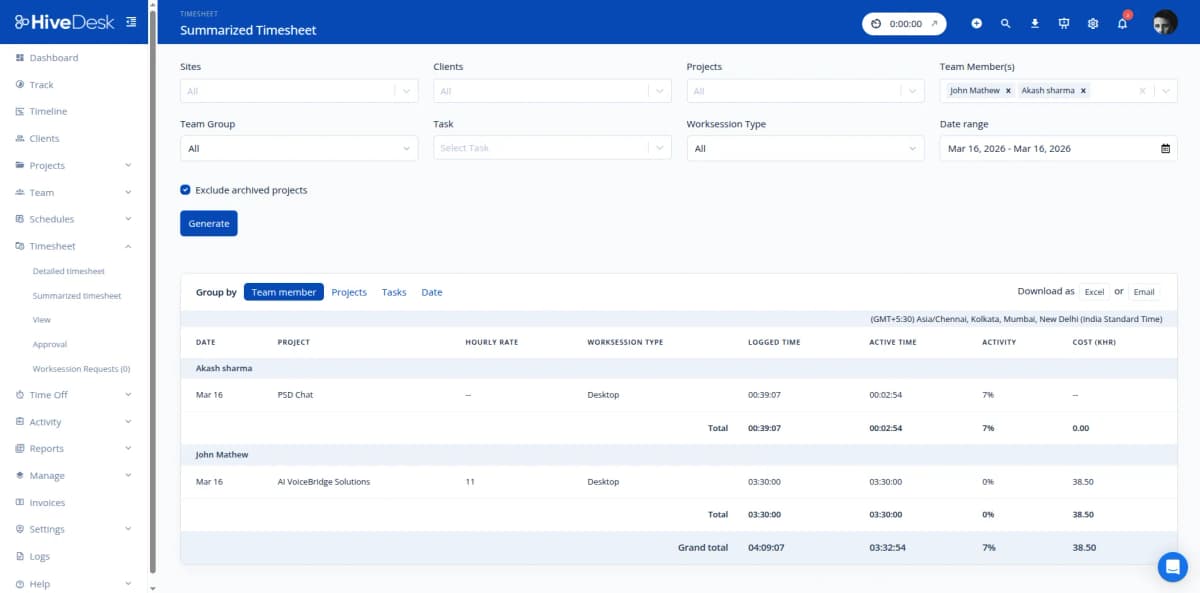
Asana Integration & Chrome Extension
Track time where you already work
HiveDesk integrates with Asana so tracked hours link directly to your tasks and projects. The Chrome extension lets developers start and stop tracking from the browser toolbar — ideal for browser-based IDEs, code review tools, and documentation. No context switching required.
- Asana integration links tracked time to specific tasks and projects
- Chrome extension for one-click tracking from the browser toolbar
- Desktop apps for Windows, macOS, and Linux
- iOS mobile app for time tracking on the go
- Minimal disruption — start a timer and keep coding
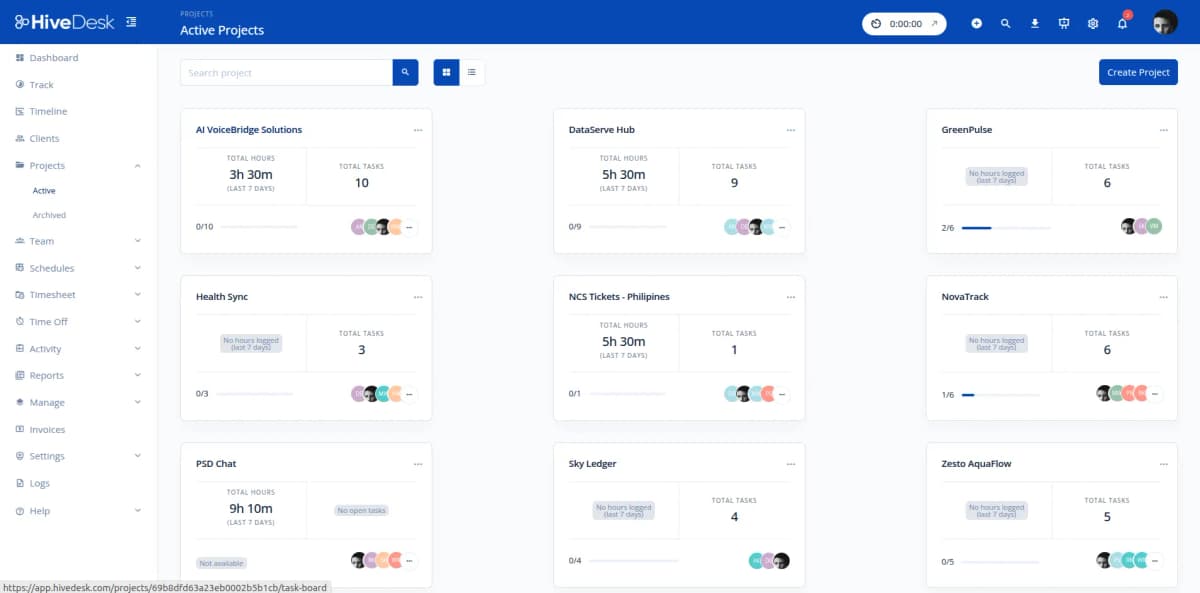
Remote Dev Team Management
Manage distributed developers with confidence
Software teams are increasingly distributed across time zones. HiveDesk gives engineering managers real-time visibility into who is working, on which project, and for how long — without interrupting developers with status requests or adding yet another standup meeting.
- Real-time dashboard shows active developers and their current tasks
- Activity monitoring with periodic screenshots for accountability
- Employee scheduling to assign developers to projects and shifts
- Attendance tracking across time zones — see who clocked in and when
- Leave management for PTO requests and approvals
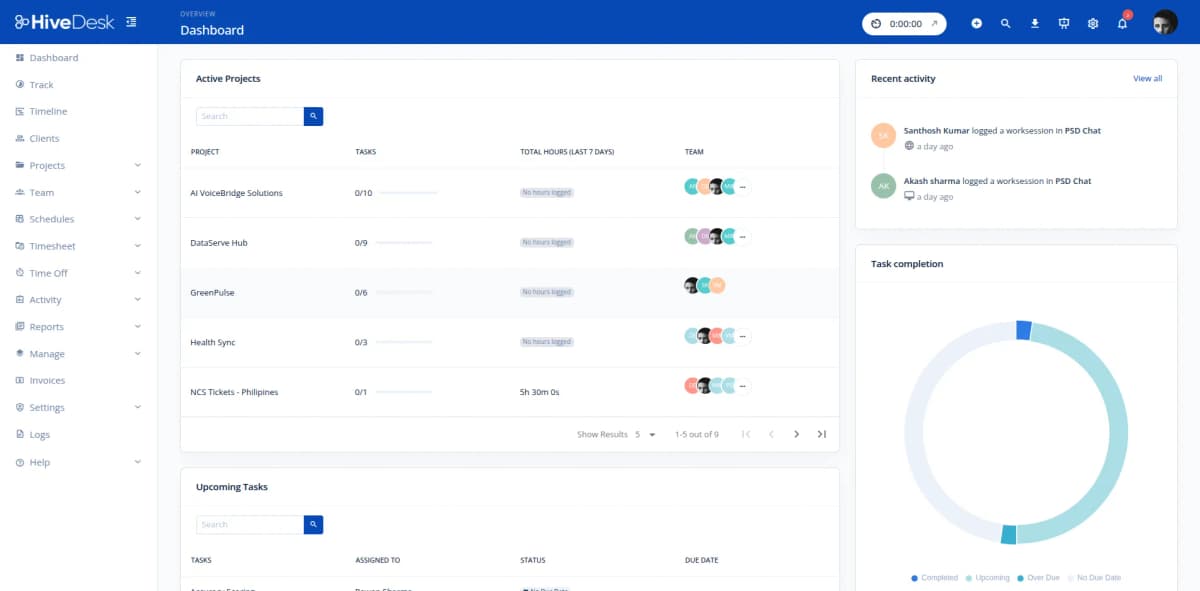
Client Billing & Timesheets
Bill clients with detailed, verifiable time records
Contract development teams need transparent billing. HiveDesk generates per-client timesheets with hours broken down by developer, project, and task. Screenshot reports provide proof of work when clients want to see what their budget funded. Export everything as PDF or Excel for clean invoicing.
- Per-client timesheets show hours by developer and task
- Screenshot reports serve as verifiable proof of work
- Export billing reports as PDF or Excel for invoicing
- Manager approval workflow before timesheets are finalized
- Track billable utilization across your development team
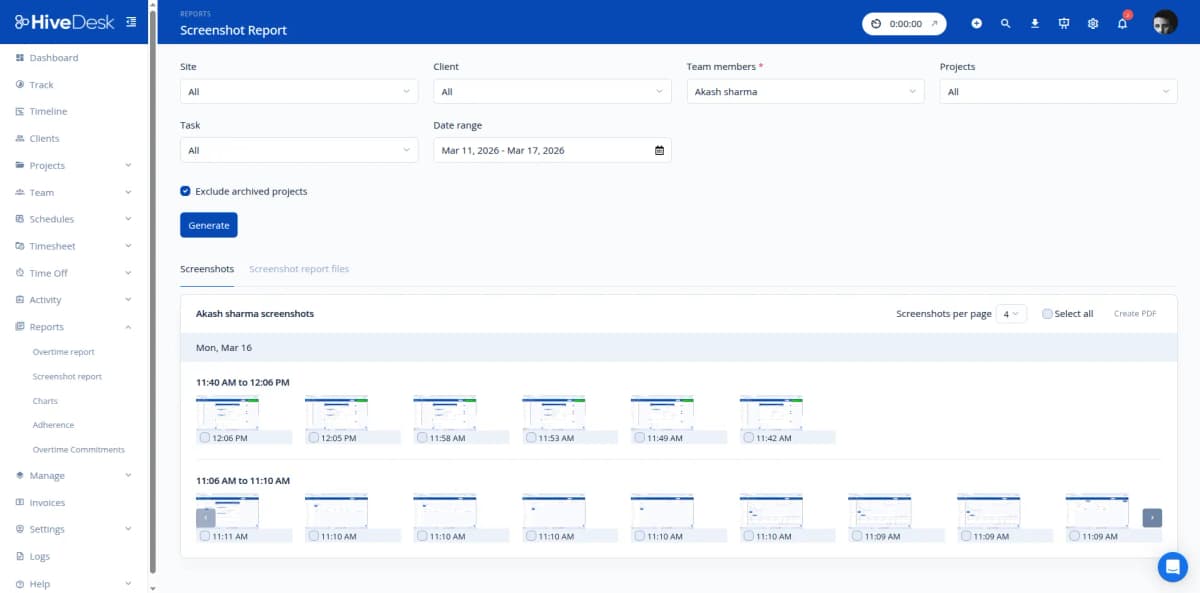
How Development Teams Use HiveDesk
Every development role benefits from automatic time tracking. Here is how different teams use HiveDesk day to day.
In-House Development Teams
Engineering managers track hours across sprints and projects to understand where development time actually goes. Compare estimated vs actual hours to improve future sprint planning and resource allocation.
- Track hours per sprint, epic, and user story
- Compare estimates vs actual time to refine planning
- Identify which tasks consistently take longer than expected
Contract & Freelance Developers
Agencies and consultancies that bill clients for development work need accurate, verifiable time records. HiveDesk captures every billable hour by client and task, with screenshot proof of work for transparent invoicing.
- Track billable hours by client and project
- Generate client-ready timesheets for invoicing
- Provide screenshot reports as proof of work
Remote & Distributed Dev Teams
Development teams spread across time zones need visibility without constant standups. HiveDesk shows who is online, what they are working on, and how hours are distributed — without interrupting deep work.
- Real-time visibility into remote developer activity
- Schedule coverage across time zones
- Track attendance without manual check-ins
Dev Team Leads & Project Managers
Technical leads and PMs need to understand resource utilization across projects. HiveDesk provides per-project and per-developer time breakdowns that feed directly into capacity planning and workload balancing.
- Per-project time breakdowns for capacity planning
- Identify overloaded team members before burnout
- Balance workloads across concurrent projects
Everything Your Dev Team Needs. $5/User/Month.
One plan with every feature included. No tiers, no hidden fees, no per-feature upsells.
Automatic Time Tracking
One-click timer on desktop, mobile, and Chrome browser. Time is recorded by project, task, and sprint — no manual entries at the end of the day.
Activity Monitoring
Periodic screenshots and activity levels provide accountability for remote dev teams without micromanaging individual coding sessions.
Employee Scheduling
Assign developers to projects and shifts. Track schedule adherence and balance workloads across sprints and client engagements.
Timesheets & Approval
Auto-generated timesheets with manager approval workflow. Export per-client or per-project reports as PDF or Excel for invoicing.
Attendance & Leave
Track attendance automatically from clock-in data. Manage PTO requests and approvals across your development team.
Real-Time Dashboards
See who is working on which project right now. Drill into tasks, sprints, and individual developer contributions.
Trusted by Teams Across 6 Continents Since 2011
We have used every time tracking software under the sun, and they all fall short in some area that we need, but overall HiveDesk has met our needs. Their PDF screenshot reports are clean, easy to use and understand. Our clients prefer them over the complicated reports of other systems.
HiveDesk has been instrumental in helping us manage our remote team effectively. The automatic time tracking and screenshot features give us the visibility we need without micromanaging. Setup was straightforward and our team adopted it within a day.
Simple, Developer-Friendly Pricing
One plan with all features included. Scale your team up or down as projects change.
All features included
- Automatic time tracking across all devices
- Activity monitoring with screenshots
- Employee scheduling
- Attendance & leave management
- Project & task tracking
- Timesheet generation & approval
- Reporting & analytics dashboards
- Asana integration
No credit card required
Frequently Asked Questions
Everything you need to know about time tracking for developers.
HiveDesk runs quietly in the background on desktop, browser, or mobile. Start the timer with one click when you begin a task, and it tracks time automatically. There are no pop-ups or interruptions while you code. The Chrome extension is especially useful for developers who work in browser-based tools — start and stop tracking without leaving your tab.
Yes. Create projects in HiveDesk that map to your sprints, epics, or client engagements. Within each project, create tasks for individual tickets or user stories. When you track time, it is recorded against the specific task and project — giving you a clear breakdown of hours per ticket, per sprint, and per client.
HiveDesk integrates with Asana, so you can link tracked time directly to Asana tasks. This means your project management workflow stays intact while you get accurate time data for billing, estimation, and resource planning. Time tracked in HiveDesk flows into your Asana task records.
The HiveDesk Chrome extension lets you start and stop time tracking from your browser toolbar. This is ideal for developers who spend their day in browser-based IDEs, code review tools, or documentation. You select your project and task from the extension, click start, and your time is captured automatically.
Yes. Set time estimates on projects and tasks, then compare them against actual tracked hours. Over time, you build a dataset of how long different types of development work actually take — making your sprint planning, project scoping, and client quotes more accurate.
Create separate projects for each client. As your team works, HiveDesk captures billable hours by client, project, and developer. At invoicing time, generate per-client timesheets that break down every hour by task. Export as PDF or Excel and attach to your invoices. Screenshot reports provide additional proof of work if clients request it.
Yes. HiveDesk is built for remote and distributed teams. Real-time dashboards show which developers are currently working and on what tasks. Employee scheduling, attendance tracking, and leave management work across time zones. You get visibility into your team without requiring everyone to be in the same office or time zone.
HiveDesk takes periodic screenshots at configurable intervals while tracking is active. Developers always know when tracking is on — the desktop app shows a visible indicator. Screenshots provide activity verification for managers and proof of work for clients. Screenshot frequency is set by the account administrator and can be adjusted per project.
HiveDesk has native desktop apps for Windows, macOS, and Linux — covering every major development environment. There is also a Chrome browser extension for browser-based work, an iOS mobile app, and a web dashboard accessible from any browser. Your team tracks time from whatever device and OS they prefer.
HiveDesk costs $5 per user per month — one plan that includes every feature. No tiers, no per-feature upsells. There is a free 14-day trial with no credit card required. Most development teams are up and running within a day: sign up, create projects, invite developers, and start tracking.
Related Resources
Guides
Templates
Ready to Get Started?
Join teams worldwide who trust HiveDesk for workforce management, time tracking, and employee monitoring. $5/user/month, all features included.