

Back Office Operations — What to Measure and What to Fix

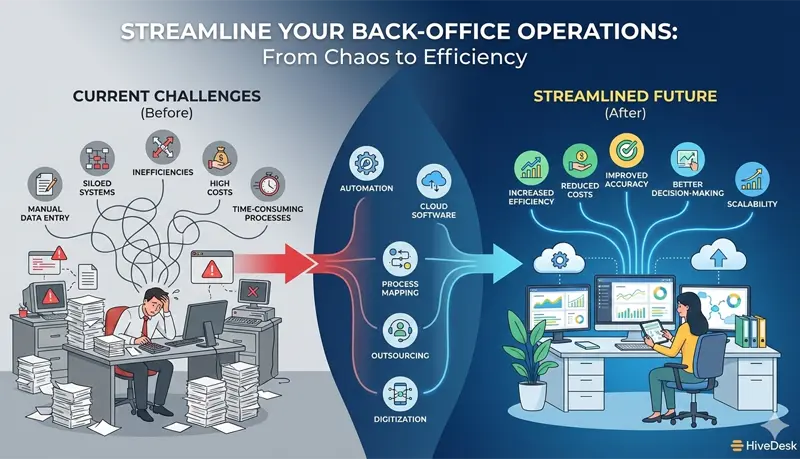
In a call center or BPO, "back office" refers to everything that is not an agent handling a customer interaction. Payroll processing, schedule building, QA evaluations, training coordination, HR administration, reporting, invoicing, compliance tracking — these functions keep the operation running but do not directly generate revenue or handle customer contacts.
Back office operations become a problem when they consume a disproportionate amount of management time, require manual effort that could be eliminated, or produce errors that create downstream costs. A supervisor who spends 6 hours per week building schedules in spreadsheets is a supervisor who is not coaching agents. An HR process that takes 3 days to onboard a new hire delays the time to productivity. A payroll error that underpays an agent creates a trust problem that no amount of engagement programming can fix.
The goal is not to eliminate back office work — it is essential. The goal is to reduce the time and error rate of back office functions so that management capacity is freed up for the work that directly affects operations: coaching, staffing decisions, quality improvement, and client relationship management. A BPO management platform that consolidates time tracking, scheduling, and reporting reduces the tool sprawl that slows back office work down.
Where back office time actually goes
Before improving anything, understand where the time is being spent. In a typical call center or BPO, the major back office functions break down roughly as follows:
| Function | Who does it | Typical time consumed | Where inefficiency hides |
|---|---|---|---|
| Schedule building and management | Supervisors, WFM analyst | 4–8 hours/week | Manual spreadsheet work, lack of scheduling software, rebuilding from scratch each week |
| Timesheet review and approval | Supervisors | 2–4 hours/week | Comparing manual time entries against schedules, chasing missing entries |
| Payroll processing | HR / finance | 4–8 hours per cycle | Manual calculations, overtime verification, multi-state tax complexity |
| QA evaluations | QA analysts, supervisors | 8–12 hours/week for a 100-agent operation | Inconsistent evaluation cadence, no calibration, paper-based scoring |
| Reporting | Supervisors, ops managers | 3–6 hours/week | Manual data pulls from multiple systems, reformatting into presentation-ready reports |
| Onboarding / HR administration | HR, training | 3–5 hours per new hire | Paper forms, redundant data entry across systems, manual benefits enrollment |
| Leave and time-off management | Supervisors, HR | 2–3 hours/week | Email-based requests, manual balance tracking, no coverage impact visibility |
| Invoicing and billing (BPOs) | Finance, ops | 4–8 hours/month per client | Manual hour aggregation, rate calculations, reconciliation against contracts |
| Compliance tracking | HR, legal | Variable | Manual monitoring of labor law changes, no systematic audit process |
For a 150-agent BPO, these functions can consume 40–60 hours of management and administrative time per week — the equivalent of one full-time employee doing nothing but back office work.
The highest-impact fixes
Not all back office improvements are equal. Focus on the changes that free up the most time, reduce the most errors, or eliminate the most costly downstream consequences.
Automate time tracking and timesheet approval
The problem: Agents manually enter time, supervisors manually compare entries against the schedule, discrepancies are investigated one by one, and corrected timesheets are forwarded to payroll. This process is slow, error-prone, and consumes 2–4 hours of supervisor time per week.
The fix: Automatic time tracking that captures clock-in, clock-out, and break times without manual entry. Timesheets are generated from tracked data and compared against the schedule automatically. Supervisors review exceptions (late arrivals, early departures, missed punches) rather than reviewing every entry.
Impact: Supervisor time on timesheet review drops from 2–4 hours/week to 30–60 minutes. Payroll errors from manual entry are eliminated. Overtime is visible before it is incurred rather than discovered during payroll processing.
Move scheduling out of spreadsheets
The problem: A supervisor building schedules in Excel spends 4–8 hours per week on a process that includes no coverage validation, no break staggering logic, no overtime flagging, and no ability for agents to view their schedule on their phone. Schedule changes happen via text message and are not reflected in the master file.
The fix: Scheduling software that provides shift templates, break placement rules, coverage-vs-requirement views, overtime alerts, and agent self-service for viewing schedules and requesting swaps.
Impact: Schedule building time drops from 4–8 hours to 1–2 hours. Service level consistency improves because coverage gaps are visible before the schedule is published. Overtime costs drop because the software flags when an assignment pushes an agent past the overtime threshold.
Standardize QA evaluation workflow
The problem: QA evaluations happen inconsistently — some agents get 6 evaluations per month, others get 1. Scoring criteria are interpreted differently by different evaluators. Results are stored in individual spreadsheets that are not aggregated. Coaching happens (or does not) based on the supervisor's initiative rather than a systematic process.
The fix: Define a QA cadence (minimum 4–6 evaluations per agent per month), use a standardized scorecard with weighted criteria, run monthly calibration sessions across evaluators, and store all evaluations in a central system that generates per-agent trend reports.
Impact: Quality data becomes reliable enough to drive coaching decisions and identify training gaps. Evaluator consistency improves. The time spent on QA does not decrease — but the value extracted from it increases dramatically.
Create a self-service layer for routine requests
The problem: Agents contact their supervisor or HR for routine requests — checking their PTO balance, submitting a time-off request, viewing their schedule, updating their direct deposit information, downloading a pay stub. Each request is small, but the volume is constant — and each one interrupts someone whose time is better spent elsewhere.
The fix: Give agents self-service access to the information and requests that do not require human judgment. A system where agents can view their schedule, check their leave balance, submit time-off requests, and see their timesheet status eliminates the majority of routine inquiries.
Impact: Supervisor and HR interruptions for routine requests drop significantly. Time-off requests route through an approval workflow that shows coverage impact, rather than an email chain that requires the supervisor to manually check the schedule.
Streamline onboarding administration
The problem: A new agent hire requires the same information entered into multiple systems — HR, payroll, time tracking, scheduling, QA, training records, CRM access. Each system has its own form. The process takes 3–5 hours of administrative time per new hire and is error-prone (wrong employee ID, missing tax form, access not provisioned).
In a call center with 30–40% annual turnover, onboarding administration is not a one-time effort — it is a continuous process. A 200-agent operation at 35% turnover processes 70 new hires per year, consuming 210–350 hours of admin time.
The fix:
- Reduce the number of systems that require separate data entry. Wherever possible, use tools that combine functions — a platform that handles time tracking, scheduling, and leave management in one system eliminates 2–3 separate onboarding steps
- Create an onboarding checklist that sequences every step with a responsible owner and deadline. Do not rely on memory or tribal knowledge for what systems need to be provisioned
- Pre-fill forms where possible. If the offer letter captures the agent's name, address, and start date, that information should not need to be re-entered into 4 other systems
Impact: Onboarding time per hire drops from 3–5 hours to 1–2 hours. New agents have all system access on day 1 rather than discovering missing access during their first week of training.
Measuring back office efficiency
Back office work is harder to measure than front office work (where AHT, FCR, and service level provide clear metrics), but it is not unmeasurable.
| Metric | What it measures | Target |
|---|---|---|
| Payroll error rate | Percentage of paychecks requiring correction | Fewer than 1% |
| Schedule build time | Hours spent creating the weekly schedule | Under 2 hours for a 50-agent operation |
| Time-to-fill for onboarding | Business days from hire decision to agent fully provisioned in all systems | 2 business days or fewer |
| QA evaluation completion rate | Percentage of agents receiving the target number of evaluations per month | 95%+ |
| Report generation time | Hours spent pulling and formatting weekly/monthly reports | Declining over time as reporting is automated |
| Time-off request turnaround | Hours from agent request to supervisor decision | 24 hours or fewer |
| Invoice accuracy (BPOs) | Percentage of client invoices requiring correction after submission | Fewer than 2% |
Track these monthly. If payroll errors are running at 5%, fixing that problem saves more money (in correction time, trust erosion, and potential wage complaints) than any process improvement initiative.
BPO-specific back office complexity
BPOs have back office demands that single-client call centers do not face:
Per-client reporting. Each client expects reports in their format, on their cadence, with their metrics. A BPO with 8 clients may produce 8 different weekly reports — each requiring data pulled from the same systems but formatted and segmented differently. Standardizing internal data collection and building client-specific report templates (rather than creating each report from scratch) reduces this burden.
Multi-rate invoicing. Clients may be billed per hour, per transaction, or per FTE — sometimes with different rates for regular hours, overtime, training, and after-hours work. Manual invoicing from timesheet data is error-prone and time-consuming. Connecting time tracking directly to the invoicing process — with rate rules configured per client — eliminates manual calculation.
Account-level cost tracking. Knowing whether a client account is profitable requires allocating shared costs (supervision, QA, facilities, training) to specific accounts. If this allocation is done manually once per quarter, you discover profitability problems too late. Monthly automated allocation — even if approximate — catches margin erosion while there is still time to act.
Multi-jurisdictional compliance. A BPO with agents in 10 states must track different overtime rules, different minimum wages, different tax withholding, different leave laws, and different break requirements. This compliance tracking is a back office function that, if done manually, is both time-intensive and high-risk. Payroll providers handle much of this, but the employer remains responsible for accuracy.
What not to do
Do not automate a broken process. If your onboarding process includes 3 redundant steps, automating those steps makes them faster but does not eliminate the redundancy. Fix the process first, then automate the improved version.
Do not add tools without removing manual workarounds. If you implement scheduling software but supervisors continue maintaining a parallel spreadsheet "just in case," you have doubled the work rather than reducing it. When a new tool replaces a manual process, decommission the manual process.
Do not optimize back office functions in isolation from front office impact. A payroll process change that saves HR 2 hours per cycle but delays paychecks by a day will increase agent attrition — costing far more than the time saved. Every back office change should be evaluated against its impact on the people and processes it supports.
