

Track Resolution Time. Schedule Coverage. Bill Accurately.
IT help desks juggle L1/L2/L3 support tiers, 24/7 shift coverage, and ticket-based client billing — often with no visibility into where agent hours actually go. HiveDesk tracks resolution time by tier and client, schedules shift coverage, monitors agent activity, and generates the timesheets you need for accurate billing and payroll.
No credit card required · $5/user/month · All features included
IT Help Desks Run on Time — But Most Cannot Track It
Resolution time, shift coverage, and billable hours drive help desk operations. Without accurate time tracking, you are guessing at staffing levels, under-billing clients, and losing visibility into agent productivity.
Without IT help desk time tracking
- No visibility into how long tickets actually take to resolve by tier
- Agents forget to log time or estimate hours at the end of the week
- Client invoices are based on guesswork — leading to under-billing or disputes
- Shift handoffs have gaps because attendance is tracked manually
- Remote support agents work without oversight or accountability
- Overtime costs and break compliance are discovered after payroll runs
With HiveDesk
- Time tracked automatically by support tier, ticket category, and client account
- Every minute is captured as agents work — no manual entry at day's end
- Per-client timesheets with screenshot reports for transparent billing
- Attendance tracked from clock-in data — shift gaps caught immediately
- Real-time dashboards show remote agent activity and current tasks
- Overtime flagged before payroll — break times recorded for compliance
Resolution Time Tracking
Track how long tickets take — by tier, category, and client
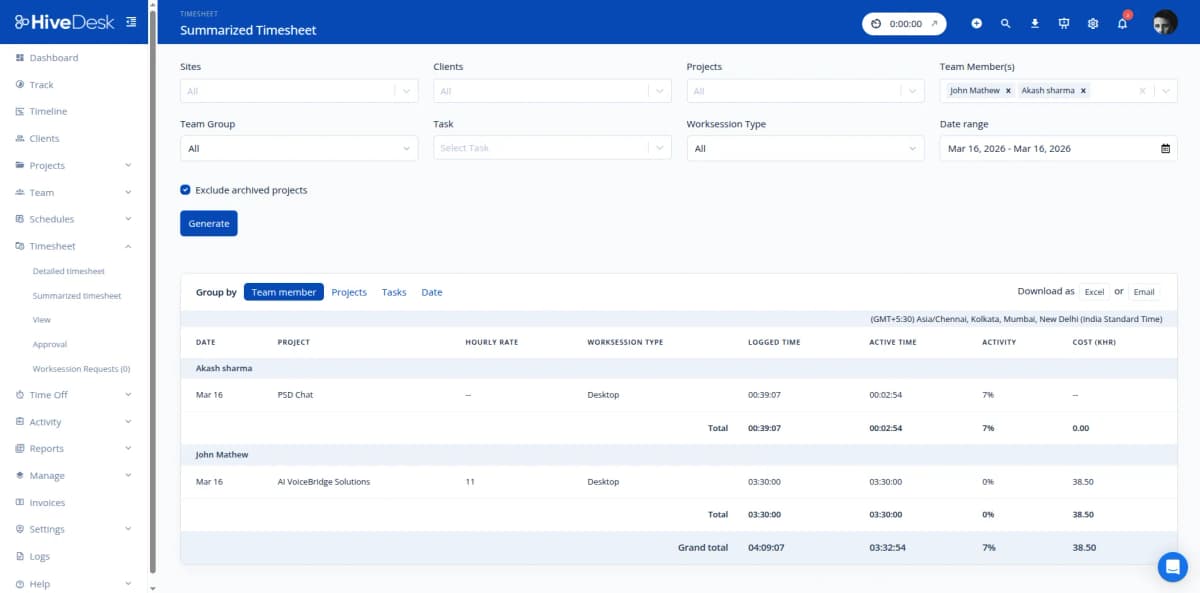
Understanding resolution time is critical for staffing, SLA compliance, and billing accuracy. HiveDesk lets you create projects for each support tier (L1, L2, L3), ticket category, or client account. Agents track time with one click as they work tickets. Reports show you exactly where hours are going — so you can staff smarter and bill accurately.
- Organize projects by support tier (L1/L2/L3)
- Track time by ticket category — password resets, hardware, software, escalations
- Per-client time tracking for managed IT services billing
- One-click time tracking on desktop, mobile, and Chrome
- Historical data shows average resolution time by tier and category
Shift Coverage & Scheduling
Schedule 24/7 coverage without spreadsheet headaches
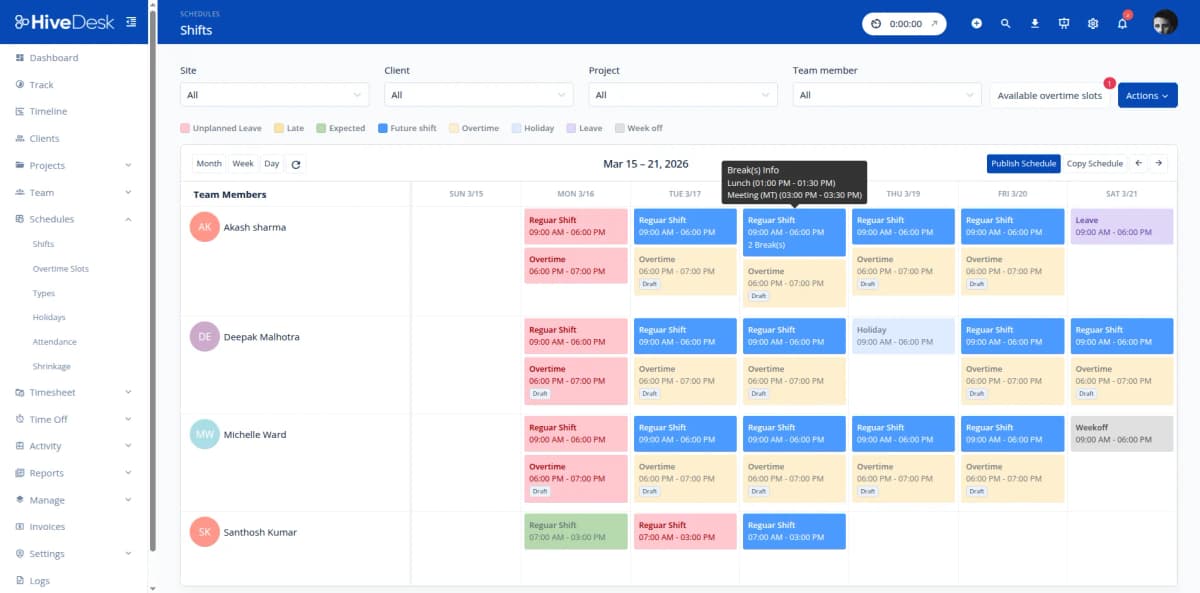
IT help desks often need round-the-clock coverage. HiveDesk lets you build shift schedules, set up recurring weekly rotations, and assign agents to specific support queues. Attendance tracking compares actual clock-in times against scheduled shifts — so you catch no-shows and late arrivals immediately, not after the damage is done.
- Create day, evening, and overnight shifts with start/end times
- Recurring schedules for weekly shift rotations
- Attendance tracking compares clock-in times vs scheduled shifts
- Leave management — see availability before building schedules
- Track schedule adherence across distributed teams
Agent Monitoring & Productivity
See what your support team is doing right now
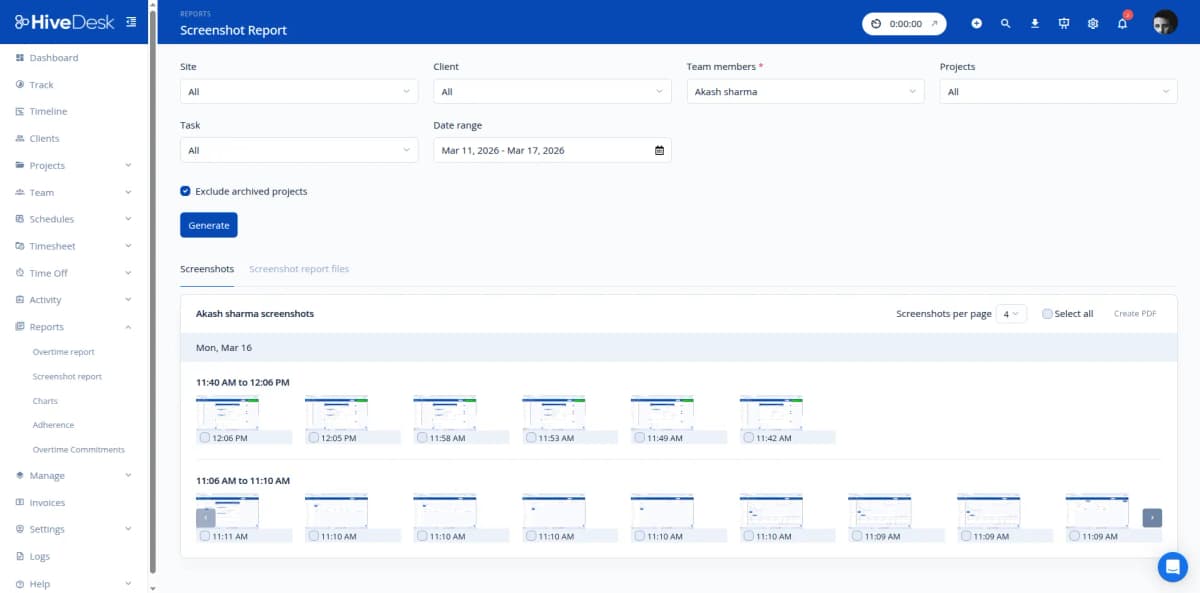
Whether your help desk agents work on-site or remotely, you need visibility into their activity during shifts. HiveDesk provides real-time dashboards showing who is online and what they are working on, plus periodic screenshots and activity level tracking. Identify idle time between tickets, spot agents who may need help, and ensure coverage stays at target levels.
- Real-time dashboard shows active agents and current tasks
- Periodic screenshots provide activity verification
- Keyboard and mouse activity levels tracked per session
- Identify idle time and agents who may need additional support
- Same visibility for remote agents as on-site teams
Client Billing & Timesheets
Bill clients based on tracked hours, not estimates
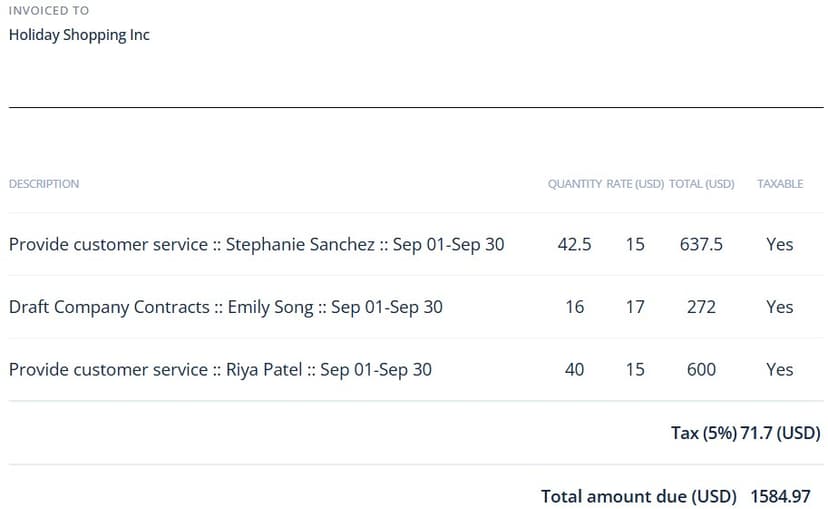
For managed IT services and MSPs, accurate billing depends on accurate time data. HiveDesk generates per-client timesheets from automatically tracked hours. Managers review and approve timesheets before they go out. Export as PDF or Excel for invoicing. Attach screenshot reports for clients who want proof of work alongside their bills.
- Per-client timesheets generated from tracked hours
- Manager approval workflow before invoicing
- Export as PDF or Excel — ready to attach to invoices
- Screenshot reports as proof of work for client billing
- Separate billable client hours from internal non-billable time

How IT Help Desks Use HiveDesk
From tiered support teams to managed service providers, HiveDesk gives IT operations the workforce management tools they need.
L1 / L2 / L3 Support Management
Track time spent at each support tier to understand how hours are distributed. Identify bottlenecks where L1 agents spend too long on issues that should be escalated, or where L3 engineers are pulled into routine work.
- Separate time tracking per support tier
- Identify escalation bottlenecks
- Staff each tier based on actual workload data
Managed IT Services & MSPs
Track support hours by client account for accurate billing. Generate per-client timesheets that show exactly how many hours each agent spent on each account. Attach screenshot reports as proof of work with your invoices.
- Per-client time tracking for billing
- Screenshot reports as proof of work
- Export timesheets for client invoicing
24/7 Help Desk Coverage
Schedule agents across day, evening, and overnight shifts with recurring rotations. Track attendance to ensure shift handoffs happen on time. Manage leave requests so you know availability before building next week's schedule.
- Recurring shift schedules for round-the-clock coverage
- Attendance tracking for shift handoff accountability
- Leave management for proactive scheduling
Remote & Distributed IT Teams
Manage support agents working from home or across multiple locations with the same visibility as on-site teams. Real-time dashboards show who is online, activity monitoring confirms productive work, and attendance tracking catches no-shows.
- Real-time visibility into remote agent activity
- Activity monitoring with periodic screenshots
- Attendance tracking across time zones
Everything Your IT Help Desk Needs. $5/User/Month.
One plan with every feature included. No tiers, no hidden fees, no per-agent upsells.
Automatic Time Tracking
One-click timer on desktop, mobile, and browser. Agents track hours against support tiers, ticket categories, or client accounts.
Activity Monitoring
Periodic screenshots and activity levels during work sessions. See what agents are working on and identify idle time between tickets.
Shift Scheduling
Create shifts for 24/7 coverage. Set up recurring rotations and assign agents to specific support queues and time slots.
Timesheets & Approval
Auto-generated timesheets from tracked hours. Manager approval workflow. Export as PDF or Excel for payroll and client invoicing.
Attendance & Leave
Track attendance from clock-in data. Manage PTO, sick leave, and approvals. Know agent availability before building schedules.
Real-Time Dashboards
See who is working, on which queue, and for how long. Monitor team activity across support tiers in real time.
Trusted by Teams Across 6 Continents Since 2011
We have used every time tracking software under the sun, and they all fall short in some area that we need, but overall HiveDesk has met our needs. Their PDF screenshot reports are clean, easy to use and understand. Our clients prefer them over the complicated reports of other systems.
HiveDesk has been instrumental in helping us manage our remote team effectively. The automatic time tracking and screenshot features give us the visibility we need without micromanaging. Setup was straightforward and our team adopted it within a day.
Simple Pricing for IT Help Desks
One plan with all features included. Scale up or down as your support team changes.
All features included
- Automatic time tracking on all devices
- Activity monitoring with screenshots
- Shift scheduling with recurring rotations
- Attendance & leave management
- Project & task tracking by tier and client
- Timesheet generation & approval
- Reporting & analytics dashboards
- Asana integration
No credit card required
Frequently Asked Questions
Everything you need to know about IT help desk time tracking and workforce management.
HiveDesk tracks time automatically while your support agents work. Create separate projects for L1, L2, and L3 support tiers, or organize by ticket type (password resets, hardware issues, software installations, escalations). Agents switch between projects with one click as they move between tickets. At the end of the day or billing period, pull reports showing exactly how much time was spent on each tier, ticket category, or client account.
Yes. Set up projects for each client account and have agents track time against the correct client as they work tickets. HiveDesk generates per-client timesheets showing hours by agent and task category. Export these as PDF or Excel and attach them to your invoices. Screenshot reports provide additional proof of work if clients request verification of billed hours.
HiveDesk lets you create shift schedules with specific start and end times, set up recurring rotations for weekly shift patterns, and assign agents to specific shifts. The attendance tracking feature compares actual clock-in times against scheduled shifts, so you can see who showed up on time, who was late, and who missed their shift. Leave management lets agents request time off and managers approve it — so you know agent availability before building schedules.
Yes. Create separate projects for each support tier. Assign agents to the appropriate tier project and track time spent at each level. Reports show how hours are distributed across tiers, helping you identify if L1 agents are spending too much time on issues that should be escalated, or if L3 engineers are being pulled into L1 work. This data helps you staff each tier more effectively.
HiveDesk takes periodic screenshots and tracks keyboard and mouse activity levels during work sessions. Screenshot frequency is configurable. Agents always know when monitoring is active and can view their own data. For IT help desks, this provides visibility into whether agents are actively working tickets or idle between calls — without the manager needing to walk the floor or check in constantly.
HiveDesk integrates with Asana for task and project management. You can track time against Asana tasks linked to specific tickets or projects. For other ITSM tools, HiveDesk works alongside them as a separate workforce management layer — handling time tracking, scheduling, attendance, and reporting while your ticketing system handles the ticket workflow.
HiveDesk automatically tracks working hours, break times, and overtime. The system generates detailed timesheets from tracked hours with a built-in manager approval workflow. Export approved timesheets for payroll processing. Attendance reports, overtime reports, and activity reports provide the audit trail you need for labor law compliance and SLA reporting. HiveDesk is GDPR compliant with AES-256 encryption and role-based access controls.
HiveDesk costs $5 per user per month — one plan that includes every feature. No tiers, no per-feature upsells, no hidden fees. You get time tracking, activity monitoring with screenshots, employee scheduling, attendance and leave management, project and task tracking, timesheets with approval workflow, and reporting. There is a free 14-day trial with no credit card required.
Related Resources
Guides
Templates
Ready to Get Started?
Join teams worldwide who trust HiveDesk for workforce management, time tracking, and employee monitoring. $5/user/month, all features included.