

Call Center Workforce Management Software That Works on Day One
Enterprise WFM software costs a fortune and takes months to deploy. Spreadsheets leave gaps in coverage. HiveDesk is contact center workforce management software that gives you agent scheduling, time tracking, adherence monitoring, and real-time dashboards — at $5/user/month.
No credit card required · $5/user/month · All features included
Contact Center WFM Is Either Too Expensive or Too Manual
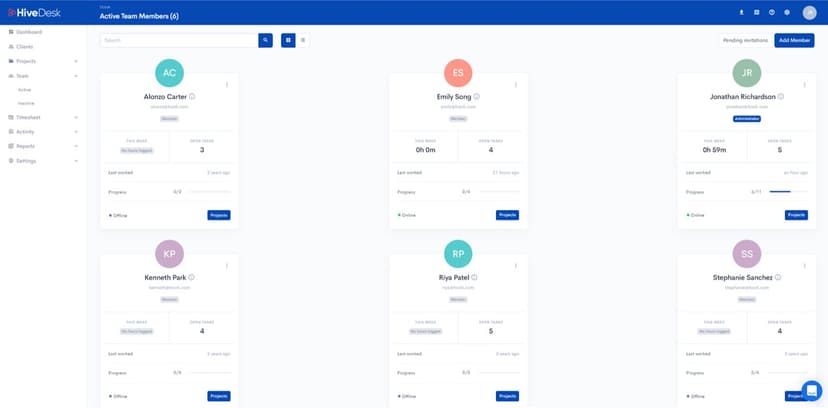
Enterprise WFM platforms like NICE and Verint cost tens of thousands per year and take months to implement. Spreadsheets and manual scheduling leave gaps in coverage. HiveDesk sits in the middle — practical call center WFM software with scheduling, adherence, and monitoring that works from day one.
Without proper workforce management
- Agent schedules built in spreadsheets — slow to update when volume changes
- No real-time view of who is on shift, who is idle, and who is missing
- Shrinkage and off-task time go undetected until service levels drop
- Overtime costs surprise you after payroll, not before
- Intraday changes require manual phone calls and messages to agents
- Compliance records are incomplete — break times and overtime are guesswork
With HiveDesk WFM
- Shift schedules built and adjusted from a centralized web dashboard
- Real-time dashboards show exactly who is working, on what, right now
- Activity monitoring with screenshots identifies shrinkage as it happens
- Overtime hours tracked and flagged before payroll processing
- Schedule changes take effect immediately — no calls or messages needed
- Automatic time records with break, overtime, and attendance data for audits
Agent Scheduling
Build shift schedules that keep queues covered
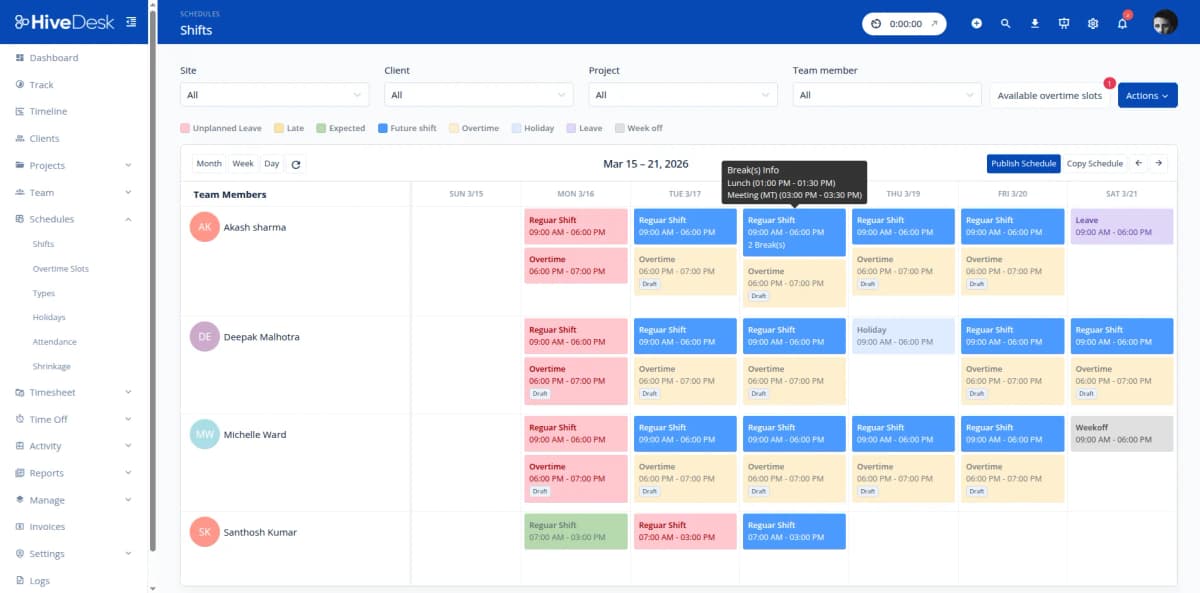
Understaffed shifts mean long hold times and missed SLAs. Overstaffed shifts waste labor budget. HiveDesk lets you create shift schedules with specific start and end times, set up recurring rotations, and assign agents to queues or client accounts. When volume changes, adjust schedules from the dashboard — no spreadsheet gymnastics required.
- Create shifts with start/end times and assign agents
- Set up recurring schedules for weekly shift rotations
- Assign agents to specific queues, projects, or client accounts
- Adjust schedules in real time when volume spikes or agents call out
- View team availability before building schedules
Schedule Adherence
Know who is on schedule and who is not — in real time
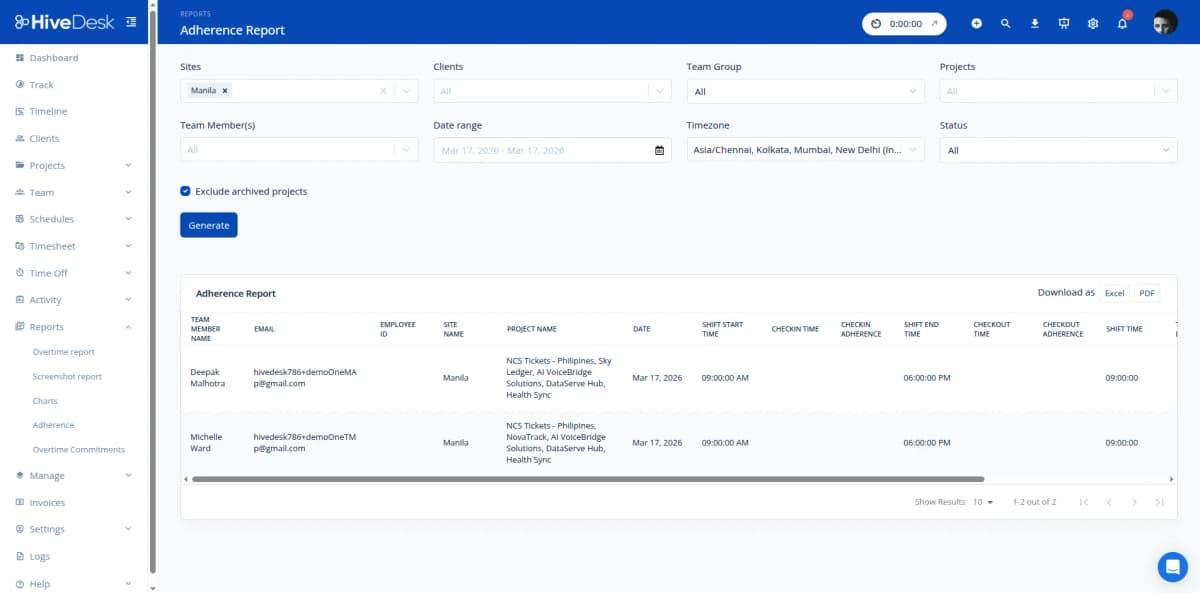
A schedule is only useful if agents follow it. HiveDesk automatically compares actual clock-in and clock-out times against scheduled shifts. Adherence reports show on-time arrivals, late starts, early departures, and unplanned absences — so you can address issues before they erode service levels.
- Automatic comparison of actual hours vs scheduled shifts
- Adherence reports by agent, team, and time period
- Late arrivals and early departures flagged automatically
- Attendance records maintained continuously from clock-in data
- Historical adherence data for performance reviews and coaching
Real-Time Intraday Management
Respond to intraday changes before service levels drop
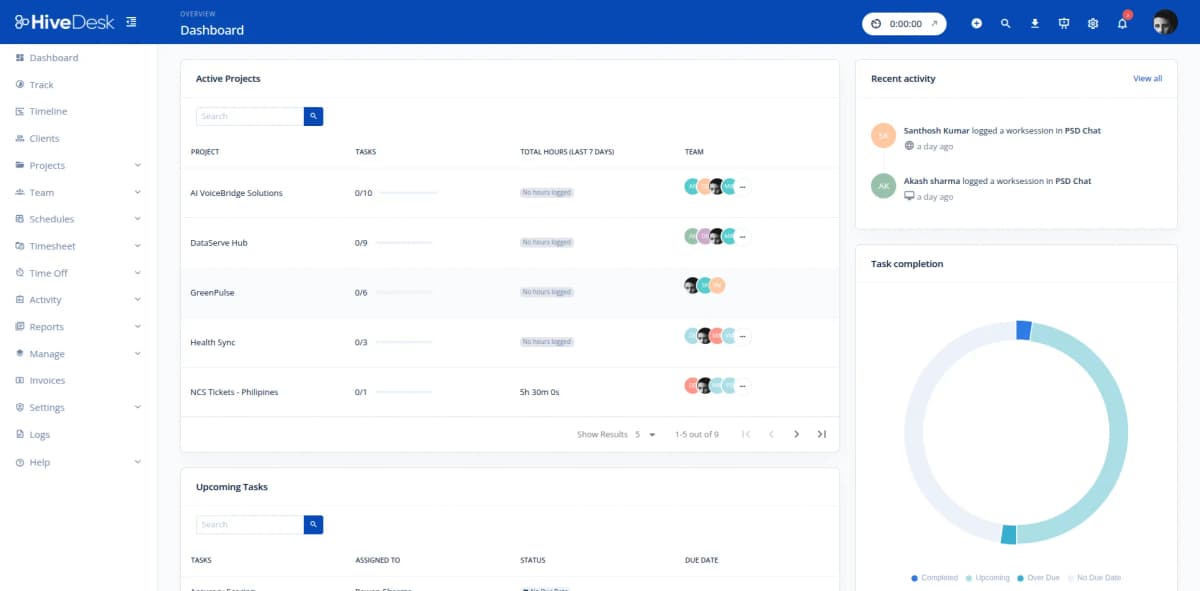
Contact center volume is unpredictable. Agents call out sick, campaigns drive unexpected spikes, and queues back up without warning. HiveDesk gives you a real-time dashboard showing who is working, who is idle, and what everyone is doing right now. Combined with activity monitoring and periodic screenshots, you have the visibility to make fast intraday staffing decisions.
- Real-time dashboard shows active agents and their current tasks
- Activity monitoring with periodic screenshots during shifts
- Identify idle time and off-task behavior as it happens
- Reassign agents between queues based on current demand
- Track shrinkage in real time — not days later in a report
Labor Cost Control & Compliance
Control overtime, track breaks, and stay audit-ready
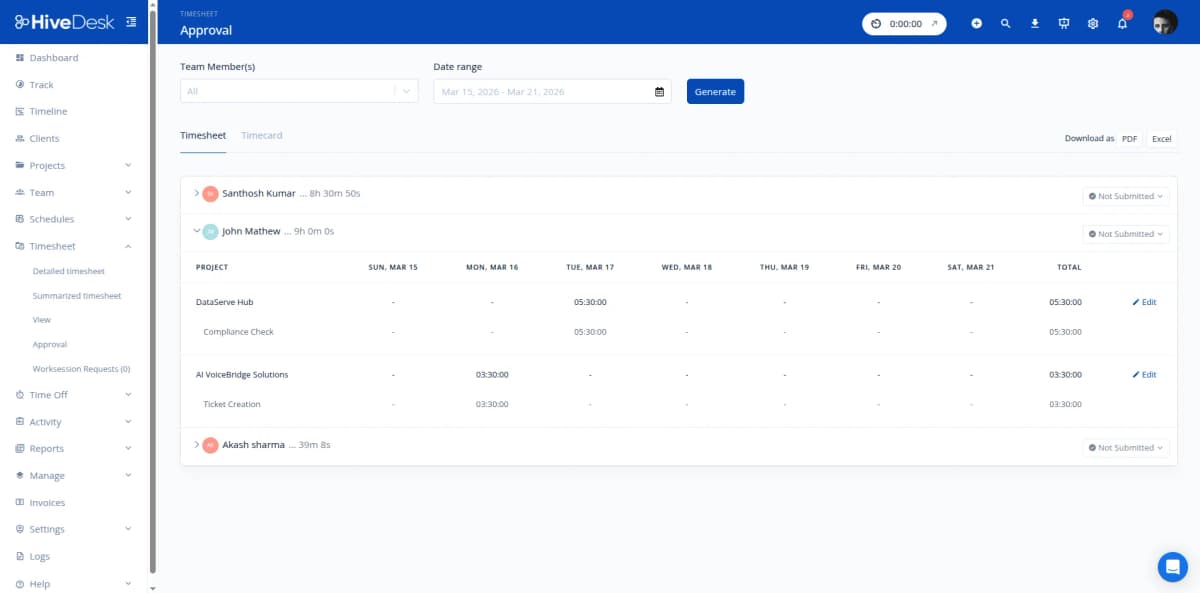
Labor is the biggest line item in any contact center budget. HiveDesk tracks every hour including overtime, breaks, and idle time — so you see exactly where labor costs are going. Timesheets are auto-generated from tracked hours with a manager approval workflow. Export clean data for payroll processing and keep audit-ready compliance records without manual effort.
- Overtime hours tracked and flagged before payroll
- Break times recorded automatically for labor law compliance
- Auto-generated timesheets with manager approval workflow
- Export approved timesheets as PDF or Excel for payroll
- GDPR compliant with AES-256 encryption and role-based access
How Contact Centers Use HiveDesk for Workforce Management
From inbound call centers to multi-channel BPO operations, HiveDesk provides the WFM foundation contact centers need.
Inbound Call Centers
Schedule agents to cover peak call volumes, track adherence during shifts, and monitor productive time. Reduce hold times by ensuring the right number of agents are on the phones at the right times.
- Schedule agents based on call volume patterns
- Track schedule adherence across shifts
- Monitor agent activity during working hours
BPO Operations
Manage agents across multiple client accounts with separate tracking per client. Generate per-client timesheets for billing, track labor costs by account, and provide clients with screenshot-backed proof of work.
- Track time by client account for accurate billing
- Generate per-client timesheets and reports
- Provide screenshot reports as proof of work
Remote & Hybrid Contact Centers
Get the same visibility into remote agents that you have with on-site teams. Real-time dashboards show who is working, activity monitoring confirms productive time, and attendance tracking catches no-shows before they impact service levels.
- Real-time visibility into remote agent activity
- Screenshot monitoring for accountability
- Attendance tracking across time zones
Multi-Channel Support Teams
Track agent time across phone, email, chat, and social media support queues. See how time is distributed across channels, identify where agents spend the most hours, and balance workloads to prevent burnout.
- Organize projects by support channel
- Track time distribution across channels
- Balance workloads and prevent overtime
Complete Contact Center WFM. $5/User/Month.
One plan with every feature included. No tiers, no per-agent upsells, no hidden fees. Simpler and cheaper than enterprise WFM software.
Agent Scheduling
Create shift schedules with start/end times, set up recurring rotations, and assign agents to queues or client accounts. Track attendance against scheduled shifts.
Time Tracking
Automatic time tracking on desktop, mobile, and browser. Agents track hours against queues, projects, and tasks with one click.
Activity Monitoring
Periodic screenshots and activity level tracking during shifts. Identify shrinkage, off-task behavior, and coaching opportunities.
Timesheets & Approval
Auto-generated timesheets with manager approval workflow. Export as PDF or Excel for payroll processing.
Attendance & Leave
Track attendance from clock-in data. Manage PTO requests, sick leave, and approvals. See agent availability before scheduling.
Real-Time Dashboards
See who is working, on what queue, and for how long — right now. Drill into projects, tasks, and individual agent activity.
Trusted by Teams Across 6 Continents Since 2011
We have used every time tracking software under the sun, and they all fall short in some area that we need, but overall HiveDesk has met our needs. Their PDF screenshot reports are clean, easy to use and understand. Our clients prefer them over the complicated reports of other systems.
HiveDesk has been instrumental in helping us manage our remote team effectively. The automatic time tracking and screenshot features give us the visibility we need without micromanaging. Setup was straightforward and our team adopted it within a day.
Enterprise WFM Features Without the Enterprise Price
NICE and Verint charge thousands per month and take months to implement. HiveDesk gives you practical contact center workforce management at a price that makes sense.
All features included
- Agent scheduling with recurring shifts
- Automatic time tracking on all devices
- Activity monitoring with screenshots
- Schedule adherence tracking
- Attendance & leave management
- Timesheets with approval workflow
- Real-time dashboards & reporting
- Asana integration
No credit card required
Frequently Asked Questions
Everything you need to know about contact center workforce management with HiveDesk.
Contact center workforce management is the process of scheduling the right number of agents with the right skills at the right times to meet service level targets. It includes forecasting call volume, creating agent schedules, tracking schedule adherence in real time, managing intraday changes, and controlling labor costs. WFM software automates these processes so operations managers spend less time on spreadsheets and more time optimizing performance.
HiveDesk lets you create shift schedules with specific start and end times, assign agents to shifts, and set up recurring schedules for rotating shift patterns. You can schedule agents across different queues, projects, or client accounts. The attendance tracking feature compares actual clock-in and clock-out times against scheduled shifts so you can see who showed up on time, who was late, and who missed their shift entirely.
HiveDesk compares each agent's actual working hours against their scheduled shift using automatic time tracking. When agents clock in, the system records the exact time and compares it to the scheduled start. Managers can view adherence reports that show on-time arrivals, late starts, early departures, and unplanned absences. This data helps you identify adherence issues before they impact service levels.
Yes. When call volume spikes or agents call out sick, managers can adjust schedules in real time from the web dashboard. Reassign agents between queues, extend shifts, or bring in additional coverage. The real-time dashboard shows you who is currently working, who is idle, and who is available — so you can make informed intraday staffing decisions quickly.
Enterprise WFM platforms like NICE and Verint are designed for large-scale operations with complex forecasting models, ACD integration, and multi-skill routing optimization. They cost significantly more and require lengthy implementations. HiveDesk is built for contact centers that need practical workforce management — agent scheduling, time tracking, adherence monitoring, activity tracking, and reporting — without the complexity or cost of enterprise platforms. At $5/user/month with all features included, HiveDesk delivers the core WFM capabilities most contact centers need at a fraction of the price.
HiveDesk takes periodic screenshots during work sessions and tracks keyboard and mouse activity levels. Screenshot frequency is configurable by the administrator. Agents always know when monitoring is active and can view their own tracking data. This gives managers visibility into agent activities during shifts — helping identify shrinkage, off-task behavior, and coaching opportunities — without accessing or storing customer conversation data.
Yes. HiveDesk tracks all working hours including overtime, breaks, and idle time. You can see exactly how much labor is being used per shift, per queue, and per agent. Overtime hours are flagged before payroll processing so there are no surprises. By tracking schedule adherence and productive time, you can identify where labor is being wasted and make scheduling adjustments to reduce unnecessary costs.
HiveDesk tracks agent time and activity regardless of what channels they are working on — phone, email, chat, or social media. You can organize projects by channel or client account and track how much time agents spend on each. While HiveDesk does not integrate directly with ACD or omnichannel routing platforms, it provides the workforce management layer — scheduling, time tracking, adherence, and reporting — that works alongside your existing contact center technology.
HiveDesk automatically tracks working hours, break times, and overtime to help you comply with labor laws. The system generates detailed time records that can be used for audits. Timesheets are auto-generated from tracked hours with a built-in manager approval workflow. HiveDesk is GDPR compliant, uses AES-256 encryption at rest and TLS 1.2+ in transit, and provides role-based access controls to limit who can view sensitive data.
Most contact centers are up and running the same day. Sign up for a free 14-day trial, create projects for your queues or client accounts, set up shift schedules, and invite your agents. Agents download the desktop, mobile, or Chrome app and start tracking time immediately. There is no complex implementation, no IT department required, and no training sessions needed. HiveDesk costs $5 per user per month — one plan with every feature included.
Related Resources
Guides
Templates
Ready to Get Started?
Join teams worldwide who trust HiveDesk for workforce management, time tracking, and employee monitoring. $5/user/month, all features included.